In short
- Following the NAR settlement effective August 17, 2024, buyer-agent compensation can no longer be advertised on the MLS and is negotiated separately.
- Most MLSs prohibit identifiable people (and often pets) in listing photos, but exact rules vary.
- Required listing fields vary by MLS but typically include price, address, room/bath count, square footage, lot size, taxes, and amenities.
- Virtual staging is widely permitted but nearly all MLSs now require clear per-image and/or listing-level disclosure.
Real estate listing photos are the first showing buyers see online. If you want a clean approval across multiple listing services (MLSs), your photos and details have to match each system’s rules.
Updated for 2026: this guide walks through what’s consistent across MLSs, what changed after the NAR settlement (especially around advertising compensation and disclosure), and a simple prepare–focus–edit workflow that keeps listings compliant and market-ready. This photography workflow is one part of broader real estate marketing strategies.
How MLS rules vary
A multiple listing service is where agents and brokers cooperate, share listing data, and help buyers discover properties for sale or rent. Because thousands of listings flow through these systems, members work within defined rules so data and photos stay clear and comparable.
Following the dos and don’ts of MLS matters, but the specifications vary from one market to another. That’s often driven by local rules, technology differences, or syndication settings.
In what follows, we outline specifications and practices that tend to be similar across many listings. These specifications have been gathered after consulting prominent listing platforms, such as Zillow, Redfin, Realtor.com, etc.
MLS property description requirements
Agents can add rich context about the property and neighborhood (amenities, schools, transportation, and more). Required MLS fields, however, are set by your local system and typically include:
- Price (asking price)
- Exact address
- Bedrooms and bathrooms (room/bath count)
- Square footage (as defined by your MLS)
- Lot size
- Taxes or tax year (where required)
- Amenities and features (parking, garage, deck/rooftop, utilities, and similar fields)
- Property type, year built, and other MLS-specific fields
Requirements vary by MLS, so confirm your data-entry sheet before you publish. Note: Following the NAR settlement effective August 17, 2024, buyer-agent compensation can no longer be advertised on the MLS and must be negotiated separately outside the platform.
Photo requirements for multiple listings
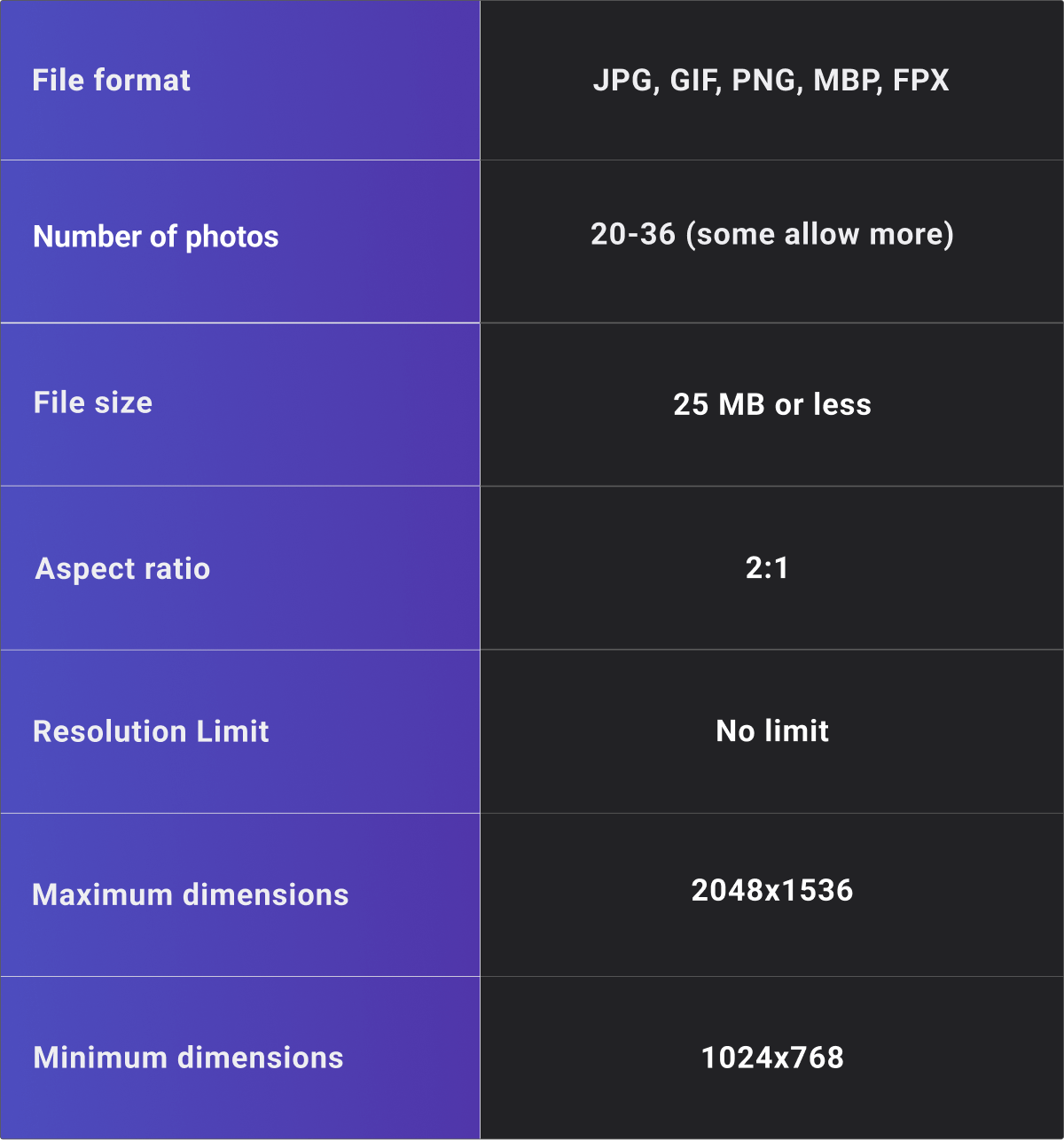
Photo requirements live in two places: your MLS input form and the way your MLS syndicates to portals. There isn’t a single national standard. Expect variation in maximum file size, accepted formats (usually JPEG), minimum resolution, aspect ratio, and photo count. Check your MLS help docs and input screens before you upload.
Buyer-facing portals such as Zillow publish display guidance, but the MLS feed controls what you’re allowed to submit. Conform to your MLS, and your photos will usually syndicate cleanly.
NorthstarMLS publishes listing photo rules to help agents prepare their submissions.
MLS photo-content rules focus on accuracy and appropriateness. Photos must be free of sexual or violent content and should not advertise products or services. Most MLSs prohibit any identifiable people from appearing in listing photos, and many also prohibit pets. Exact rules vary by MLS, so confirm your local guidelines before publishing.
Must-follow tips for taking MLS-ready photos
Photos alone cannot sell a property, but they definitely determine how much attention the property is going to get when listed. That’s why you should make sure that they'll showcase your property to the highest standards. This necessitates taking certain steps before, while, and after shooting your real estate photos.
Prepare: Things to do before shooting
Clean up
To take stunning photos, the place should look rather stunning itself. That's to say, you should declutter the place and clean it up. Move the unnecessary items out, mop the floor, dust the furniture, spruce up the windows, and even go so far as to paint the walls if you have to. Also, keep in mind that you’re not doing this just to take better photos. Sooner or later, visitors are going to stop by your place, and it must look neat and inviting.
Depersonalize the house
The photos you put out there should encourage house hunters to imagine themselves living there. So remove every item that tells a story of you or your family. Let them start writing their own story the moment they see the photos or step into the place.
Family photos, personal knick-knacks, souvenirs, and children’s artwork are some of the things you should move away before shooting your place.
Bring in natural light
Bright rooms evoke a sense of warmth and comfort in all of us. They make everyone feel relaxed, uplifted, and at ease. For this reason, you should do your best to bring in as much natural light as you can. One little tip: Rooms that don’t receive enough natural light can look brighter if you put white items in them. If the room's empty, try installing a big mirror on one of the walls – or placing it next to the ground to avoid ugly holes – to reflect light.
Focus: Tips to observe while shooting
If you don’t want to hire a real estate photographer, you need to learn some basic techniques to shoot great shots. Here are a few things that can help you with that.
Mind the position and angle
Pick a well-known property listing site and check out the first few properties you see. You'll come across lots of photos in which half of the floor or room is missing. This happens when the person behind the camera either chooses the wrong spot or positions the camera at the wrong angle.
Regarding the angle of the camera, it’s best to stand in the corner unless you’re shooting a bathroom. For bathrooms, small as they usually are, it's suggested to stand in the doorway to capture the entire space effectively. As for the position of the camera, a chest-level position is best to provide a balanced perspective of the space you’re shooting.
Use a tripod
As an agent or the owner of the property, you probably don’t have a tripod but make sure to get one. Using a tripod has two benefits: For one thing, you can push it to the corner of the room, hence capturing as much of the place as possible. Two, it helps stabilize the camera, resulting in sharper, professional looking photos.
Focus on key features
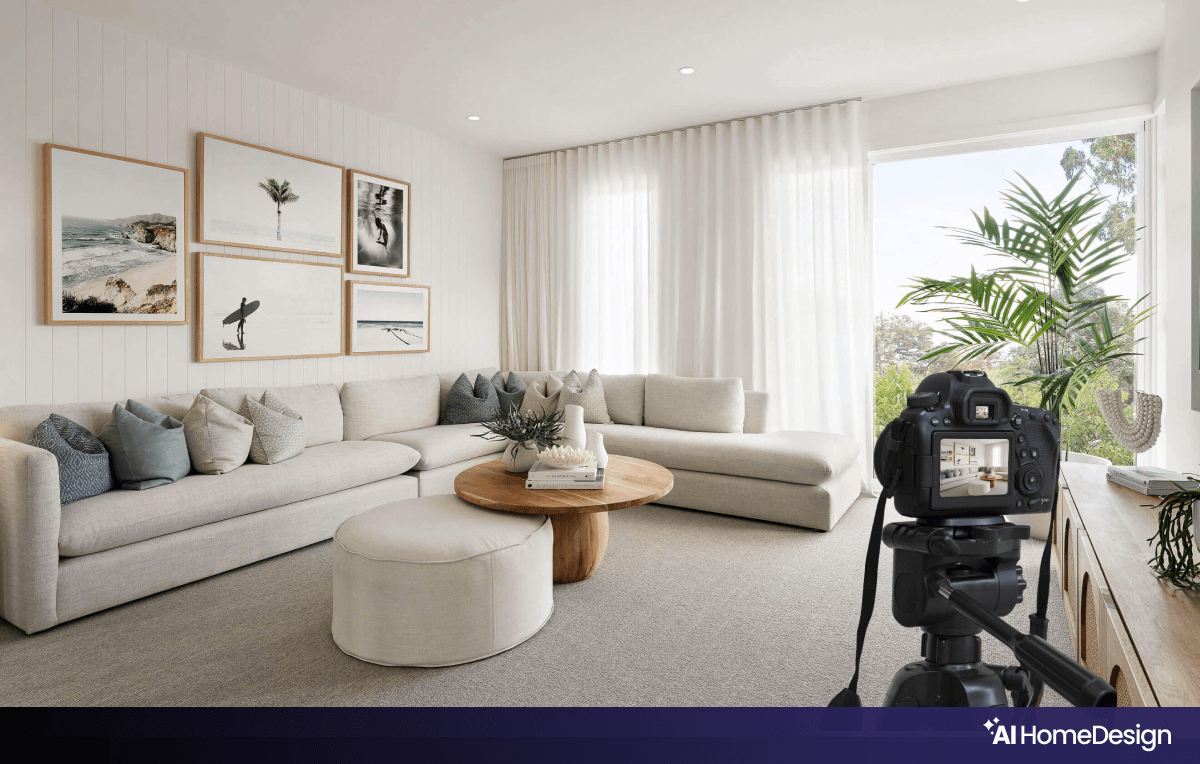
Every part of your place has a selling point. For one room, it could be a big window with a nice view. For another, it might be a cozy little fireplace or a built-in bookshelf. Accentuate these features with optimal lighting and attractive decor.
Edit: Enhance photos after shooting
Editing isn’t about hiding flaws — it’s about clarity and accuracy. Use edits to correct exposure, color, and perspective, reduce noise, and remove minor distractions. Keep permanent features intact and avoid fabricating views or concealing damage.
The techniques used when editing rental and for-sale listing photos should reflect the type of listing. AI photo editing tools can help with common corrections when a guided or automated workflow is needed.
Virtual staging
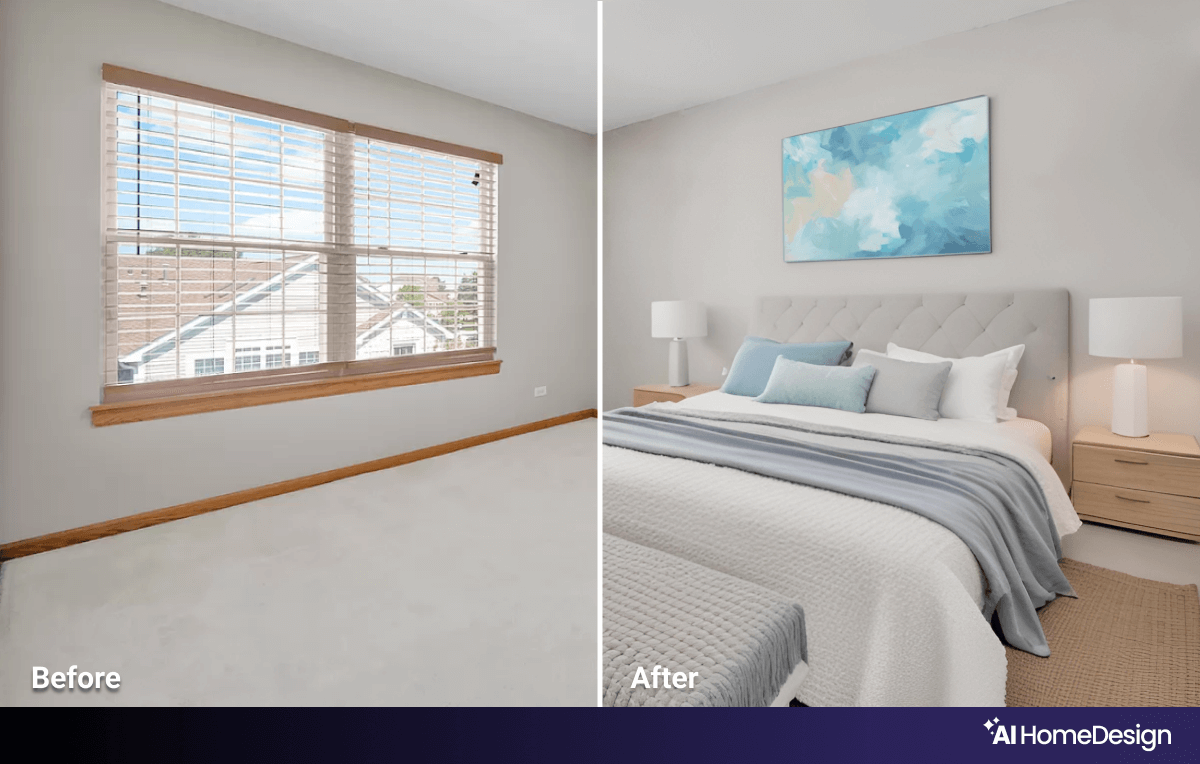
Buyers wish to see both the empty and staged versions of your place. The empty photo lets them assess condition; the staged version helps them visualize scale and use.
Virtual staging remains widely permitted across MLSs, but nearly all now require clear per-image and/or listing-level disclosure.
If you’re working with vacant rooms or minimal furniture, AI virtual staging can generate styled photos in under a minute while you keep the original vacant counterpart on hand for disclosure and review.
Image enhancement
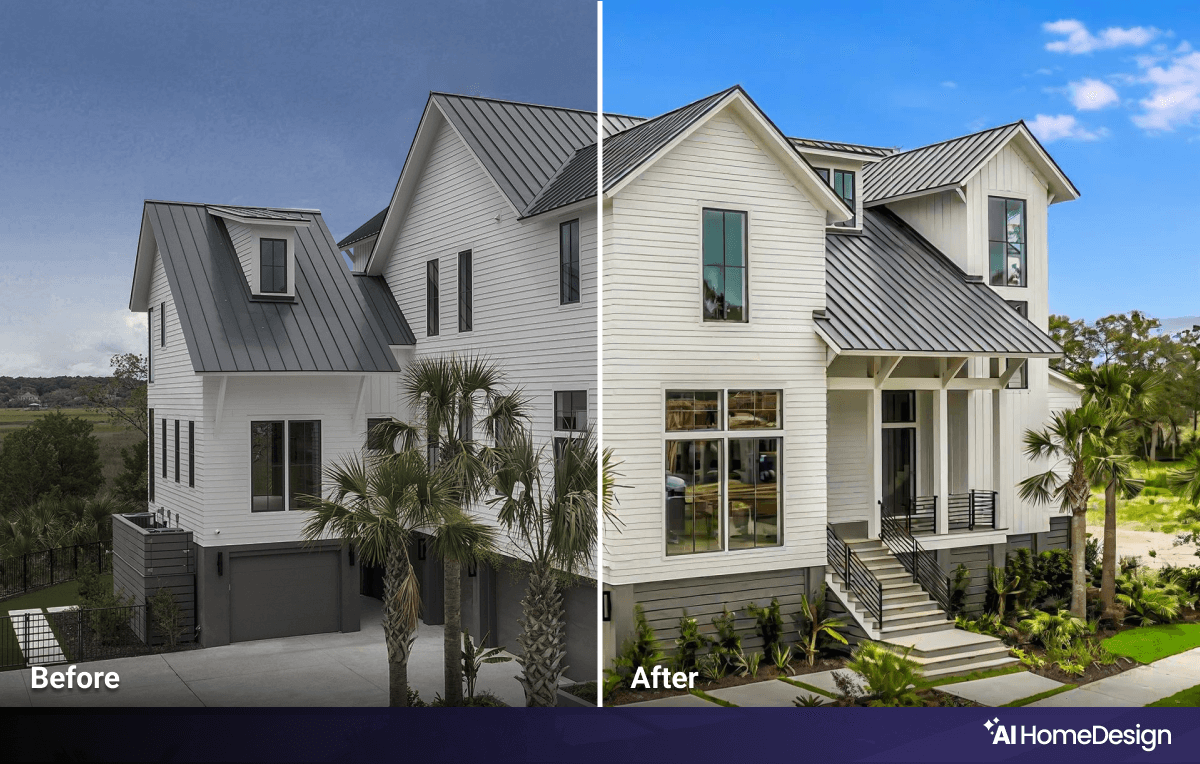
Even with strong source photos, you’ll usually apply basic Image Enhancement to balance exposure, white balance, contrast, and clarity. If shadows or noise remain, address them before any advanced edits. A step-by-step photo enhancement workflow helps organize these corrections before advanced edits.
Day to dusk
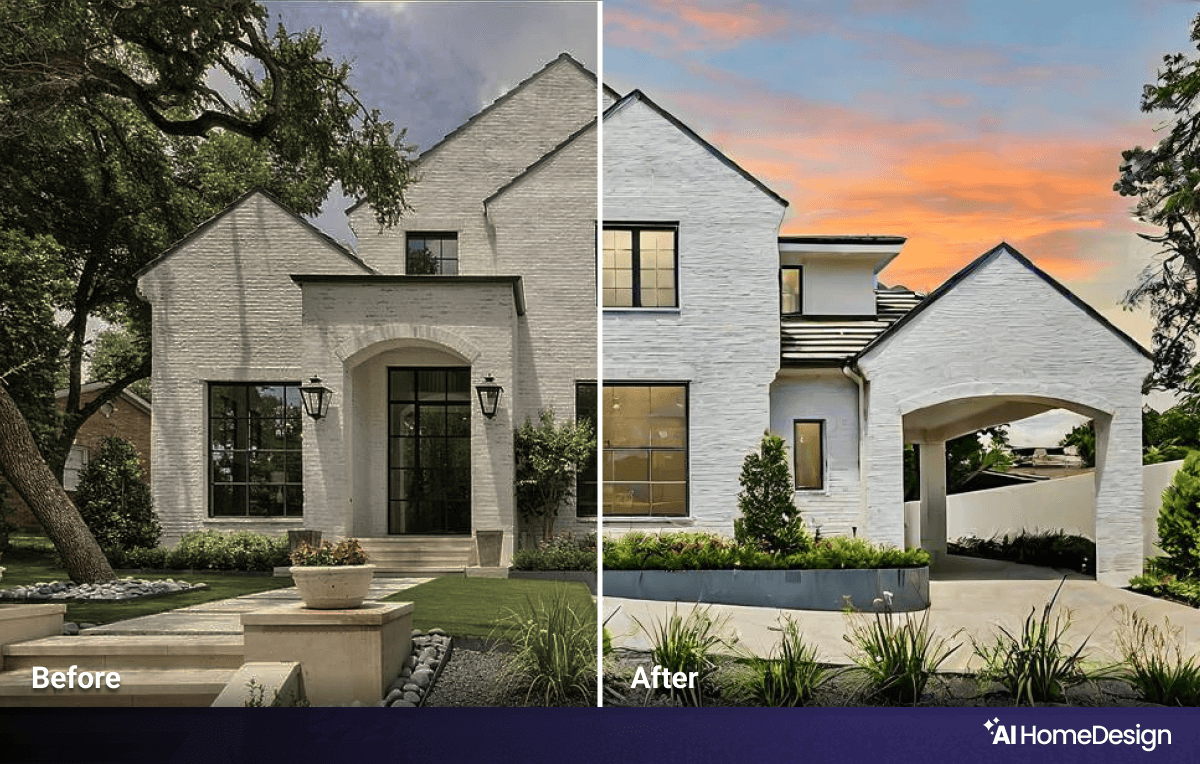
Have you ever wondered which photo should be the cover photo of your listing? How about the front door view of your home with a day-to-dusk view? This specialized photo editing technique is designed solely to enhance the appearance of your home's exterior to lure house hunters into checking your listing! As the name implies, a day-to-dusk service turns daytime photos into twilight, dusk, or even nighttime images. The result is a stunning view of your house under an enchanting sky.
Item removal
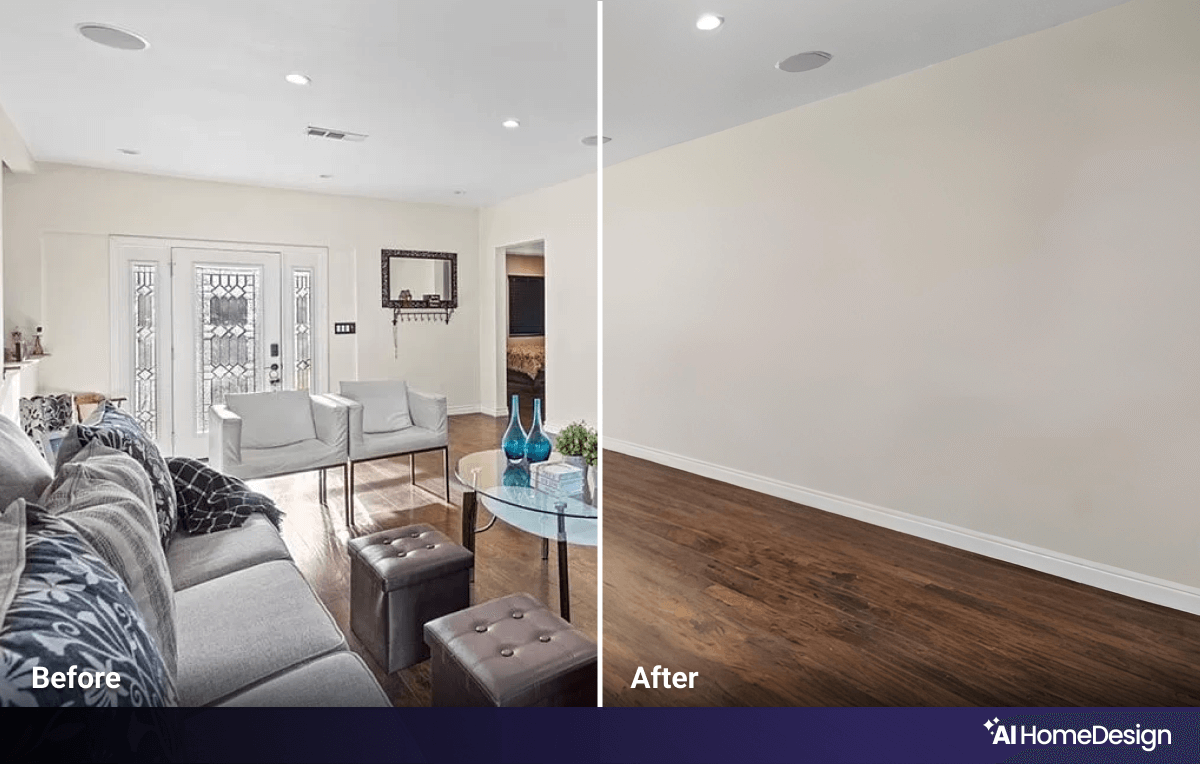
Going through your real estate photos, you might notice previously overlooked objects that spoil the look. Spread-around books, left-over cups, or pet beds that only distract buyers are some common examples, and finding one in your final photos is never pleasant. Of course, you shouldn’t leave such details as they affect buyers' first impression. To right such wrongs, you can virtually remove unwanted objects from your photos so that viewers pay attention to what you want them to see, not the clutter or distractions in the background.
All prepped for suitable listings
The formula hasn’t changed: prepare the rooms, focus on clean capture, then edit for clarity. What did change is the compliance layer around those photos. Verify your own MLS’s current rules before you publish, keep people and pets out of frame, label any virtually staged photos, and avoid edits that alter permanent features or hide defects.
Once your gallery is live, promote it where buyers actually look. Share highlights on social media platforms for real estate. Strengthen on-site visibility with SEO for real estate agents. Plan targeted outreach with relevant real estate advertising ideas. Follow this workflow and your listing will meet MLS expectations and perform across the channels that matter.
Frequently asked questions
Can I advertise the buyer's agent commission on the MLS?
No. Following the NAR settlement effective August 17, 2024, buyer-agent compensation can no longer be advertised on the MLS and must be negotiated separately outside the platform.
Are people or pets allowed in real estate listing photos?
Most MLSs prohibit any identifiable people from appearing in listing photos, and many also prohibit pets. Exact rules vary by MLS, so confirm your local guidelines before publishing.
Do I need to disclose virtually staged photos on the MLS?
Virtual staging remains widely permitted across MLSs, but nearly all now require clear per-image and/or listing-level disclosure. Label each staged image or note the staging at the listing level to stay compliant.
What details are required in an MLS listing?
Required fields vary by MLS but typically include price, address, room and bathroom count, square footage, lot size, taxes, and amenities. Buyer-agent compensation is no longer permitted on the MLS.