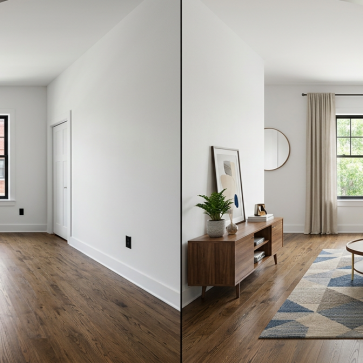
In our analysis of virtual staging versus traditional staging, we examined what each method offers and its limitations. But if you’ve decided to go digital in 2026, one big question remains: which tool should you actually use? Picking the best virtual staging software comes down to price, speed, and the quality of the furnished results. To help you choose the best virtual staging option, we tested the leading platforms head to head.
This guide reviews and compares the leading staging tools for real estate in 2026, breaks down their features, and includes a step-by-step guide to staging a photo yourself.
Whether you want a tool to virtual staging software you can try at no cost or a platform built for high-volume listing work, you’ll find the right option here.
Top Virtual Staging Tools 2026
1. AI HomeDesign
AI HomeDesign is one of the fastest and most affordable AI virtual staging platforms, offering both AI-driven and manual staging options.
With AI HomeDesign, you can stage any room type in eight styles and run unlimited free renders. After you use one credit to stage a photo, all additional edits to that same image, such as item removal, day-to-dusk, and enhancements, are free.
- Price: $0.24/photo
- Speed: 30 seconds
- Free Trial: 3 free credits on signup
- Best For: Agents, photographers, and sellers who want fast, low-cost, listing-ready photos at scale.
- Weaknesses: No 360 virtual staging
How to use AI HomeDesign:
- Upload a photo
- Select the room type
- Pick a style
- Click “Generate”
- Download or regenerate until you’re satisfied with the results
2. Virtual Staging AI
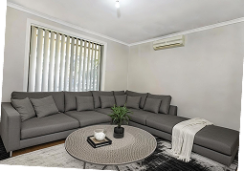
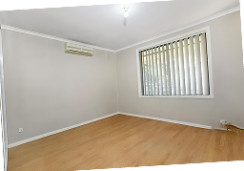
Virtual Staging AI centers on one-click simplicity for users who want results without manual tweaks. After staging a photo, you can also remove unwanted items. Note that the Basic plan is $16/month with yearly billing (about $25/month if you pay month-to-month) and covers 6 photos.
- Price: From $16/month (annual billing)
- Speed: 30 seconds
- Free Trial: First few photos free when signing up
- Best For: Realtors who want quick one-click staging
- Weaknesses: The Subscription model may not suit occasional users.
How to use Virtual Staging AI:
- Upload a room photo
- Choose a staging style
- Click “Process Photo”
3. Apply Design
Apply Design combines automation with manual control, making it useful for photographers and agents who need to reflect client preferences. Apply Design now starts at around $10.50 per image (DIY as low as $7) and highlights an 18,000+ furniture-piece library, giving users plenty of flexibility, though staging many images can still add up.
- Price: from ~$10.50/image ($7 DIY)
- Speed: Apply Design typically delivers renders in about 10–15 minutes per image.
- Free Trial: First photo free for new users
- Best For: Agents and sellers who want a balance of automation and manual control
- Weaknesses: only one free generation, charges per generation rather than per photo
How to use Apply Design:
- Upload your photo
- Select the room type
- Choose a style
- Choose items you want in the room
- Click “Done”
4. REimagineHome
REimagineHome provides staging, decluttering, and landscaping. REimagineHome offers 3 free designs for new users to test the platform. With its credit-based pricing, it’s especially appealing to agents and photographers handling multiple listings who want staging without the delays of manual services.
- Price: $14–$99/month (popular Optimal plan at $29)
- Speed: Minutes
- Free Trial: 3 free designs on signup
- Best For: Agents who need decluttering and landscaping with staging
- Weaknesses: Monthly pricing might exceed pay-per-image services; Regenerations are not free.
How to use REimagineHome:
- Upload your photo
- Choose your preferred style
- In the chatbox, provide a prompt so that the platform better understands what you want
- Choose “Yes, continue”
5. Stager AI
Stager AI provides virtual AI as part of a broader suite of design and renovation tools, including virtual renovations, lawn and sky replacement, and digital wall painting. New users receive 10 free credits at sign-up, and all regenerations can be done at no extra cost.
- Price: $29.99/month
- Speed: 30 seconds
- Free Trial: Yes
- Best For: Designers and agents
- Weaknesses: The interface is a bit confusing, making it difficult to navigate for first-timers
How to use Stager AI:
- Upload a photo
- Choose the room type
- Pick a style
- Choose a color palette
- Click “Virtually Stage Now”
6. Collov AI
Collov AI is another staging tool that offers a number of design solutions, including home renovation, cabinet and flooring visualizer, etc. Collov AI starts at $16/month (about $0.27/image for 60 images) and allows re-staging and iteration at no extra cost, so you can refine a room without burning through credits.
- Price: $16/month (~$0.27/image)
- Speed: Seconds
- Free Trial: Yes
- Best For: Agents and real estate photographers
- Weaknesses: Limited style variety on some room types
How to use Collov AI:
- Upload a photo
- Choose a design style
- Select/unselect “Remove existing furniture”
- Click “Generate”
7. Spacely AI
Spacely AI is a staging platform built for real estate agents who want an all-in-one solution. It supports multiple room types and design styles. Note that Spacely AI now charges credits per render (a credit-based model introduced in September 2025), so regenerations draw down your credit allowance rather than being free.
- Price: Credit-based, from about $12.75/month to ~$102/month; renders cost 2–8 credits each
- Speed: Seconds
- Free Trial: Yes
- Best For: Real estate agents who want an all-in-one staging tool
- Weaknesses: The generated results are highly similar in terms of furniture, layout, and color, providing little variety
How to use Spacely AI:
- Create an account
- Upload your photo
- Pick a style
- Select “Generate”
Choosing the Best Virtual Home Staging Software for Your Listings
So which is the best ai virtual staging tool for your workflow? It depends on volume and budget. For high-volume agents and photographers, AI HomeDesign’s $0.24-per-photo pricing with unlimited free regenerations is hard to beat in 2026. If you want one-click simplicity, Virtual Staging AI delivers, while Apply Design’s 18,000+ furniture library suits those who want granular manual control. Teams that also need decluttering or landscaping should weigh REimagineHome, and designers exploring full renovations may prefer Stager AI or Collov AI. Test the free trials before committing, because the best virtual home staging software for you is the one whose default results match your listing style with the fewest edits.
A Note on Our List of Top Virtual Staging Tools
Photo editing tools such as Adobe Photoshop, Lightroom, and Blender can be used to virtually stage a space as well. However, these programs serve broader purposes and do not qualify as dedicated staging platforms. Additionally, using these tools requires specialized training that most agents do not have time for. For these reasons, we excluded them from our list.
Similarly, we did not include apps like Live Home 3D, Planner 5D, Homestyler, or IKEA Place, as they focus on interior design, floor plans, or room-sketch projects rather than photo-based staging for property listings. The tools in this guide function like installed programs but run entirely in your browser: no downloads, installations, or updates needed.
So, although the tools introduced here may not be literally termed as “software,” they perform quite similarly, enabling agents to virtually stage properties with AI.
In Closing
The 2026 landscape has shifted: several platforms moved to credit-based pricing, libraries grew past 18,000 items, and per-photo costs dropped low enough that quality presentation is now within reach for every agent. The trade-offs that matter most are how each tool prices regenerations and how closely its default output matches your listing aesthetic. Each platform also has its own requirements for photo quality, size, format, and lighting that affect results, so run a few free trials on real listing photos before you commit and let the renders, not the marketing, decide your winner.