Virtual staging for Airbnb listings can make a property feel warmer, clearer, and more inviting in photos. It works best when the edits stay close to the real guest experience rather than presenting an idealized version of the space.
Hosts often use it to clarify layout, function, and atmosphere without physically furnishing every room. Used carefully, it can strengthen first impressions and help guests understand the property more quickly.
Used poorly, it can create mismatched expectations, complaints, and weaker reviews.
This guide examines the types of virtual staging that tend to work best for short-term rentals and where they often fall short.
It also looks at how to assess whether virtual staging suits a listing strategy. For Airbnb, the balance between visual appeal and accuracy matters more than it does in traditional home sales.
What Virtual Staging Means for Airbnb Listings
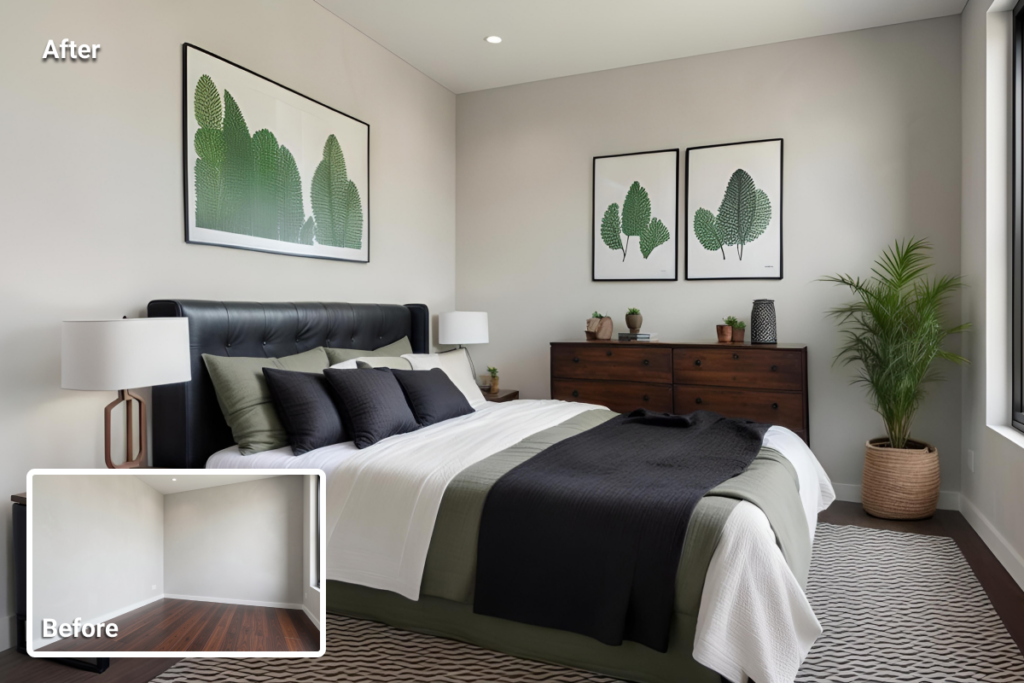
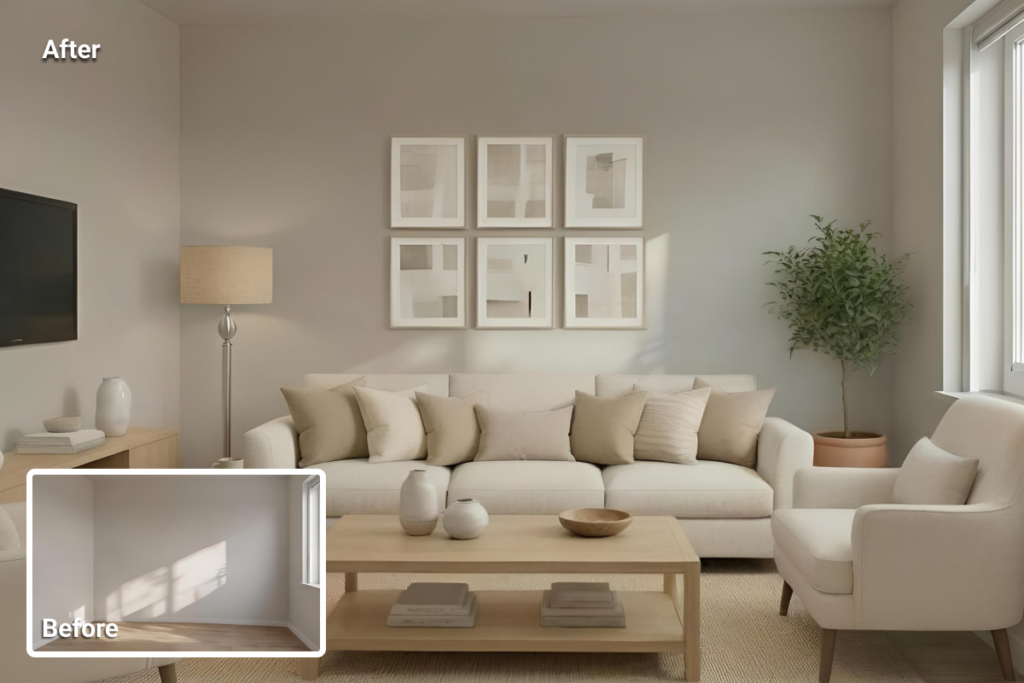
AI Virtual staging for Airbnb listings means digitally adding furniture, decor, and layout cues to listing photos so the space feels clearer and easier to understand.
Unlike physical staging, it does not involve bringing real furniture into the property. Instead, it is a photo-editing approach used to help empty or lightly furnished short-term rentals present more clearly in search results.
Hosts often find virtual staging most useful when a unit is vacant, partially furnished, or between design updates. In these cases, rooms can look smaller, flatter, or less functional in photos than they do in person.
Virtual staging can define how a bedroom, living area, or dining space is meant to work. That makes the property feel more complete and easier to interpret at a glance.
Its value, however, depends on accuracy. For Airbnb listings, visual improvement only helps when staged images stay close to the real space and do not create expectations the property cannot meet.
The goal is not to idealize the rental, but to present it more clearly while preserving a truthful sense of layout, comfort, and use.
When Virtual Staging Can Help an Airbnb Listing
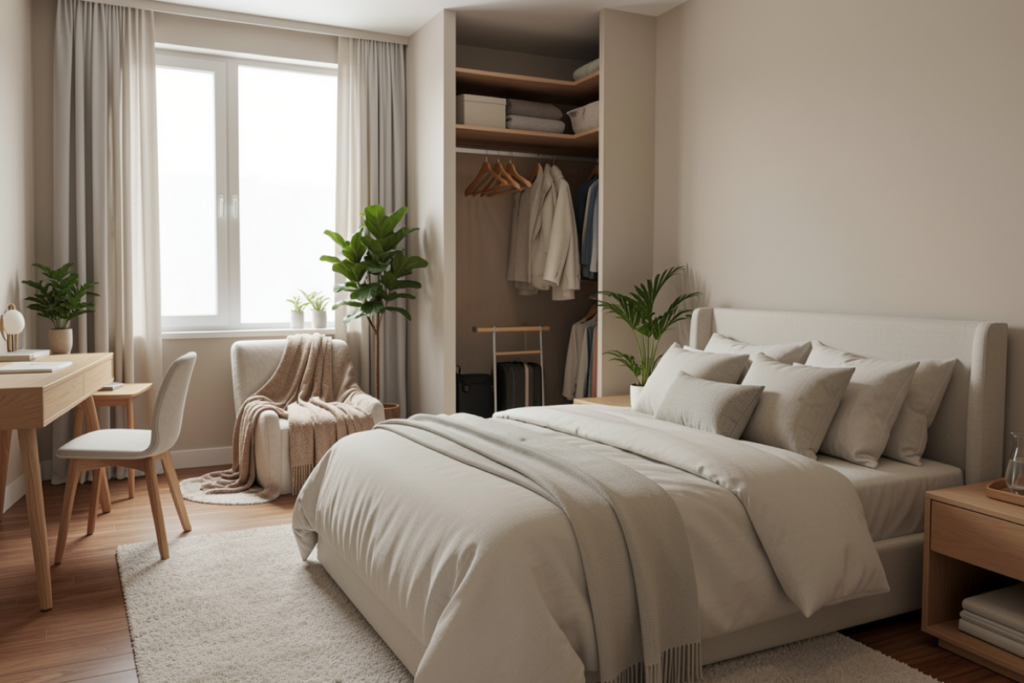
Virtual staging can be especially useful when a space looks unfinished or difficult to interpret in photos. This often includes empty rooms, newly renovated units, or awkward layouts where guests may struggle to understand scale, flow, or function.
In these cases, staged images can help clarify how a spare area might work as a bedroom, dining nook, or small workspace, while also making furniture placement and walking space easier to read.
In these cases, the value reflects the broader benefits of virtual staging, especially when a listing needs to make empty or hard-to-read rooms easier to interpret.
It can also support faster listing preparation when multiple properties need to be published or refreshed on a tight timeline.
Some industry sources also suggest that stronger listing visuals can support better performance.
Hostaway, for example, cites data linking better Airbnb photos to 24% more bookings and a 26% higher nightly rate, though that evidence refers to stronger listing photography more broadly rather than virtual staging alone.
Even so, the value of virtual staging depends on accuracy. Airbnb’s policy states that listing photos and descriptions must represent the space truthfully and that content which misrepresents a listing or misleads guests violates its rules.
Airbnb also notes that it may require hosts to remove content if AI or other digital editing is used to hide flaws, add amenities, or otherwise misrepresent the listing.
For that reason, virtual staging works best when it helps guests understand the property more clearly without creating expectations the space cannot meet.
What Works in Airbnb Virtual Staging
Virtual staging works best when it clarifies how a space functions rather than making it look better than it really is.
In Airbnb listings, the strongest results come from edits that help guests understand the stay more clearly while keeping the image close to the actual property.
Use Staging to Explain the Room
The most effective staging makes the room’s purpose easier to read.
- Show a blank living room as a usable seating area, not a luxury setup the space cannot support.
- Stage a spare area as a bedroom, dining nook, or compact workspace only when the dimensions genuinely fit.
- Keep furniture scale believable and consistent with the room’s real proportions.
Match the Property and Guest Audience
Good staging should feel appropriate to the property, not aspirational for its own sake.
- Match the style to the home type, location, and likely guest profile.
- Avoid generic luxury styling that feels disconnected from the actual rental.
- Focus most on living areas and bedrooms, while using kitchens and bathrooms only for light visual support.
Check Every Edited Image Before Publishing
Even good staging can lose credibility if the final image looks artificial.
- Review shadows, object placement, window lines, and perspective carefully.
- Make sure the staged image still reflects the real layout and fixed features.
- Avoid any edit that creates expectations the guest will not actually encounter on arrival.
What Doesn’t Work in Airbnb Virtual Staging
Virtual staging starts to hurt trust when it improves the image but weakens the connection between the photo and the actual stay.
In Airbnb listings, the risk is not only visual inconsistency but also guest disappointment when the property feels different from what the photos suggested.
Airbnb’s rules prohibit listing content that misrepresents the space or misleads guests, which is why overly aggressive staging creates more risk than value.
Avoid Overstaging the Space
Edits become risky when they make the property feel more luxurious or more complete than it really is.
- Do not turn a modest room into a high-end space it cannot realistically support.
- Do not add decor or furniture that changes the perceived standard of the stay.
- Do not use aspirational styling that makes the rental feel upgraded beyond its real condition.
Do Not Distort Scale or Layout
Trust drops quickly when the staged image no longer matches the actual room.
- Avoid furniture sizing that makes the room look larger or more functional than it is.
- Do not stage a space for a use the layout cannot genuinely support.
- Make sure the edited photo still reflects the real floor plan, pathways, and fixed features.
Do Not Let Artificial Details Slip Through
Even a reasonable staging concept can fail if the final image looks visibly edited.
- Watch for inconsistent shadows, reflections, lighting, and object placement.
- Review windows, perspective lines, and proportions before publishing.
- Do not publish any staged image that could create expectations the guest will not actually encounter on arrival.
Airbnb Policy Risk: Accuracy Comes First
Airbnb’s Ground Rules require listing photos and descriptions to represent the space accurately. They also prohibit content that misrepresents a listing or misleads guests.
That includes AI-generated or edited images when they create a false impression of the layout, condition, furnishings, or features of the stay.
Airbnb also states that hosts may be required to remove content if digital editing is used to hide flaws, add amenities or attributes that are not part of the listing, or otherwise misrepresent the property.
Why Disclosure Matters
Clear labeling works as a cautious best practice when a photo has been virtually staged. It helps reduce the chance that edited images are mistaken for the exact in-unit setup and keeps guest expectations closer to the actual stay.
Airbnb’s policy, however, is framed around accuracy and misleading content rather than a clearly defined universal labeling format for virtually staged images.
Why Misrepresentation Risk Matters
Trust drops when staged images make the property feel materially different from what guests will actually find on arrival.
If edited photos overstate furnishings, hide limitations, or add features that are not part of the stay, the result can be complaints, refund pressure, and weaker reviews.
Under Airbnb’s rules, the safest use of virtual staging is one that improves clarity without changing the truth of the listing.
A Simple Airbnb Virtual Staging Workflow
Virtual staging works best when the workflow stays simple. Strong source photos, a clear room purpose, and a careful final review all help staged images feel more realistic and more useful in Airbnb listings.
1. Define the Room’s Guest-Facing Purpose
Start by deciding what the room is meant to communicate. A spare area might function as a bedroom, compact workspace, or dining nook, but that use should be set before staging begins.
The goal is to clarify the room’s purpose, not assign a function the layout cannot realistically support.
2. Apply Staging, Then Review for Realism
Add furniture and decor that fit the room’s size, layout, and likely guest expectations. Then compare the staged image with the actual property. Check scale, walking paths, windows, and fixed features.
This is also the stage where lighting, shadows, perspective, and object placement should be reviewed carefully so the image still feels like a truthful version of the space.
3. Publish Only After an Accuracy Check
The final image should make the property easier to understand without changing what guests should expect on arrival.
Airbnb’s Ground Rules prohibit content that misrepresents a listing or misleads guests, including digitally edited images that create a false impression of the space or add features that are not really part of the stay.
Clear labeling of virtually staged images is the more cautious approach, but the policy itself is centered on accuracy rather than a clearly defined universal labeling format.
What Listing Photos Work Best for Virtual Staging
Virtual staging works best when the source photos are clean, uncluttered, and high in quality. More realistic results usually start with images where room edges, windows, doors, and architectural details are easy to read.
When the input is strong, staged outputs tend to look more believable and usually require fewer corrections.
The most useful listing photos share a few basic traits:
- straight-on angles that make the layout easier to read
- visible floor area, so furniture scale feels accurate
- clear room boundaries, corners, doors, and windows
- good lighting that preserves surfaces, edges, and depth
These details help virtual staging place furniture more naturally and reduce proportion mistakes. They also make it easier to keep the edited image aligned with the room’s actual dimensions and layout.
Poor source photos create problems quickly. Low light can flatten surfaces and hide edges, while distorted ultra-wide shots can bend walls and stretch perspective.
When that happens, staged results often look less natural and need more revision before they are usable.
AI vs human-led virtual staging for Airbnb: Speed, Cost, and Control
For Airbnb listings, the main tradeoff is usually speed and scale versus a more hands-on service model. AI staging is typically the faster option, while human-led staging usually takes longer and comes at a higher per-image cost.
That difference matters most when listings need frequent updates, seasonal refreshes, or quick turnaround across multiple properties.
Current provider pages show that AI HomeDesign promotes staging in about 30 seconds. ApplyDesign presents itself as a lower-cost DIY option starting at $7 per image at volume.
On the human-led side, BoxBrownie advertises virtual staging at US$30 per image with turnaround in under 48 hours. AI HomeDesign also offers a manual staging option within its broader service mix.
Control varies as well. DIY and AI-led tools can speed up production and support higher listing volume, but they still require careful review for scale, realism, and fit.
Human-led staging may allow for more tailored styling in some cases, especially when the property needs a more deliberate visual approach or additional manual retouching.
Even so, speed should not outweigh accuracy. Airbnb’s Ground Rules state that listing photos and descriptions must accurately represent the space, and that content which misrepresents the listing or misleads guests violates the policy.
Airbnb also says hosts may be required to remove content if AI or other digital editing is used to hide damage, add amenities or attributes that are not part of the listing, or otherwise misrepresent the property. In practice, that means the better option is the one that helps a listing move faster without weakening the connection between the staged image and the actual stay.
Tool Comparison: AI HomeDesign vs. ApplyDesign vs. BoxBrownie
The clearest differences between these virtual staging options are pricing model, turnaround time, and workflow style. Realism, revision flexibility, and support may vary as well, but those factors are harder to compare consistently from public information alone.
Quick Price and Turnaround Snapshot
| Tool Name | Key Feature | Starting Price |
|---|---|---|
| AI HomeDesign | ~30-second delivery | $0.24/photo |
| ApplyDesign | DIY or one-click staging | $7.00/image |
| BoxBrownie | Standard and 360° staging | $30.00/image |
- AI HomeDesign: as low as $0.24/photo; Pro $19/month, Pro Plus $29/month, Enterprise $49/month billed yearly; manual staging available separately; about 30 seconds.
- ApplyDesign: DIY staging from $7/image; one-click staging from $10.50/image; about 10 to 15 minutes.
- BoxBrownie: standard virtual staging US$30/image; 360° virtual staging US$60; about 48 hours.
For a broader view of pricing and value, this breakdown of virtual staging costs and ROI explains how per-image pricing, subscriptions, and turnaround affect the overall cost.
That makes the practical distinction fairly clear. AI HomeDesign is positioned around speed and scale, ApplyDesign sits in the middle with more direct styling control, and BoxBrownie follows a more traditional done-for-you model.
For Airbnb-related workflows, the better fit depends on how often listings need updates, how much manual control is needed, and how closely the final image needs to stay aligned with the real guest experience.
How to Choose the Right Virtual Staging Option for Airbnb
The right option depends on publishing speed, workflow control, and how closely the final image matches the real stay experience.
Price matters, but it is only one part of the decision. Turnaround time, revision needs, portfolio size, and accuracy risk all shape whether a tool is a practical fit.
- For speed and volume: AI HomeDesign focuses on speed and scalefor faster, higher-volume workflows, with staging promoted at about 30 seconds and pricing as low as $0.24 per photo on higher-volume plans.
- For more direct styling control: ApplyDesign suits workflows that need a more hands-on approach, with DIY staging from $7 per image and one-click staging from $10.50.
- For a more traditional done-for-you service: BoxBrownie and manual staging options may be a better fit when a more outsourced workflow is preferred, though the tradeoff is usually higher cost and slower turnaround.
BoxBrownie currently lists standard virtual staging at US$30 per image, while AI HomeDesign also offers manual staging separately. - For larger portfolios: Subscription-style pricing and faster turnaround tend to matter more when multiple listings need frequent updates or seasonal refreshes.
- For lower policy risk: The safest option is the one that improves clarity without changing what guests should expect on arrival.
Airbnb’s Ground Rules center on accurate representation and prohibit content that misrepresents a listing or misleads guests, including digitally edited images that create a false impression of the space.
Clear labeling of virtually staged images is the more conservative approach, but the policy itself is framed around accuracy rather than a universal disclosure format.
In practice, the best choice is usually the one that supports faster publishing without weakening trust. For Airbnb listings, a staged image is only useful when it helps guests understand the property more clearly while staying close to the actual space.
Final Thoughts
Virtual staging can help Airbnb listings when it makes the space easier to understand without changing what guests should expect on arrival.
Its strongest use is in empty or hard-to-read rooms that need more context in photos. Its weakest use is any edit that exaggerates the property or creates a gap between the listing and the actual stay.
For Airbnb, the most effective staging is not the most dramatic one, but the one that improves clarity while staying close to the real space.
FAQs
Virtual staging is not automatically prohibited, but edited listing images cannot misrepresent the property. Airbnb requires photos and descriptions to reflect the space accurately and may require removal of digitally edited images that mislead guests.
Clear labeling is the safer approach because it helps reduce confusion about what is digitally staged and what is actually in the unit. Airbnb’s policy, however, is framed around accuracy and misleading content rather than a clearly defined universal labeling format for virtually staged images.
For lower-cost, higher-volume workflows, AI-led staging is usually the more practical option. In this comparison, AI HomeDesign has the lowest advertised entry point, with pricing promoted as low as $0.24 per photo on higher-volume plans.
Not always. AI staging is usually the better fit for speed, scale, and frequent listing updates, while human-led staging can still be useful when a property needs more tailored manual treatment or additional visual polish.
It may help when stronger visuals make the property easier to understand, but direct Airbnb-specific evidence for virtual staging remains limited. One industry source cited by Hostaway links better Airbnb photos more broadly to 24% more bookings and a 26% higher nightly rate.