REimagineHome vs AI HomeDesign Comparison 2026
REimagineHome vs AI HomeDesign in 2026: compare workflow, cost per finished photo with retries, MLS labeling practices, and which tool fits agents vs designers.
Listings rarely fail because an AI tool cannot make a room look attractive. They fail when a team cannot finish a full gallery on deadline, or when the cost per usable image doubles after retries. That is why the reimaginehome versus AI HomeDesign decision is less about “best render” and more about workflow and pricing mechanics.
Both tools can produce convincing interiors from a single photo. The practical question for 2026 is which subscription finishes more of a listing’s jobs per dollar, with less friction at the gallery level. The sections below use the same rubric an agent or listing coordinator uses at 11 p.m., when the MLS deadline is in the morning.
At a glance
How To Judge an AI Staging and Redesign Tool in 2026
A subscription can look cheap until a listing needs staging, decluttering, day-to-dusk, and finish swaps in the same week. The first criterion is job coverage, meaning how many listing tasks one tool can ship without opening a second app. In real estate, “staging” rarely stays pure. Teams also need AI Item Removal for lived-in rooms, Image Enhancement to salvage exposures, and renovation visuals for fixer-ups.
The second criterion is true cost per finished photo. Sticker price does not equal cost per deliverable when retries cost money. A generation-based credit model can be totally rational for concept work, but agents should map the unit of billing to the unit of work, which is usually the finished photo delivered to a seller.
Third comes gallery consistency. A listing feels fake when each room reads like a different house. A consistent Space and Style pass across the entire set helps, but every tool still needs human review before export.
Fourth is workflow shape. Batch upload, per-property organization, and the ability to chain edits on the same image decide real turnaround more than raw render speed.
Fifth is delivery and compliance. Watermarks, licensing for client deliverables, and MLS-safe labeling practices matter as much as pixels. This is also where high-volume teams look for an API or a brokerage route instead of individual logins.
reimaginehome Pricing and Credit Questions to Confirm
REimagineHome is widely discussed as an iteration-first redesign and staging tool. That category tends to suit users who want to explore style direction quickly, then keep refining until one image feels right. In that workflow, the tool behaves like a creative studio rather than a listing production line.
The key variable is the unit of billing. Many credit-metered tools price a “generation,” and some generation types can cost more than one credit. That structure is not bad. It simply creates variable cost when a project requires many retries, feature switches, or multiple deliverable versions.
Before committing, agents and photographers can treat the REimagineHome decision as a verification checklist rather than a vibe check:
One more warning sign matters for listing teams: if a tool expects one-photo-at-a-time uploads with no property Projects, the workflow can slow down at exactly the moment volume rises.
What AI HomeDesign Is Built for
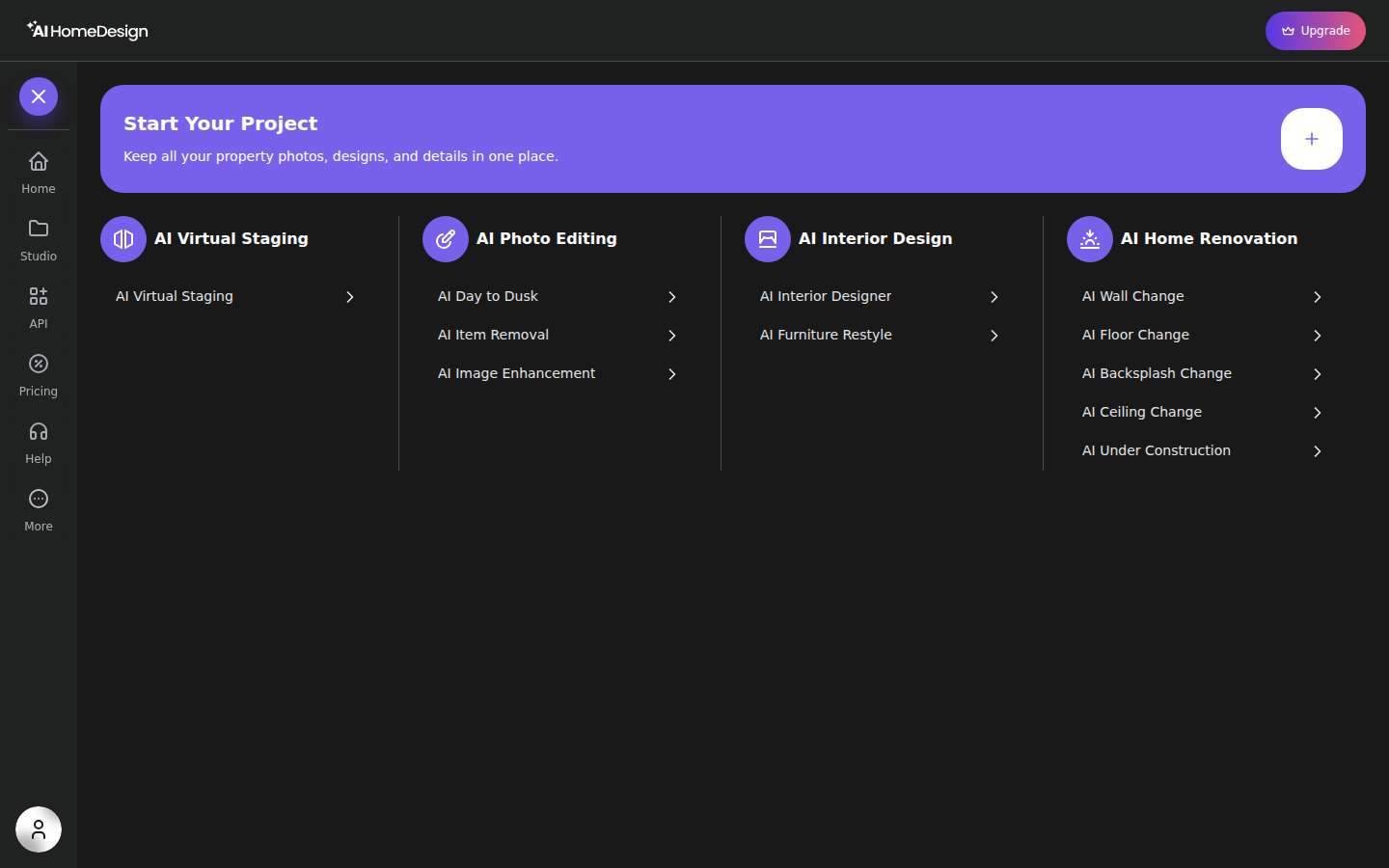
AI HomeDesign is built around a listing workflow, not a single-image workflow. The app groups work into three hubs, virtual staging, photo editing, and renovation. That matters because a real listing rarely needs just one of them. A gallery often needs staging for empty rooms, AI Item Removal for lived-in rooms, AI Day to Dusk for exteriors, and then a few renovation concepts to help buyers price the project.
Tool coverage is concrete, not a catch-all claim. AI HomeDesign includes AI Virtual Staging, AI Day to Dusk, AI Item Removal, and AI Image Enhancement. It also includes renovation-side tools such as AI Interior Designer, AI Furniture Restyle, AI Wall Change, AI Floor Change, AI Backsplash Change, AI Ceiling Change, and AI Under Construction.
The workflow stays consistent across tools. The user starts from the sidebar, uploads a batch, and then works image by image in the same editor layout. The right panel asks for Space first, then Style or Material options unlock. Generate runs on one credit and returns four renders for review. From the results screen, the “Keep editing” panel chains the same photo into another tool, which avoids re-uploading and keeps context.
AI HomeDesign also reaches different operating setups on one account and one credit pool: a web app for individual agents, a B2B Solution for organizations, a REST API for integration work, and an MCP server for teams that call tools from AI assistants. API access is Enterprise-only, so brokerages planning integration should confirm plan fit early.
Limitations still matter. Free Plan downloads carry an AI HomeDesign watermark and the canvas shows an upgrade banner. Several tools also lock options behind “Select Space First.” Credit rollover is documented inconsistently across materials, so teams that care about rollover should confirm it in writing. For a deeper walkthrough, see our full AI HomeDesign review.
The Real Cost Math for a 25 Photo Listing
Cost becomes clear when the unit of work stays fixed. Take an illustrative listing with a full gallery: several empty rooms that need staging, several occupied rooms that need decluttering, one exterior that needs AI Day to Dusk, a set that needs Image Enhancement, and a handful of renovation concepts for kitchen and bath finishes. That is not an industry average. It is a common mix in day-to-day production.
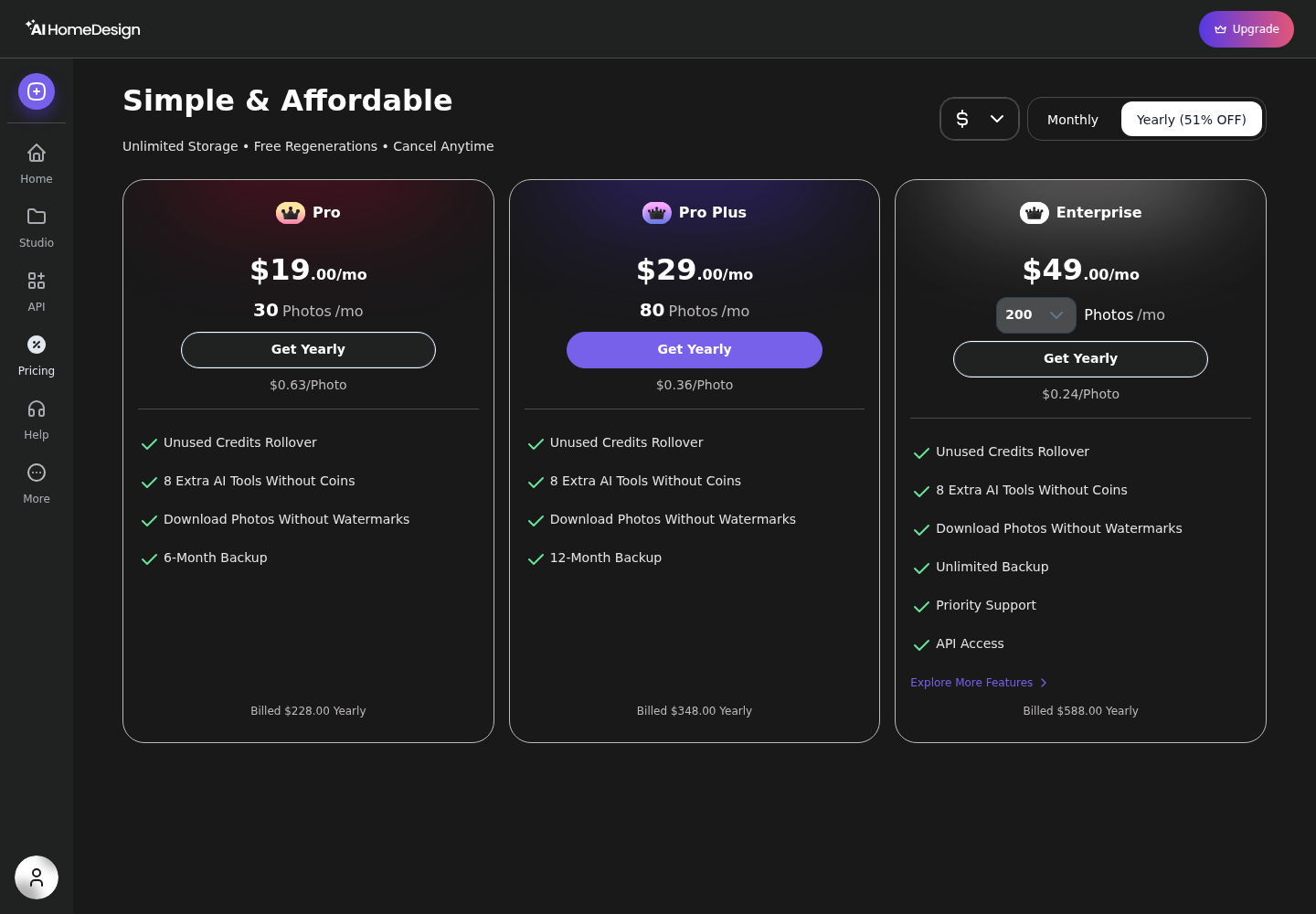
AI HomeDesign publishes per-photo equivalents by tier, which makes the math transparent. Monthly pricing works out to about $1.17 per photo on Pro, $0.74 on Pro Plus, and $0.49 on Enterprise. Yearly billing reduces that to about $0.63, $0.36, and $0.24 per photo, which is where the “from $0.24 a photo” claim comes from.
Retries change the effective cost more than the sticker price does. AI HomeDesign’s model returns four renders per credit and offers free regenerations, so a rejected output does not force another paid attempt. Credit-metered tools can still be cheaper for small, polished concept work, but the buyer has to price the retry rate.
A practical read of the trade-off helps teams avoid overbuying. A designer producing only a few polished concept images per month does not need a high-volume plan. A listing team shipping galleries benefits from predictable per-photo math.
Some readers will realize they need a different category of product, such as a broader planning tool or a shoppable furniture workflow. That is where a broader guide to AI home design and virtual staging alternatives fits.
MLS Compliance and Which Tool Fits Which Use Case
Shipping fast still requires safe labeling. Most MLS systems allow virtual staging, but disclosure and misrepresentation risk sit on the agent, not the software. AI HomeDesign is MLS-compliant by default, meaning the system aims to preserve structure and permanent fixtures while applying staging and design changes. Even so, teams still need a publishing checklist.
This copy-paste disclosure block covers the common cases and keeps language simple:
- Virtually staged image: furniture and decor added digitally.
- Digitally edited image: brightness and minor items may be adjusted.
- Renovation render: finishes shown are conceptual and not current condition.
- Buyers should verify property condition, features, and measurements in person.
Local MLS and state rules differ, so teams should check local requirements before posting. Teams can also set a simple delivery target for compliance: run the AI pass the same day photos arrive, then reserve the final hour for a human review and disclosure pass before upload.
Verdict routing works best by workflow, not by brand preference. AI HomeDesign fits solo agents and listing coordinators who need one subscription to handle staging plus cleanup plus renovation concepts, and who want listing-level Projects and batch upload. REimagineHome fits designers and stagers who mostly refine a small number of concept images and can tolerate variable credit spend during iteration.
Staged images are only one input to lead flow, pricing strategy, and follow-up. For that wider context, see where staged imagery fits in a 2026 listing marketing plan. When the bottleneck sits elsewhere, the right fix may live in the rest of the agent software stack.
The clear pick
Choose AI HomeDesign when
AI HomeDesign suits agents, photographers, teams, and brokerages that need one toolset for staging, cleanup, and renovation concepts across a whole listing gallery.
Choose REimagineHome when
REimagineHome suits users who mainly iterate on a small number of concept images and prefer a creative, iteration-first workflow once pricing and credit rules are confirmed.
Frequently Asked Questions
Is AI HomeDesign better than REimagineHome?
AI HomeDesign fits better when the deliverable is a full listing gallery with mixed tasks, because it combines virtual staging, photo editing, and renovation concepts in one workflow with batch upload and Projects. REimagineHome can be a better fit when the deliverable is a small set of concept images that need heavy creative iteration, where a credit-per-generation model can match the work.
How much does AI HomeDesign cost per photo?
AI HomeDesign publishes a per-photo equivalent by plan, which makes budgeting straightforward. Pro, Pro Plus, and Enterprise map to different monthly photo volumes and a lower effective per-photo rate at higher tiers. Yearly billing reduces the effective per-photo price versus monthly. Teams should still price in the expected amount of rework for their listing photos.
What does one credit get on AI HomeDesign?
On AI HomeDesign, one generation uses one credit and returns four renders for review on the results screen. Paid plans also include free regenerations, so rerunning a photo to improve the result does not add additional credit cost. That matters most on occupied rooms and tricky angles, where teams often need more than one attempt.
Does REimagineHome have batch upload and property Projects?
REimagineHome’s current workflow features and organization tools should be verified on its own product pages before subscribing, because vendors change batch handling and team features frequently. For listing teams, batch upload and property-level organization reduce late-night production time more than faster single-image rendering does. If those features are missing, gallery delivery becomes the bottleneck.
Are AI-staged photos allowed on the MLS in 2026?
Many MLS systems allow virtually staged images, but they expect clear Disclosure so buyers understand what they see. Photos should be labeled as virtually staged, and teams should avoid edits that change structure, permanent fixtures, or visible defects in a misleading way. Renovation visuals should be presented as conceptual. Local MLS and state requirements differ.
Do unused AI HomeDesign credits roll over?
AI HomeDesign’s materials describe credit rollover in two different ways, so buyers should confirm rollover terms with support before purchase if rollover is decisive. One set of documentation lists rollover on every plan, while another limits rollover to higher tiers. That difference matters most for seasonal agents whose photo volume fluctuates month to month.