Decor8 AI vs AI HomeDesign for Listing Photo Staging
Decor8 AI vs AI HomeDesign: compare staging, editing tools, and pricing. See which finishes an MLS-ready set faster, plus disclosure rules and costs.
A listing photo set rarely needs just furniture. It needs consistent edits, fast revisions, and clean files that can ship to MLS on a deadline. That is why the real question behind Decor8 AI comparisons is not “which app makes prettier rooms,” it is which tool finishes the full set.
Decor8 AI and AI HomeDesign both cover virtual staging, but they approach the job from different angles. Decor8 AI sells an unlimited design workflow at a flat monthly price. AI HomeDesign sells a listing-photo pipeline where staging is one tool inside a larger production chain.
The sections below compare both tools against the five jobs a real listing set tends to require, then map pricing to common monthly photo volume and MLS disclosure.
At a glance
Decor8 AI vs AI HomeDesign: The Short Answer
Decor8 AI runs on a flat $14.99 per month unlimited model, which suits high-iteration design exploration. AI HomeDesign uses a credit pool across eleven tools, which suits teams that need one place to stage, edit, and deliver a full listing set.
AI HomeDesign publishes this comparison, and it uses documented features and pricing rather than a claimed realism score. A broader walkthrough of the platform lives in our full AI HomeDesign review.
A simple way to separate the two is to treat Decor8 AI like a design-variation engine, and treat AI virtual staging as one step inside a listing-production workflow.
How We Compared Them Using Listing Jobs
Most “vs” pages compare these products like two interior design apps. A listing team feels different pressure. Buyers scroll fast, sellers want control, and the MLS clock does not pause.
This guide scores both tools against five jobs that show up in real listing production: virtual staging for empty rooms, photo enhancement, day to dusk for exteriors, item removal, and virtual renovation. A tool that only finishes one job does not reduce work. It just pushes the remaining edits into another queue.
That framing aligns with how the National Association of REALTORS describes emerging AI use in listing marketing, including the need to keep consumer trust through clear labeling and responsible edits, as noted in this NAR overview of AI tools in marketing.
The comparison sticks to vendor-published claims and the documented AI HomeDesign workflow. No claim in this article relies on a private “test set,” and no statement implies a head-to-head render lab.
Job Coverage Compared Across A Real Listing Set
A listing set usually needs both breadth and repeatability. Breadth means the tool can finish the common edits without a second subscription. Repeatability means an agent can apply the same choices across a whole property.
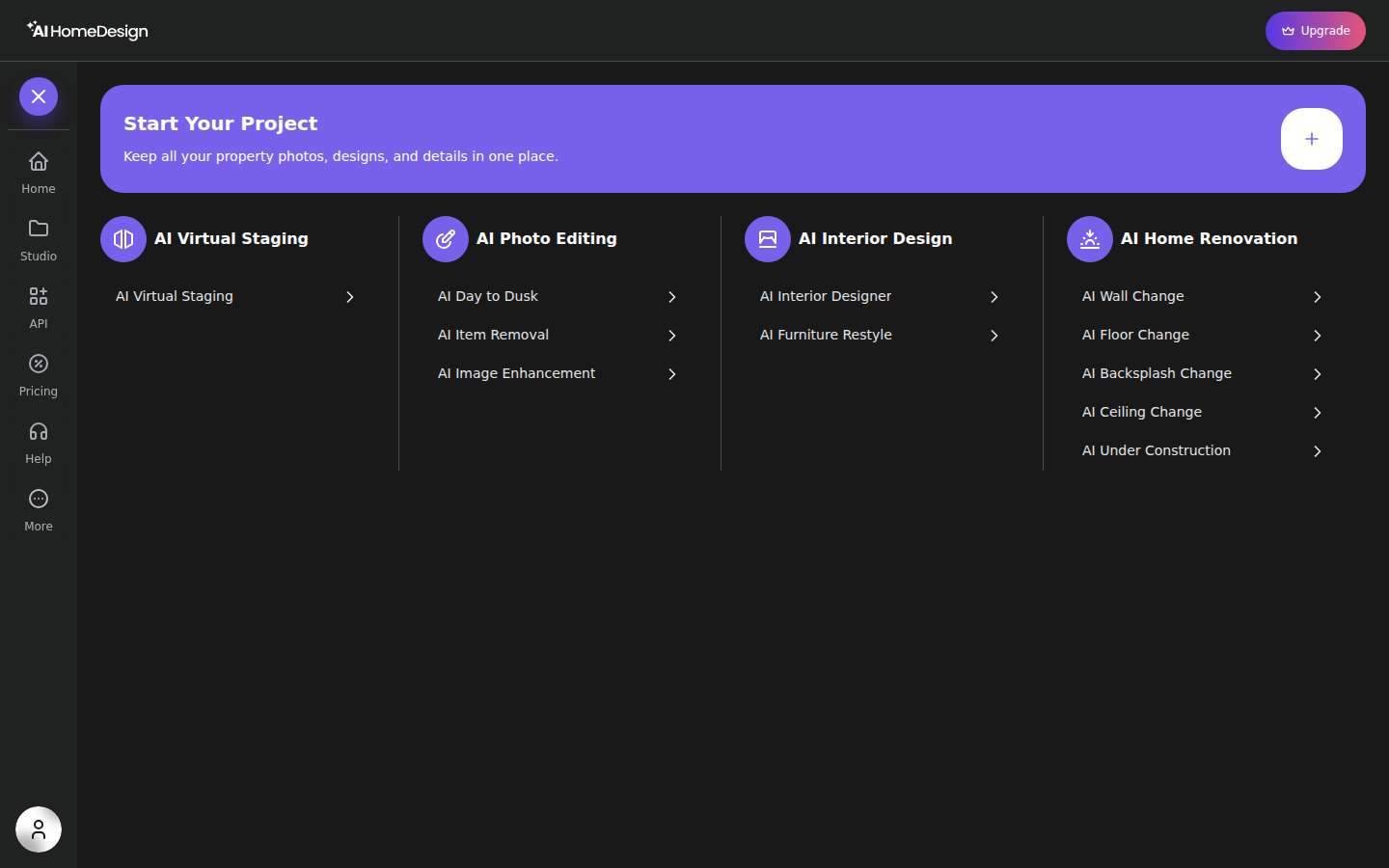
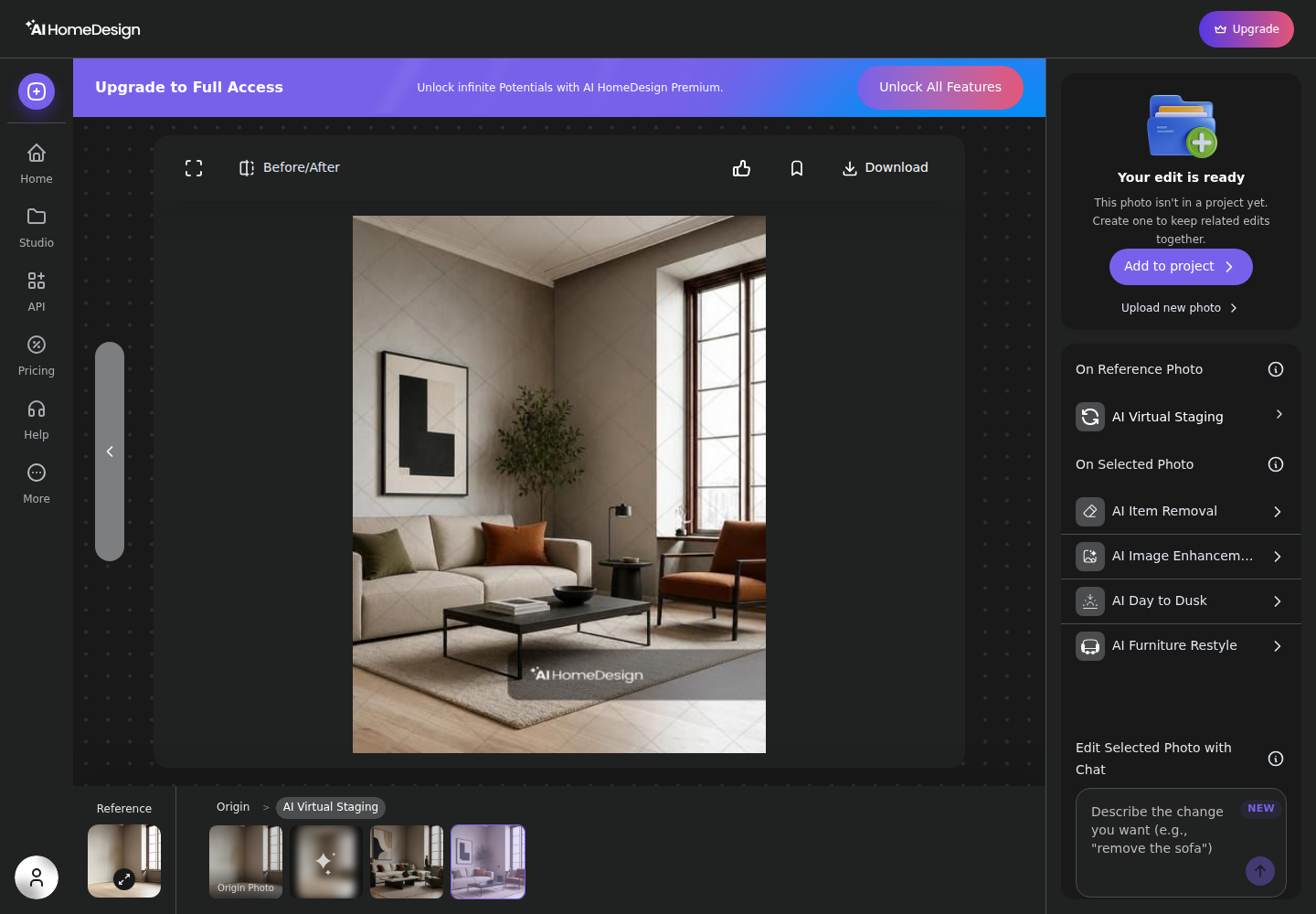
AI HomeDesign puts the workflow on one results screen where a staged output can flow into item removal, image enhancement, or day to dusk without re-uploading. The Services catalog also makes the broader toolbox visible at a glance.
Decor8 AI positions the opposite strength: an unlimited plan designed for rapid iteration. Its vendor page lists a $14.99 per month unlimited plan with 56+ styles, 38 room types, and under-30-second renders, plus chat-to-design edits.
The five-job view below stays practical. Each job includes the “what,” the “what it costs to revise,” and the listing context that decides whether it matters.
Virtual staging: both tools stage empty rooms. AI HomeDesign returns four renders per generation, and the editor starts with a space selection before style, which helps keep furniture scale consistent across a gallery. Decor8 AI wins for sheer variation volume since “another idea” does not change the monthly bill.
Photo enhancement: Decor8 AI lists photo enhancement and upscaling as part of the unlimited plan. AI HomeDesign uses AI Image Enhancement with targeted fix toggles such as turning on lights, removing extra objects, or adding a screen to a TV, which helps when a listing set needs consistent corrections rather than a full redesign.
Day to dusk: both tools claim day-to-dusk conversion. AI HomeDesign treats this as a dedicated tool, with explicit options to pick the twilight sky style and apply shadow removal and lawn touch-up, which matches how agents order twilight as a distinct marketing asset.
Item removal: Decor8 AI lists remove furniture and remove clutter. AI HomeDesign offers AI Item Removal with an auto declutter option for broad cleanup, plus a brush-based select-area mode for precise removals when only one object needs to disappear.
Virtual renovation: Decor8 AI includes paint and cabinet color visualization plus renovation visualization. AI HomeDesign’s renovation hub breaks the job into separate tools like wall, floor, backsplash, ceiling changes, and an under-construction completion view. That separation matters when a listing needs one controlled change instead of a full restyle.
Pricing Compared for Monthly Listing Volume
The pricing comparison changes once “one listing” is treated as a bundle of edits. A single room photo may need staging, then item removal, then enhancement, and that is three separate generations in a credit model.
AI HomeDesign pricing ties directly to monthly photo volume. The published yearly rates are Pro at $19 per month for 30 photos, Pro Plus at $29 per month for 80 photos, and Enterprise at $49 per month for 200 photos. Each generation spends one credit and returns four renders, and plans include free regenerations.
Decor8 AI’s headline is simpler: $14.99 per month for unlimited staging and redesign. That flat fee can stay lower than a credit plan when the month involves heavy experimentation across many photos.
A practical way to compare is to estimate “generations,” not just “photos.” Scenario A uses a lighter month, one 12-photo listing where four photos need staging, one exterior needs day to dusk, and two need declutter. That is seven generations in total. Scenario B uses three listings with 25 to 30 photos that each need a mix of staging and cleanup, which pushes the monthly generation count closer to a full plan tier.
Pricing pressure also shows up in specialty edits. Twilight conversion often gets priced as its own add-on in the market, so it helps to compare the total workflow cost rather than only the staging line item. A deeper cost breakdown sits in what day-to-dusk editing costs elsewhere.

Stage your first listing in under 5 seconds
15 space types, 10 styles, MLS-compliant by default. All 11 tools on one account. Free trial credits, no credit card.
Start staging freeWorkflow Fit for A 25-Photo Listing Shoot
Listing teams rarely edit one hero image. They edit a full set, rename files, and push the final folder to MLS and portals. The best workflow is the one that keeps that pipeline moving without extra exports.
AI HomeDesign supports batch upload by drag-and-drop and keeps work organized in Studio projects. A project can be created by address or by pasting a listing URL, which keeps a property’s originals and edits in one place. From the results screen, the selected render can go straight into another tool, including plain-English chat editing.
Decor8 AI’s workflow centers on rapid iteration. The data supports web and app access across major platforms, plus chat-to-design edits described as non-destructive branching. The same model also makes revision cost simple, since another attempt does not spend a credit.
A realistic delivery expectation for AI-assisted listing production is one day for a standard photo set, and two days when twilight or heavy declutter requests stack up. Agents should keep the originals, keep a staged set, and keep a simple disclosure note in the same property folder. Discussion items such as which design style a seller prefers belong in conversation, not embedded into the image files.
For teams that would rather outsource the whole set than run tools in-house, done-for-you staging services can fit better than any self-serve editor. For everyone else, it helps to compare both tools against the wider field of AI staging alternatives before standardizing a workflow.
MLS Rules, Disclosure, And Edited Listing Photos
AI edits can help marketing, but they do not replace disclosure. The safest stance treats disclosure as the default whenever furniture, lighting, or finishes are materially changed.
Agents can avoid most problems with a simple rule: keep the original photo available, and label the edited one clearly. Many teams place the label in the MLS photo remarks or photo captions. Some also place an on-image label when local rules or brokerage policy call for it.
Sample language that fits most brokerage policies is plain and direct: Virtually staged. Digitally altered. AI-generated furniture. The words matter less than the clarity.
Three situations deserve extra care. First, avoid removing permanent defects a buyer would want to see, such as damage or safety issues. Second, treat virtual renovation renders as “possible,” not “present,” especially when walls, built-ins, or finishes change. Third, avoid text overlays that could confuse MLS compliance, including commission language, limited-time offers, or pricing claims. Keep those assets for social and ads instead.
Other Tools That Can Be A Better Fit
Some teams need a narrower tool with a different billing model. Others need a higher-volume production system. Pricing a few adjacent options can prevent a switch six weeks later.
Stager AI positions itself for production workflows, including a trial and pricing that starts from $19.99 per month, plus per-image options, as described on Stager AI’s Decor8 alternative page. It can suit teams that want staging plus common photo edits and also want a vendor-described batch API path.
Collov AI is another staging-first option with declutter and renovation swaps. The related deep-dive in Collov AI head-to-head helps when the real decision is credits versus subscriptions rather than one brand.
REimagineHome publishes tiered image-pack plans and positions compliance checks per photo, with additional options like human-assisted staging. A longer breakdown sits in REimagine Home compared.
RoomLab.app positions an all-in-one toolkit with packs and subscriptions, plus features like 4K upscaling and video transitions, as described in RoomLab.app’s pricing overview. It can fit lightweight staging and enhancement needs where a full listing pipeline is not required.
The clear pick
Choose AI HomeDesign when
AI HomeDesign fits agents, photographers, and teams that need staging plus day-to-dusk, item removal, enhancement, and renovation visuals in one listing-photo workflow with predictable per-photo pricing at scale.
Choose Decor8 AI when
Decor8 AI fits homeowners, designers, and agents who want unlimited design variations and fast iteration on a flat monthly subscription, especially when the month involves heavy style exploration.
Frequently Asked Questions
Is Decor8 AI cheaper than AI HomeDesign?
Decor8 AI can be the lower headline number at $14.99 per month for unlimited redesign and staging. AI HomeDesign starts at $19 per month billed yearly for 30 photos, and drops to $49 per month billed yearly for 200 photos. The fair comparison is cost per finished listing set, since a single photo may need staging, item removal, and enhancement as separate generations.
Does Decor8 AI have a free plan?
No free tier is listed for Decor8 AI in the provided pricing facts. The entry point is the $14.99 per month unlimited plan, with an additional $0.20 per image API option and custom enterprise pricing. AI HomeDesign offers a free trial with free credits and no card required, but free results carry an AI HomeDesign watermark.
How long do staging renders take in each tool?
Decor8 AI states under 30 seconds per image for staging and redesign. AI HomeDesign pricing is credit-based per generation, and each generation returns four renders to choose from. Both tools support a minutes-not-days workflow, which is the real comparison against outsourced editing where a listing can wait for delivery.
Do regenerations cost extra on AI HomeDesign?
AI HomeDesign includes free regenerations on every plan, and each paid generation returns four renders per credit. That structure means selection often happens inside a single generation before spending another credit. Decor8 AI’s unlimited subscription treats iteration as a time cost rather than an extra line item on the bill.
Which tool covers more than virtual staging for listings?
Both tools list coverage beyond virtual staging, including item removal and virtual renovation. AI HomeDesign is built as a broader listing-photo pipeline with eleven tools across virtual staging, photo editing, and renovation, including dedicated AI Day to Dusk, AI Item Removal, and AI Image Enhancement. That matters when a full MLS set needs multiple edit types.
What disclosure is safest for AI-staged listing photos?
Treat disclosure as the default. Label virtually staged images, keep the unedited original available, and avoid edits that remove permanent defects a buyer would reasonably want to see. Renovation renders should be presented as potential, not current condition. AI HomeDesign is MLS-compliant by default, but the disclosure obligation stays with the agent.