House Flipping Software Stack for Investors in 2026
Hard money paperwork forces a simple question: which house flipping software actually reduces risk before the first draw gets funded. Spreadsheets can handle one rehab, but they rarely hold up when receipts go missing, comps get disputed, or a partner asks for a clean report.
A flip is four different jobs that happen on one timeline: sourcing, underwriting, rehab execution, and resale. Software matters when one of those jobs starts leaking money.
This guide maps a practical stack by stage, with published pricing and the specific role each tool plays.
House Flipping Software Stage by Stage
Lead flow breaks first, not analysis math. A flip stack usually starts with a source of motivated sellers or discounted listings. Data platforms earn their monthly cost only when they surface deals worth underwriting.
Underwriting comes next. Investors need comps, ARV logic, and a maximum offer that still holds after closing costs, holding costs, and a realistic rehab budget. Deal analysis tools help here, but they do not run a jobsite.
Rehab execution turns into a second business the day a project hits multiple trades. Schedules, change orders, photos, and receipts decide whether draw requests get approved and whether the project stays on track. A platform that connects tasks and budget vs. actual solves a different problem than ARV.
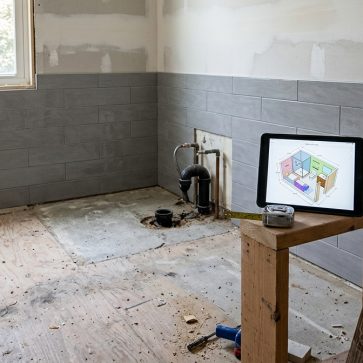
Resale is also a software stage. A finished flip often sits vacant, and buyers judge it from a photo set first. Renovation previews help lock scope early, and listing photo workflows help the exit happen faster.
How This List Was Built
Tool selection followed the flip lifecycle from sourcing through resale. Each pick needed a clear place in the stack, a published price, and a job that investors routinely pay for in time or mistakes.
The rubric stayed practical: stage coverage, comps and ARV workflow, rehab estimating support, budget vs. actual visibility, receipt discipline, lender-friendly reporting, and mobile field use. Published pricing and free tiers came from vendor pages, checked in September 2026.
Several categories stayed out on purpose. CAD and construction drafting software can matter on large structural rehabs, but most investors hire that work out. Permit and engineering workflows also vary by jurisdiction, so this guide focuses on investor operations.
A final constraint kept the list honest. A tool that helps analyze deals does not automatically help run a rehab, and a tool that runs a rehab does not automatically make ARV more accurate.
Deal Sourcing and Underwriting
Deal flow and underwriting usually fail for different reasons. Lead flow fails when follow-up breaks or data filters stay too broad. Underwriting fails when the comp set is weak, ARV logic is inconsistent, or the rehab estimate lacks an audit trail.
Investors who struggle with acquisition often need a prospecting layer before they need a more complex rehab platform. Some teams also wholesale the deals they do not want to close, which makes the acquisition stack overlap with wholesaling software.
Underwriting still needs a handoff point. The underwriting deliverable should include comps, ARV assumptions, a rehab budget line-item view, and a max-offer output that a partner can audit. Negotiation notes and seller psychology belong in a separate file, not inside the report.
Two tools cover this stage from different angles. PropStream handles the sourcing and comping side, with comps built from MLS sales data, public record data, or both, plus guidance on selecting comparables by dimensions, renovations, year built, and neighborhood. On the underwriting side, DealCheck runs fast profit, ROI, and max-offer math with up to 20 sales comps at $10/mo, while REI/kit applies appraisal adjustment techniques to ARV and pairs them with a rehab cost estimator at $53/mo. High lead volume favors DealCheck for triage; deals that need a defensible valuation for a private lender favor REI/kit.
Where each tool sits
Vertical placement is price: budget near the bottom, premium near the top. Horizontal placement is indicative only, because several of these tools are self-serve software whose speed varies by workflow rather than by any measurable turnaround.
The tools in detail
FlipperForceTop pick
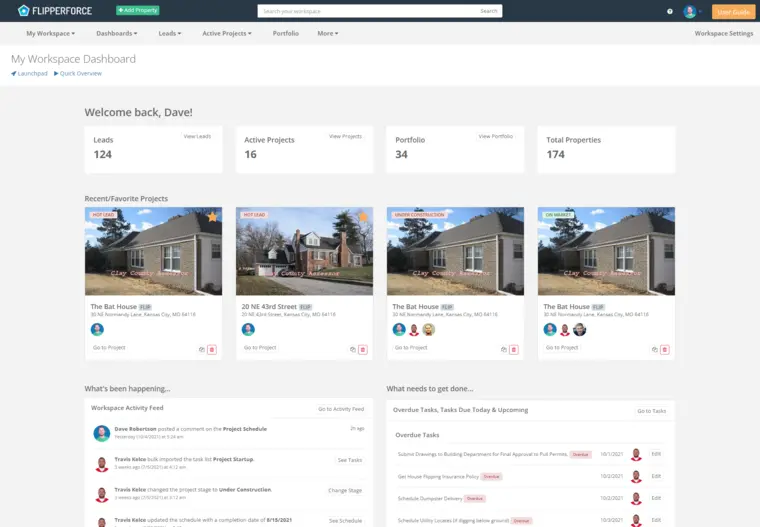
FlipperForce positions itself as an all-in-one flip management platform: deal analysis plus project tracking plus bookkeeping. It includes deal analysis with rehab estimating and investor reports, project management with calendars, schedules, and task tracking, and project accounting with budget vs. actual tracking.
Field execution is a core part of the product. FlipperForce offers a mobile jobsite app for updates and photo logs. It also lists a Receipt Inbox, an AI Receipt Analyzer, and an AI Expense Importer, with AI receipt itemization described as happening in seconds.
Pricing includes a free forever Rookie Analysis Plan for deal analysis only, listed as 1 user and 5 leads or analyses. Solo is $79/mo monthly or $59/mo billed yearly at $708/yr. Teams is $199/mo monthly or $149/mo billed yearly at $1,788/yr. Business is $499/mo monthly or $349/mo billed yearly at $4,188/yr. FlipperForce also lists a 30-day free trial with no credit card required.
Best for: investors who want one system of record for schedules, budget vs. actual, receipts, and draw support.
Pros:
- combines schedule discipline with project accounting, which improves budget visibility
- receipt workflows support audit trail needs for draws and taxes
- mobile field updates keep progress photos tied to the project record
Cons:
- paid plans can be hard to justify for investors still in pre-purchase analysis mode
Skip it if the only need is underwriting, because the free analysis tier covers that stage.
Source: FlipperForce official site
View FlipperForce →
REI/kit
REI/kit approaches underwriting from an appraisal angle. It runs comps and ARV analysis using appraisal adjustment techniques, which gives the valuation step a defensible structure instead of a rough average of nearby sales.
The rehab side is estimated in the same place. REI/kit includes a rehab cost estimator with nationwide labor and material cost data, and it adds premium property and owner data for due diligence, including taxes, owners, and estimated equity.
Exit logic is handled as a comparison rather than a single answer. REI/kit supports multiple exit strategy analysis across flip, wholesale, and BRRRR, and it outputs professional reports to share with private lenders and cash buyers.
Pricing for the plan carried in this list is $53/mo, the Marketing Starter tier billed annually at $640/yr. The ladder above it is also priced on annual billing: Marketing Success at $87/mo billed annually at $1,040/yr, and Marketing Scale, the tier that bundles premium property and owner data with the comps, ARV, and rehab estimating workflow, at $170/mo billed annually at $2,040/yr ($204/mo on monthly billing). REI/kit also lists a Free plan at $0/mo for demo purposes, so the analysis workflow can be tested before the paid data plan starts.
Best for: investors who need defensible ARV and a lender-ready report on every deal.
Pros:
- appraisal adjustment logic makes ARV easier to defend with partners and lenders
- rehab cost data sits next to the comps, so the max offer reflects one consistent budget
- multiple exit strategies get compared inside the same analysis record
Cons:
- the premium property and owner data for due diligence sits on the higher Marketing Scale tier, at $170/mo billed annually
- does not run the jobsite schedule or the project ledger
Skip it if underwriting is already consistent and the bottleneck is rehab execution.
Source: REI/kit official site
View REI/kit →
DealCheck
DealCheck is built for fast deal math. It analyzes a fix-and-flip property in seconds, provides profit and ROI outputs, and runs a max-offer calculation. It also pulls up to 20 sales comps and generates instant ARV estimates.
DealCheck includes rehab budget and scope-of-work worksheets, plus scenario comparisons across rehab scope and holding period. It also exports a professional property report that can be shared with private lenders, partners, or cash buyers.
Pricing starts with Starter at $0 for up to 15 saved properties and 5 comps. Plus is $10/mo, and Pro is $20/mo with unlimited properties and comps. Paid plans include a free 14-day trial.
Best for: fast triage on lots of leads, with consistent max-offer logic.
Pros:
- quick underwriting feedback for a high volume of incoming deals
- comp pull and ARV workflow stays inside the same analysis record
- scenario comparison encourages discipline on holding period assumptions
Cons:
- does not manage the jobsite schedule or receipts
Skip it if the main problem is not deal math, but field execution and draw readiness.
Source: DealCheck official site
View DealCheck →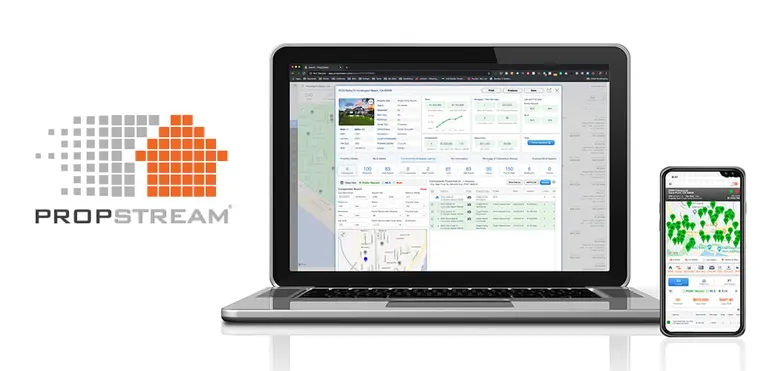
PropStream
PropStream focuses on sourcing and comping before the deal is owned. It supports comps using MLS sales data, public record data, or both, and it adds guidance on selecting comparables by dimensions, renovations, year built, and neighborhood.
Pricing starts at $99/mo for Essentials, with an annual option shown as $81/mo billed annually at $972/yr. PropStream lists a 7-day free trial that includes 50 free leads, and add-ons are priced separately.
Best for: investors who need consistent prospecting and a repeatable comps workflow.
Pros:
- works as a dedicated prospecting cost that can be measured against deals sourced
- gives structured guidance for tightening comps, which helps ARV discipline
- fits due diligence and valuation workflows across multiple strategies
Cons:
- add-ons can raise cost beyond the base plan
- monthly prospecting cost hurts when deal volume is low
Skip it if lead flow is already strong and the current bottleneck is rehab execution.
Source: PropStream official site
View PropStream →
Baselane
Baselane focuses on project-based accounting by property. It supports per-property income and expense tracking and positions its product around AI-powered bookkeeping with auto categorization and tagging to properties.
Baselane also lists auto-receipt matching and storage, balance sheet reports, and an accountant tax package. It supports separating funds with unlimited virtual accounts, which can keep one project from absorbing another project’s costs.
Pricing lists Core at $0/mo. Baselane also lists Smart at $20/mo on an annual plan, and it offers a 30-day trial.
Best for: investors who need clean project-level bookkeeping and receipts that survive audit moments.
Pros:
- property-level tagging makes per-flip profitability easier to audit
- receipt matching and storage reduces end-of-project reconstruction
- virtual accounts support clean separation across multiple concurrent projects
Cons:
- does not replace a rehab scheduler or task system
Skip it if the only goal is deal math, because it is built for money discipline after acquisition.
Source: Baselane official site
View Baselane →What it really costs per listing
Pick a tool, set how many listings you do a month, and see the real per-listing cost.


Show the finished room before the work starts
Walls, floors, ceilings and backsplash, from one photo. All 11 tools on one account. Free trial credits, no credit card.
Start renovating freeRehab Operations and Draw Readiness
Rehab execution turns into a process problem as soon as trades overlap. A schedule that lives in a text thread cannot support a lender draw request, and it rarely survives a change order. The right tool connects tasks, photos, and budget movement into one project record.
Scope clarity also matters most in kitchens and baths. A small finish shift can swing material lead times and budget variance. This is one reason investors often reference bathroom design software during scope definition, even when a designer does not join the project.
Layout changes push the stack again. Wall moves and room reconfiguration add risk, because the resale needs the new flow to read clearly. A lightweight plan asset can anchor both scope and marketing, which is why some teams keep floor plan software in the toolkit.
The operational standard that protects margin stays simple. Every scope change needs a written, priced record in the same place as the budget. Receipts need same-day capture with a clear tag to the project and cost code. That discipline exists for two audits: lender draws and taxes.
Flip Accounting and Audit Trail
Flip accounting fails quietly. A project can look fine on a bank balance while one property bleeds cash and another absorbs the receipts. Per-project tagging is the difference between a story and a ledger.
A clean audit trail is not just for taxes. Draw requests and partner updates often need the same artifacts: categorized expenses, stored receipts, and a simple budget vs. actual view that ties back to scope. Investors who wait until the end of the rehab often end up rebuilding the record under pressure.
Banking structure can also solve real problems. Separate accounts per property reduce accidental commingling. That matters when multiple flips run at once, and it matters when a lender or partner expects clean reporting.
Baselane sits in the stack as the money layer, which in practice means per-property tagging. It tracks income and expenses by property and auto-categorizes transactions with tags to the right project, so the receipts from one flip never land in another flip's ledger. Auto-receipt matching and storage keep the artifacts attached to the transactions they document, and unlimited virtual accounts let each property hold its own funds. That is what turns a bank balance into a per-flip profit number a lender or partner can audit, and it costs $0/mo on Core or $20/mo on the annual Smart plan.
Resale Marketing and Renovation Previews
At the exit, holding cost stops being theoretical. Every extra week on market adds loan interest, utilities, insurance, and taxes, and the photo set is what decides whether buyers book a showing or keep scrolling. Listing visuals are a holding-cost control for that reason: they move days on market and buyer response, the two variables still open to influence once the rehab is finished.
The work at this stage is narrow. A finished flip needs listing photography that reads correctly on a phone screen, and an empty house needs furniture in frame so buyers can judge scale and use, which is what virtual staging covers. Earlier, renovation previews serve a different purpose: they show scope before budget is committed, so a finish level or a wall move can be tested against the expected resale before a trade is booked.
The stage also carries a disclosure discipline. Virtually staged images should be labelled as virtually staged wherever they appear, and concept renders should be labelled as concepts that do not reflect current condition. Neither is a construction document, and neither should be handed to a contractor as one. Mislabelled images create MLS and buyer-trust problems that cost more than the photo work saved.
How to Choose in One Sitting
Start with the phase that currently creates the biggest loss. A project that sits on the market needs a listing fix, not a deeper comps tool. A rehab that slips schedule needs a task, receipt, and budget record, not a new prospecting subscription.
Free tiers create a safe selection sequence. DealCheck Starter, FlipperForce’s free Rookie Analysis tier, and Baselane Core can run meaningful parts of a real deal with no subscription risk. Trials on paid tiers should only start when a real rehab or real pipeline exists to test against.
Pricing changes, and subscriptions compound. Investors should re-check plan pages before committing, and then judge each monthly cost against one measurable outcome: deals sourced, budget variance reduced, draw readiness improved, or exit speed improved.
Software does not create margin. Purchase price creates margin. Still, weak bookkeeping and a weak listing can erase it fast, even on an otherwise good deal.
Find your pick
Tap your situation for a quick recommendation.
Frequently asked questions
Most flippers run a small stack, not one app. A typical setup includes a sourcing and comps platform, a deal analysis tool for ARV and maximum offer, an operations tool for schedules and receipts, a money layer for per-property bookkeeping, and a visual tool for renovation previews and listing photos. The right mix depends on which stage is currently losing money.
Yes, but usually for part of the workflow. DealCheck lists a Starter plan at $0, FlipperForce lists a free forever Rookie Analysis plan for deal analysis only, and Baselane lists a Core plan at $0/mo for banking and bookkeeping essentials. Prospecting platforms like PropStream use a free trial model instead of a free plan.
DealCheck is the low-cost choice for fast underwriting because it analyzes deals in seconds, runs a maximum offer calculation, and supports up to 20 sales comps with instant ARV estimates. FlipperForce can also cover deal analysis and rehab estimating, but it makes the most sense when the same account will also run schedules, receipts, and budget vs. actual during the rehab.
FlipperForce is built for rehab execution because it combines schedules, task tracking, project updates with photos, and budget vs. actual tracking in one record. It also includes a Receipt Inbox and AI receipt workflows, which helps keep draw documentation organized. Investors who only need analysis can start on its free forever analysis tier instead of paying for operations early.
The simplest setup focuses on per-property tracking and receipt storage. Baselane supports property-level income and expense tracking, AI auto-tagging, and auto-receipt matching, which helps keep a draw and tax audit trail clean. The practical goal is a ledger that shows budget vs. actual by project, plus receipts stored against transactions.
Clear disclosure protects trust and MLS compliance. Virtually staged photos should be labeled “virtually staged,” and concept images should be labeled as renovation concepts that do not reflect current condition. Renovation renders can guide decisions and marketing, but they are not construction documents.