AI HomeDesign Review: Honest Comparison Guide 2026
An honest AI HomeDesign review with a scoring rubric, persona picks, pricing tiers, and switching guidance, plus how it compares to the top alternatives for homeowners, designers, and agents in 2026.
In short
- AI HomeDesign leads for real estate: it handles virtual staging, photo editing, day-to-dusk, and item removal in one workflow, where most alternatives do a single job.
- Match the tool to the job: pick by the room types, output quality, turnaround, and budget you actually need. Several alternatives fit narrow niches well.
- Compare head-to-head before switching: the one-on-one guides below put AI HomeDesign against each major alternative on price, speed, and quality.
Buyers and clients judge a room in seconds. That reality pushes more people to look for an honest ai homedesign review before paying for another month or starting another project.
Most comparison posts skip the hard parts. They hide limits, blur licensing rules, and avoid the messy truth about consistency across a full photo set. A tool that wins a single hero render can still fail on a 25-photo listing.
This guide treats AI HomeDesign as the baseline, then measures other tools against real workflows for homeowners, designers, and real estate agents.
What This Guide Covers
- a quick way to compare tools without guessing
- where AI HomeDesign leads, and where other tools fit better
- persona recommendations for homeowners, designers, and agents
- pricing realities, including what free tiers leave out
- switching and migration guidance that avoids lost work
A useful comparison starts with shared definitions. “Interior design AI” often means style inspiration, while “virtual staging” means listing-ready edits anchored to the original room photo. Those goals overlap, but they do not match.
Next comes a simple promise: every tool gets both strengths and weaknesses, including AI HomeDesign. That honesty matters more in 2026, since many products ship fast features and then change limits without notice.
The fastest way to use this article is to pick a persona section first, then return to the tool breakdowns. A second pass through the pricing section helps prevent surprise watermarks, low resolution exports, or restricted commercial use.
One final note: the best choice depends on inputs. Clean photos, consistent angles, and realistic expectations do more for results than any single feature checkbox.
Why AI Interior Design Tools Matter in 2026
Design tools now sit inside real estate, renovation planning, and retail. Agents use photo edits to explain pricing. Designers use renders to align taste before procurement. Homeowners use mockups to avoid expensive mistakes.
Market pressure adds fuel. More listings compete for attention, and more clients expect visual proof before booking a showing. That context connects closely to broader 2026 real estate market trends, including tighter timelines and higher media expectations.
AI also changes who can produce credible visuals. A homeowner can stage a spare bedroom without a design background. A photographer can remove clutter in minutes. That shift creates a new problem: quality varies wildly across platforms.
A serious comparison looks past a single render. It asks whether the tool preserves windows, outlets, and wall lines across many photos. It also checks commercial use, disclosure expectations, and whether the platform supports listing workflows.
How This Guide Scores Each Tool
Most buyers compare tools on vibes. That approach fails once a project needs repeatable outputs, client approvals, and re-edits. A rubric replaces guesswork with repeatable criteria.
This guide weighs “output realism” the most, since fake geometry breaks trust fast. It treats “pricing value” and “ease of use” as the next priority, since most users quit if the learning curve or costs spike.
| Criterion | What strong looks like | What weak looks like |
|---|---|---|
| Output realism | stable walls, lighting, and scale across photos | warped geometry, floating objects, shifting windows |
| Pricing value | predictable limits, clear commercial terms | opaque credits, surprise caps, unclear licensing |
| Ease of use | fast uploads, guided presets, low setup | confusing prompts, many retries, hidden controls |
| Speed | quick iteration without quality collapse | long waits, queues, inconsistent reruns |
| Support and trust | clear policies, responsive help, stable exports | missing documentation, slow replies, broken downloads |
| Persona fit | features match a real workflow end to end | great demo, poor day-to-day workflow |
Scores in this article stay qualitative on purpose. Many tools change tiers often, and a false sense of precision misleads readers. A “strong” mark means the tool can hold up across a full project, not only a single screenshot.
AI HomeDesign in 2026 as the Baseline
Consistency separates listing-ready output from playful inspiration. AI HomeDesign focuses on rooms that must look real, not just stylish. That focus shows up when the photo set includes hard angles, mirrors, and mixed lighting.
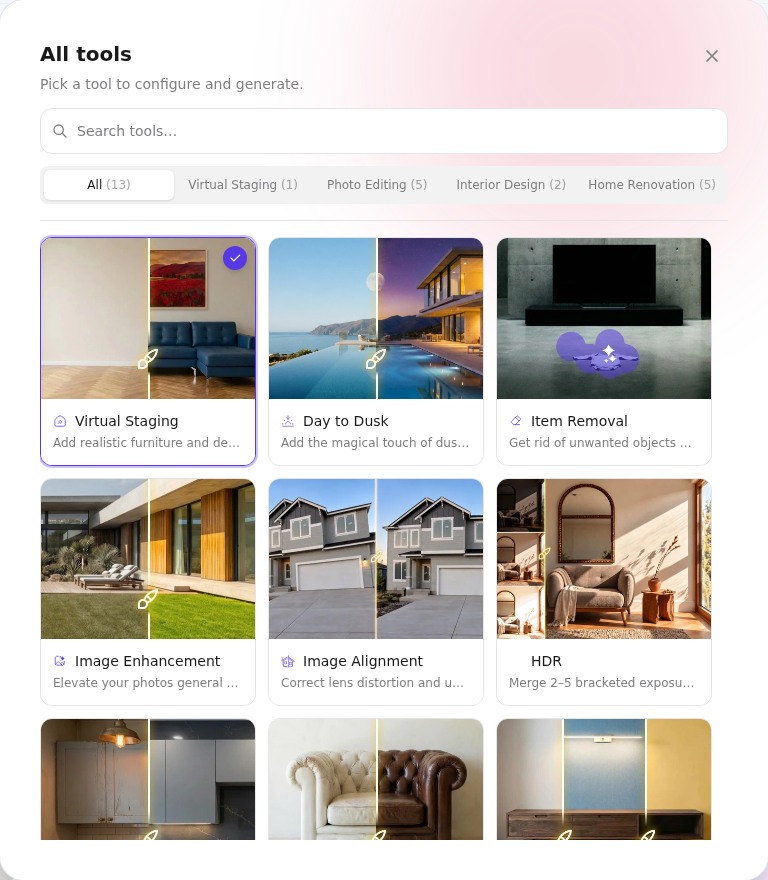
AI HomeDesign also covers several real estate tasks beyond furniture. AI Virtual Staging handles vacant rooms and mismatched furnishings. AI Item Removal helps clear clutter without a reshoot. AI Day to Dusk supports twilight-style exteriors. Image Enhancement helps rescue underexposed shots. Apply Design supports style swaps that keep the room structure intact.
A fair review still needs limits. AI HomeDesign does not try to replace full CAD or detailed construction documents. Floor plan generation and remodel-level modeling can fit better in dedicated planning software. Some users also prefer deeper manual controls over every object, even if that increases time per image.
Pricing at very high volume can matter for teams. A platform that works well for a solo agent can feel restrictive for a brokerage that edits many listings each week. In those cases, teams should compare batch workflows, account management, and how the tool handles shared templates.
How AI HomeDesign Compares, Tool by Tool
Room-level AI has split into two lanes. One lane targets fast style inspiration. The other targets photo-faithful edits for sales, marketing, and client approval. Many products claim both.
RoomGPT: RoomGPT works well for quick ideas and simple rooms. It often struggles with strict realism across many angles. Teams that need stable results across a listing set may outgrow it.
InteriorAI: InteriorAI offers broad style variety and fast experimentation. It can drift from the original photo details, which can create problems for real estate disclosure and client trust.
GenRoom: GenRoom focuses on quick staging-like outputs and tends to match real estate needs better than pure inspiration tools. Results still vary by photo quality, so clean inputs matter.
Spacely AI: Spacely AI can suit users who want structured templates and repeatable looks. It can feel less flexible for unusual layouts or highly specific brand aesthetics.
A second group leans into planning and remodeling. Planner 5D fits users who want layout control and model-based planning. It can demand more setup time than photo-first tools. RemodelAI aims at remodel visualization and concept direction, which can help early planning but may not satisfy listing-grade photo fidelity.
A final group targets décor variations. ReRoom and Decor8 AI can produce attractive mood shifts, but users should check how often the geometry changes and whether exports support commercial use. Reimagine Home often delivers an editorial finish for certain styles, while AI HomeDesign tends to hold structural fidelity more consistently across a full set.
Photo inputs still decide outcomes. Many “bad tool” complaints trace back to tilted verticals, mixed color temperatures, or heavy lens distortion. Those issues show up in any workflow, including AI HomeDesign. A quick read of real estate photography tips helps teams improve results before switching platforms.
good
fair
low — greener is stronger.
Head-to-Head: AI HomeDesign vs Each Alternative
Want a one-on-one breakdown instead of the overview above? Each guide below puts AI HomeDesign head-to-head with a single tool on price, speed, output quality, and real estate fit:
- Spacely AI vs AI HomeDesign: which wins for agents
- RoomGPT vs AI HomeDesign: speed, quality and price
- Planner 5D vs AI HomeDesign for real estate listings
- Coohom vs AI HomeDesign: best for real estate staging
- Homestyler vs AI HomeDesign: staging and design compared
- SofaBrain vs AI HomeDesign: per-image pricing
- Gepetto vs AI HomeDesign: the 15-second staging test
Persona Picks for Homeowners, Designers, and Agents
Beginner homeowners usually want clarity, not control. A good pick gives predictable presets, simple room categories, and fast retries. AI HomeDesign fits well when the goal involves believable “after” images, especially for living rooms and bedrooms. RoomGPT and Decor8 AI can work for lighter inspiration and social sharing.
Professional interior designers care about repeatability and client approval. AI HomeDesign suits early concept alignment when the project needs photo-faithful starting points. Spacely AI can fit designers who want template-driven consistency. Planner 5D and RemodelAI fit cases where the project needs layout planning or remodel direction more than photo realism.
Real estate agents have a different bar. Listing visuals must look plausible, fast, and consistent across many images. AI HomeDesign usually wins on realism and feature coverage, especially with AI Virtual Staging plus AI Item Removal. GenRoom can fit agents who prioritize low-cost variants and speed, as long as outputs stay disclosure-safe.
Agents also need a repeatable client package process. A practical delivery window is 2 days before the listing appointment. That timing gives sellers time to review without letting objections spiral for a week. The deliverable should include staged preview images, a short photo plan, and clear Disclosure language. Pricing strategy, commission, and negotiation posture belong in the in-person conversation, since written numbers often trigger unproductive anchoring.
Any listing use should follow MLS Rules. Images should carry a Virtually Staged Watermark when the MLS requires it. A safe default is: “Disclosure: virtually staged. Images were digitally altered using AI and do not represent current conditions.” Standard workflows also change in distressed sales, off-market or pocket listings, rural or agricultural properties, and price-sensitive markets where buyers punish over-polished edits.
For broader agent workflows, AI visuals only support the full plan. The marketing plan still needs channels, timing, and compliance, which ties into how AI is transforming real estate and modern real estate marketing strategies.
Pricing and Free Trials in 2026
Free tiers create the most confusion. Many platforms offer a taste, then cap exports with watermarks, lower resolution, or restricted commercial rights. A “free” render can still cost time if it forces multiple retries.
Pricing also differs by model. Some tools sell subscriptions with monthly limits. Others sell credits, which can feel cheaper until a project needs many variations. Teams should track cost per approved image, not cost per click.
medium
low–med — all subscription-based (InteriorAI also offers credits). Test real exports and rights before paying.
A practical “free trial test” uses the same three photos across platforms: a bright room, a dim room, and a tricky room with mirrors. That quick test reveals geometry drift, lighting issues, and export limits fast.
Teams should also plan for policy changes. A tool can add watermark rules or tighten limits with short notice. A simple internal checklist reduces surprises: export resolution, commercial use, retention of renders, and support response time.
Switching Tools Without Losing Work
Switching platforms often fails for one reason: projects rarely transfer cleanly. Most tools export images, not editable project states. A clean transition treats renders as final assets and rebuilds prompts, styles, and room tags on the new platform.
A stable migration plan keeps overlap short. Running two subscriptions for one billing cycle prevents missed deadlines. That overlap also supports side-by-side testing on the same photo set, which reveals whether the new tool holds structure across every angle.
Asset hygiene makes the move easier. Teams should store original photos, final exports, and a simple style log per room. That log can list the target style name, any negative prompts, and the chosen furniture vibe. Agents can also store the required Disclosure text and watermark rules with the media kit.
Several edge cases need extra care. Tenant-occupied homes need privacy checks before uploads. Luxury listings demand tighter realism and fewer “creative” edits. Rural properties often include mixed interiors and outdoor views that trigger odd changes. Distressed sales may need lighter edits to avoid misrepresentation claims. Large photo sets require consistent aspect ratios and vertical correction before any AI run.
The best time to switch is between milestones, not mid-approval. Designers should lock a concept round first, then test a new tool for the next round. Agents should avoid switching between photo shoot and MLS launch unless the current tool cannot meet MLS Rules or disclosure needs.
If the new platform cannot match the baseline, a partial return can still work. Many teams keep AI HomeDesign for listing hero shots and use a second tool for early inspiration, floor planning, or remodel concepts.
Frequently Asked Questions
What is the best free alternative to AI HomeDesign in 2026?
RoomGPT and Decor8 AI often work best as free starting points for inspiration, since they usually allow quick concept renders without heavy setup. Free tiers often limit resolution or add watermarks, so they can disappoint for client presentations. For listing-grade visuals, a paid plan usually becomes necessary fast.
How does AI HomeDesign compare to RoomGPT?
AI HomeDesign focuses more on photo-faithful realism and listing-ready consistency across a full set of images. RoomGPT works well for fast inspiration and simple room makeovers, but it can struggle with strict geometry and repeatability. The better choice depends on whether the goal is client-ready output or idea exploration.
Can AI HomeDesign competitors be used for real estate virtual staging?
Yes, many tools can support virtual staging, but agents should confirm commercial use rights, watermark options, and MLS Rules compliance. GenRoom and Reimagine Home often fit staging-focused workflows. AI HomeDesign remains a strong default when the job requires realistic structure, consistent angles, and tools like AI Item Removal alongside staging.
How much does AI home design software cost per render in 2026?
Costs range from pennies per approved image at higher-volume plans to several dollars per approved image on small credit packs, especially when retries pile up. The real driver is approval rate, not sticker price. A cost check should divide total spend by final, client-approved exports across a full project.
Is it hard to switch from AI HomeDesign to another platform?
A switch is manageable, but most platforms do not transfer editable projects. Rendered images usually transfer easily, while room inputs, style settings, and prompt history often require a rebuild. A smooth move keeps a one-cycle subscription overlap and uses a style log so the new tool can reproduce the same look room to room.
What are the biggest weaknesses of AI HomeDesign compared to competitors?
AI HomeDesign does not replace dedicated floor plan and CAD-style planning tools, so layout-first workflows can fit better in Planner 5D. Some teams also want deeper manual object control than photo-first AI tools provide. At very high image volume, organizations may also prefer platforms built around batch processing and account governance.