




Unlock FREE Credits by Signing Up. No Card Needed!
Let's go

AI VIRTUAL STAGING

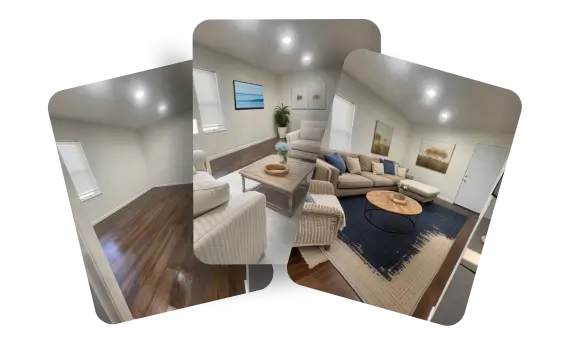
Vacant to Furnished in 30 Seconds!

Upload vacant or already-furnished photos

Not happy with the result? Regenerate endlessly for FREE

Remove unwanted objects from AI results

Stage photos for as low as $0.24/photo

virtual staging example
avatar-virtual staging example

Jersenia Patterson

RE MAX Premier Properties

logo-virtual staging example

AI HomeDesign is a great marketing tool I use for my listings. I work with many house flippers who do not have staging budgets, this tool allows me to stage our listings and make our homes look presentable.

Thank You!

A Versatile Virtual Staging Tool!

ai virtual staging step 1

Upload Furnished Photos!

Enable 'Remove Furniture' so our AI can declutter your furnished photo!

ai virtual staging step 2

Multiple Spaces & Styles

Enjoy 4 room types and 7 styles, with new options added regularly.

ai virtual staging step 3

Polish AI Results

Remove unwanted objects from your AI results using our post-process Item Removal tool!

AI Virtual Staging in Action!

virtual staging for listing

Stand Out with AI Virtual Staging

+73%

Faster Sales

+95%

Cheaper than Traditional Staging

+85%

Buyer Interest

AI Virtual Staging is 100x faster compared to the traditional way!

upload photo background

Try a Photo for Yourself!

Sign up to get FREE credits and try our AI Virtual Staging with +7 styles and spaces.

Drag or Select Your Photos

Flexible AI Solutions for Growing Teams

Edit, design, and manage property visuals using AI-powered workflows.

Single Sign-On (SSO) Access

Enable secure, centralized access to AI HomeDesign using your organization's existing identity and authentication systems.

Single Sign-On (SSO) Access

Custom Solutions

Adapt workflows, features, or integrations to match your specific operational needs beyond standard tool configurations.

Custom Solutions

API Integration

Integrate AI HomeDesign into your existing systems to automate property visual workflows across platforms and internal tools.

API Integration

Frequently Asked Questions

What is AI Virtual Staging?

AI Virtual Staging is an automated tool that allows you to furnish and decorate empty rooms digitally, using artificial intelligence. It’s designed for real estate agents, landlords, and homeowners who need high-quality visuals fast. Instead of hiring a designer or waiting days for a virtual staging expert to manually work on your photo, this tool generates a fully furnished and styled image in as little as 30 seconds. All you need to do is upload a clear photo of your space, select the room type—such as living room, bedroom, or kitchen—and choose a preferred design style. The AI applies a layout, furniture, and decor that matches your selection, producing a photorealistic image that’s ready for your listing. The result is a fast, cost-effective, and professional-looking alternative to traditional staging services.

How long does it take to get my results from AI Virtual Staging?

Your virtually staged photo is usually ready in about 30 seconds. Once you upload the image and select the design settings, the system automatically processes everything in the background. The idea is to give you a ready-to-use image in the time it takes to take a quick break or check your phone. This near-instant turnaround is especially helpful if you’re on a tight schedule and need to prepare multiple listings in a short period.

How does the AI virtual staging process work?

The process is straightforward and requires no design experience. You start by uploading a photo of the room you want to stage. The photo can be empty or even lightly furnished. After that, you select the room type, such as bedroom or dining area, and choose your preferred interior style. Once you confirm your selections, the system generates a newly staged version of your image. The AI applies layout logic, decor elements, and lighting balance automatically. You receive a final image within seconds, without needing to go back and forth with designers.

What kind of photos does your AI Virtual Staging support?

Our AI tools support common image formats, including JPG, JPEG, PNG, WEBP, and HEIC, with a maximum file size of 50 megabytes. Whether you’re uploading from a professional camera or a smartphone, the system can handle your photo as long as it falls within that size range. To get the best results, it’s recommended to upload high-resolution images with minimal distortion, clear lighting, and a straight-on perspective. The AI can stage most rooms effectively, but clean, clutter-free photos lead to more accurate furnishing and style placement.

What if I'm not happy with my AI Virtual Staging result?

You’re not locked into the first result you receive. We offer unlimited free regenerations, allowing you to adjust the room type or change the design style as many times as you like until you get the image you’re happy with. This flexibility is especially useful if you’re experimenting with different looks for the same space or want to compare styles side by side. The regeneration feature is built into the process and doesn't require any additional payments or approvals.

Where can I contact AI HomeDesign for issues or questions?

If you have any questions, run into issues, or need help deciding between AI and Human Virtual Staging, reach out to our support team. You can contact us anytime at support[at]aihomedesign.

Can I use the photos from AI HomeDesign on MLS websites, listing platforms, and portals like Zillow?

Yes. Once you download your final edited images (without watermark), you have full rights to use them for real estate marketing purposes, including uploading them to MLS websites, listing platforms like Zillow, Realtor.com, Redfin, and more. Our platform is specifically designed to help real estate professionals create listing-ready visuals that comply with standard platform requirements. Just make sure your usage follows the guidelines of your local MLS or listing service regarding photo editing and virtual staging disclosures, if applicable.

Can I stage multiple rooms or entire properties using AI Virtual Staging?

Yes. AI HomeDesign makes it easy to stage multiple rooms within the same property or across different listings. You cannot upload images in bulk, but you can upload the photos of different space types (e.g., the living room, bedroom, kitchen, and bathroom) one by one, and customize the room type and design style individually. This allows for a cohesive yet varied visual presentation across the property.

About AI Virtual Staging

AI Virtual Staging by AI HomeDesign is built to help real estate professionals and businesses present properties at their best. Whether you are working with empty rooms or dated interiors, our AI tool transforms ordinary listing photos into fully furnished, styled images in just 30 seconds. Upload a photo, select a design style and room type, and receive polished, listing-ready visuals that bring out the full potential of the space. This solution is trusted by real estate agents, agencies, brokerages, associations, and MLSs looking to save time and reduce costs while maintaining visual quality. Instead of waiting hours or days for a traditional virtual staging service, AI HomeDesign delivers immediate results with minimal effort. There is no need for back-and-forth edits or complicated workflows.

For projects that require a more customized approach, AI HomeDesign also offers Human Virtual Staging. This option is ideal for complex spaces such as open layouts or rooms that need a designer’s judgment. Our experienced team handles the entire process manually based on your photos and style preferences. Each image is carefully staged and returned within 8 to 48 hours, starting at $13.99 per photo. Both AI and Human Virtual Staging are designed to support professionals across the real estate industry. From solo agents to national brokerages, from local MLSs to large associations, our goal is to provide a reliable and effective visual marketing tool that helps your listings stand out and attract buyers.

banner

Turn Vacant to Vibrant in a Sec!