A listing photo only gets a few seconds of attention before a buyer scrolls. That reality turns “fast enough” into a real advantage, but only if the image looks believable at first glance. In that context, gepetto vs ai homedesign becomes less about a stopwatch and more about whether the output looks listing-ready immediately.
This comparison focuses on the parts that affect real production work: time from upload to export, realism across a full photo set, pricing predictability, and how each tool fits an agent or photographer workflow. For readers still scanning the category, the broader landscape sits in AI HomeDesign review.
Market attention has also shifted toward speed and repeatability as part of real estate industry trends for 2026. The sections below break down where each platform fits, and why speed alone does not decide the winner.
What AI Virtual Staging Changes for Listing Workflows
Traditional virtual staging forces a stop-and-wait cycle. An agent gathers photos, sends a request, then waits for edits and revisions. AI staging shortens that loop into a single work session. That shift matters most during pre-listing timing, price changes, and relaunches, where teams need fresh visuals quickly.
AI virtual staging software usually follows the same flow: upload a photo, pick a room type and style, generate a staged version, then export a final file. The output quality depends on the source photo and the tool’s ability to keep structure consistent. A fast render does not help if furniture floats, windows warp, or angles change.
Speed claims also hide a practical detail. Agents do not spend time only on “rendering.” They spend time on selecting a style, reviewing the result, regenerating variants, and exporting the correct format. A platform wins the speed race when it reduces decision friction, not just render time.
AI also changes the marketing rhythm around a listing. Teams can test style directions, update photos after minor repairs, and create an alternate set for social ads without restarting the whole process. For a wider view of where this sits in the industry, see how AI is transforming real estate.
gepetto vs ai homedesign: Feature And Workflow Comparison
A comparison only helps when it sticks to published facts. Gepetto lists an iOS app and an online web application, plus AI virtual staging for interior and exterior photos. The same listing also notes realistic photo retouching and a low-skill workflow.
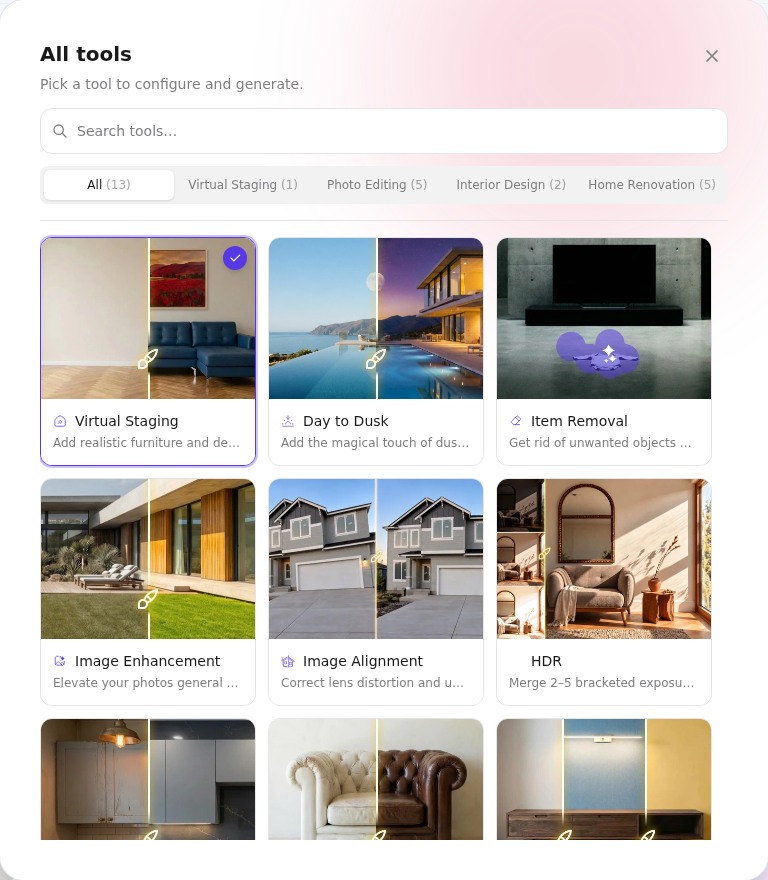
AI HomeDesign targets professional listing output and predictable volume work. Every plan includes AI Virtual Staging, AI Day to Dusk, AI Item Removal, and Image Enhancement. AI HomeDesign also supports JPG and PNG exports and states usability on MLS, Zillow, and Realtor.com.
| Feature | Gepetto | AI HomeDesign |
|---|---|---|
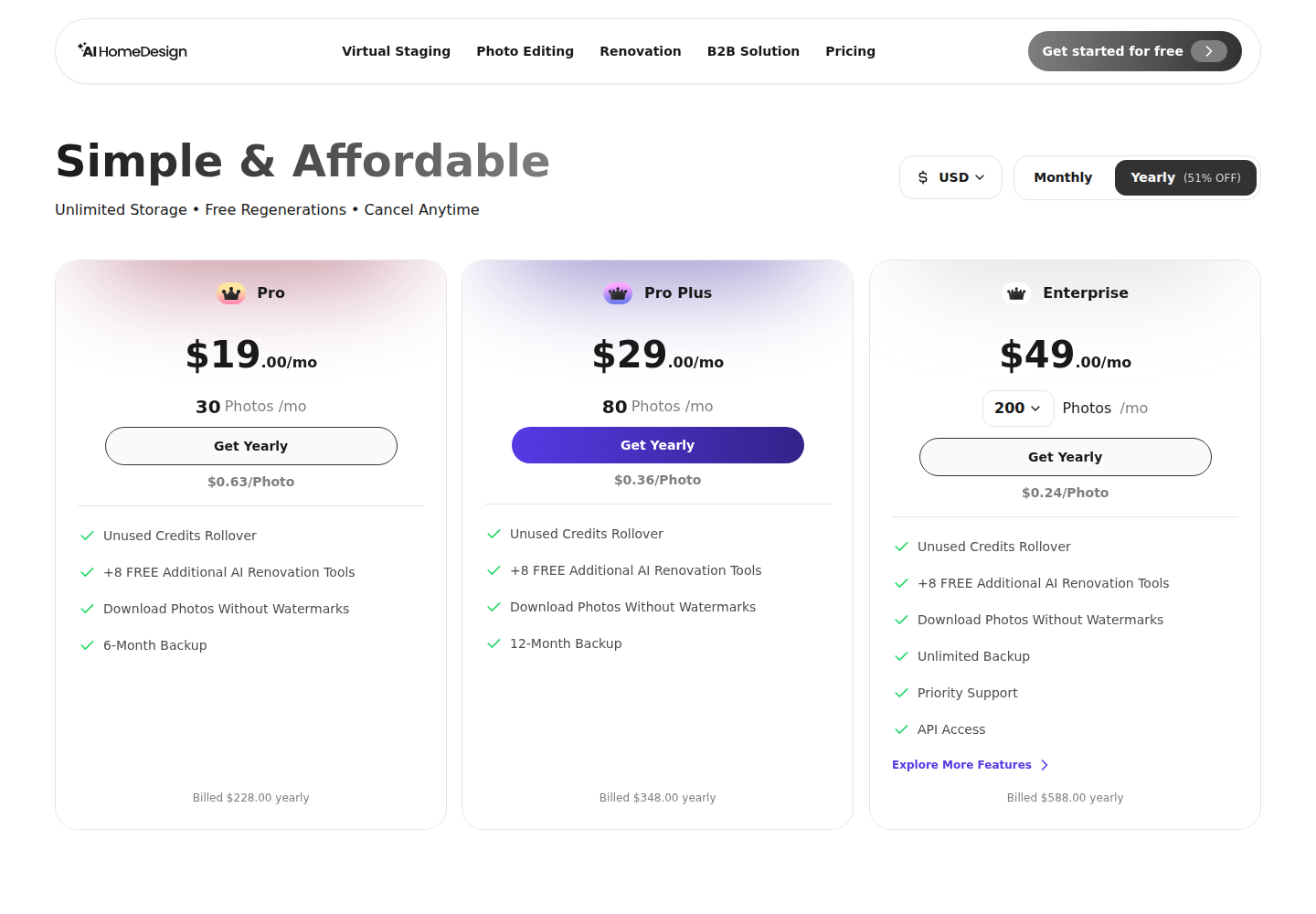
| Pricing model | user-reported as ~$10 per single image and ~$48 per month, official pricing not publicly listed | credit-based subscription, 3 tiers, from $19 per month for 30 photos, price per photo from $0.24 |
| Free trial | not publicly listed | yes, free credits, no card, free results are watermarked |
| Render speed | not publicly listed | about 30 seconds |
| Platform | iOS app and online web application | web-based platform |
| Interior staging | AI virtual staging for interior photos | AI Virtual Staging with 3 variations per room and unlimited free regenerations |
| Exterior staging | AI virtual staging for exterior photos | supported, outdoors is a supported room type |
| Style library depth | not publicly listed | 8 design styles |
| Supported room types | not publicly listed | 12 room types |
| MLS-ready positioning | not publicly listed | MLS-compliant, preserves original fixtures and structure |
| Extra editing tools | realistic photo retouching | 10+ tools, includes Day to Dusk, Item Removal, Image Enhancement, and remodel-style tools |
The table points to the decision hinge. Gepetto’s published strengths center on a mobile-first capture-to-stage flow and broad interior and exterior staging claims. AI HomeDesign brings clearer staging controls for repeatable work, plus a wider toolbox that reduces the need to switch apps mid-project.
For teams that stage at volume, transparency matters as much as speed. AI HomeDesign lists plans, per-photo economics, and a free trial structure. Gepetto does not publicly list official pricing or speed, so budget planning often starts with reported numbers instead of a posted rate card.
Speed And The 15-Second Claim in Real-World Use
A staging “speed test” has two clocks. The first clock measures render time. The second clock measures end-to-end time, meaning upload, selection, generation, review, and export. The second clock decides whether an agent can stage between appointments.
Gepetto does not publicly list render time, so the most honest approach is to treat the “15-second” concept as a benchmark, not a guarantee. If a platform finishes a render quickly but forces repeated taps, style hunting, or extra exports, the total time grows. Mobile speed can also depend on signal strength and device performance.
AI HomeDesign states a turnaround of about 30 seconds. That matters because the time claim sits close to a real agent workflow. A short cycle supports rapid iteration, especially when a listing needs multiple looks for different buyer segments.
Real work also includes regeneration. AI HomeDesign includes 3 variations per room and unlimited free regenerations, so teams can keep exploring without adding friction. Gepetto lists ease of use and no technical skills required, but it does not publish how many variants or regenerations come with a single photo.
A practical timing rule helps keep production steady. Agents and photographers should deliver a first staged set within one day of receiving the base photos. That window keeps marketing momentum while leaving room for a quick revision pass.
Image Quality And MLS-Ready AI Staged Photos
Listing-ready realism shows up in boring places. Furniture scale must match the room. Shadows must fall in the right direction. Window frames must stay straight. When a tool changes structure, the image starts to look synthetic, and buyers notice.
Gepetto positions itself around realistic results and retouching, but it does not publicly list output standards such as resolution targets or MLS compliance rules. That does not mean the tool fails, it means teams should test exports on the actual listing portals they use.
AI HomeDesign positions MLS compliance as a core requirement and states that it preserves original fixtures and structure. That promise matters for kitchens, baths, fireplaces, and built-ins, where buyers compare photos to showings. AI HomeDesign also states that exports work on MLS, Zillow, and Realtor.com, which signals a listing-first intent.
Source photo quality still sets the ceiling for both tools. Wide-angle distortion, mixed lighting, and clutter can confuse any staging model. A clean base image, straight verticals, and balanced exposure improve realism and reduce odd furniture placement. The detailed setup checklist in real estate photography tips helps teams avoid the common capture mistakes that cause staging artifacts.
Pricing And Cost Per Listing Economics
Pricing decides whether staging becomes a standard step or an occasional extra. Per-image pricing supports one-off needs, but it can create budget stress for teams that stage every listing. Subscription pricing supports repeat use, but it must stay transparent to work for monthly planning.
Gepetto’s official pricing is not publicly listed in the provided source. The app listing includes user-reported pricing references, including ~$10 per image and ~$48 per month. That reported structure can fit a homeowner or a low-volume agent who stages a small set of photos and stops.
AI HomeDesign posts transparent plan details: 3 tiers, from $19 per month for 30 photos, and price per photo from $0.24. That structure fits repeat staging because the marginal cost drops as volume grows. AI HomeDesign also includes more than staging in the plan, which reduces the need for separate tools for decluttering, lighting fixes, and listing polish.
Staging economics also tie back to listing promotion. A staged set becomes an input for ads, email blasts, and portal refreshes. For the broader playbook that connects visuals to pipeline activity, see real estate marketing strategies.
Workflow Fit, Disclosure Rules, And Clear Recommendations
Tool fit depends on where the work happens. Gepetto’s iOS app fits on-site use, quick experiments, and moments when a phone is the only device available. That matters for FSBO sellers or agents who want a fast concept image during a walk-through.
AI HomeDesign’s web platform fits batch work and consistent style direction across a full photo set. The platform also supports a broader editing workflow in one place, including AI Item Removal, AI Day to Dusk, and Image Enhancement. That bundling matters for photographers and teams that want one staging pipeline that covers fixes, not just furniture.
| Scenario | Gepetto | AI HomeDesign |
|---|---|---|
| Single property, small photo set | good fit when mobile speed matters | good fit when consistent style across rooms matters |
| High-volume agents and teams | not publicly listed | best default due to transparent plans and low per-photo pricing |
| Photographers selling staging add-ons | not publicly listed | best default due to tool breadth and web workflow |
| Exterior and curb-side use | supports interior and exterior staging | supports outdoors room type and Day to Dusk |
Disclosure also decides whether images stay usable. MLS Rules and state law can require labeling for virtually staged photos. A safe baseline is to label staged images clearly, even when a platform output looks photoreal. Disclosure: “Virtually staged. furniture and decor added digitally.” Teams can also use a Virtually Staged Watermark on the image itself when local rules demand it.
A clean deliverable rule prevents confusion with sellers. The deliverable should include the final staged files, the original unstaged files, and the Disclosure text used for marketing. Pricing strategy, negotiation posture, and seller objections belong in the in-person conversation, not inside the image packet.
Some situations call for a different approach. Distressed sales may need honesty-first photos with minimal staging. Occupied homes with personal items may need AI Item Removal before any staging. Luxury listings may still justify physical staging for tactile spaces. Rural or agricultural properties may gain more from exterior and land photos than staged interiors.
AI HomeDesign remains the stronger default for real estate professionals because it pairs fast turnaround with MLS-compliant intent, transparent pricing, and a full editing toolbox. Gepetto fits narrower cases where mobile-first convenience matters most. For readers still comparing across more tools, an honest AI HomeDesign review supports a broader shortlist.
Professional photography still raises the ceiling on any AI stage. In markets where visual competition is intense, sourcing images from professional real estate photographers often improves results more than switching staging apps.
Frequently Asked Questions
Is Gepetto available on Android, or only iOS?
Public listings show Gepetto as an iOS app on the Apple App Store. The same source also mentions an online web application, which can run in a browser. Android availability is not confirmed in the provided brief, so teams should verify current platform support before standardizing a workflow.
Do AI-staged photos need to be disclosed on MLS listings?
Disclosure requirements vary by MLS Rules and state law. Many MLS systems require a clear label for virtually staged photos, and some prefer a Virtually Staged Watermark on the image. A safe baseline is to label staged visuals in the photo remarks and in any public marketing channel that republishes the images.
Do professional photos matter before AI staging?
AI staging can work with phone photos, but professional listing photos usually produce cleaner results. Straight verticals, consistent lighting, and higher sharpness reduce AI artifacts and help furniture placement look believable. For teams selling a premium service, professional capture often matters more than the choice between staging tools.
Can AI staging tools remove existing furniture before staging?
Some platforms offer a separate removal step before furniture placement. AI HomeDesign includes AI Item Removal in every plan, which supports a cleaner base photo before staging. Gepetto lists realistic photo retouching, but the brief does not confirm a dedicated furniture removal workflow, so teams should test that feature directly.
Which tool fits a homeowner selling FSBO?
A homeowner often needs a small set of staged photos and may value a phone-first workflow. Gepetto’s iOS app can suit that pattern, especially when speed on-site matters. If the project requires multiple rooms, multiple style trials, or extra edits like day-to-dusk and item removal, AI HomeDesign can be a simpler all-in-one path.
How can MLS-ready output be checked before publishing?
A simple pre-publish check prevents listing issues. Teams can confirm that the staged image keeps walls, windows, and built-ins unchanged, then verify that export format matches portal needs. A final step is to attach the Disclosure text in the MLS photo remarks and confirm that any required Virtually Staged Watermark appears on the correct images.