Property Listings Using AI: A Practical Guide for Agents

Table of Contents

Listings move fast. Buyers scroll even faster. A bad shadow in a kitchen photo or an awkward headline can be the difference between a booked showing and a skipped listing.

Property listing using AI offer something valuable: time and the ability to test. Instead of spending hours editing photos or second-guessing copy, agents can generate a polished draft quickly and refine it based on what actually attracts attention.

This guide discusses how AI fits into the listing workflow, when virtual staging is appropriate, how to write natural property descriptions, and how to track listings more efficiently.

How Property Listings Using AI Fit Into The Listing Workflow
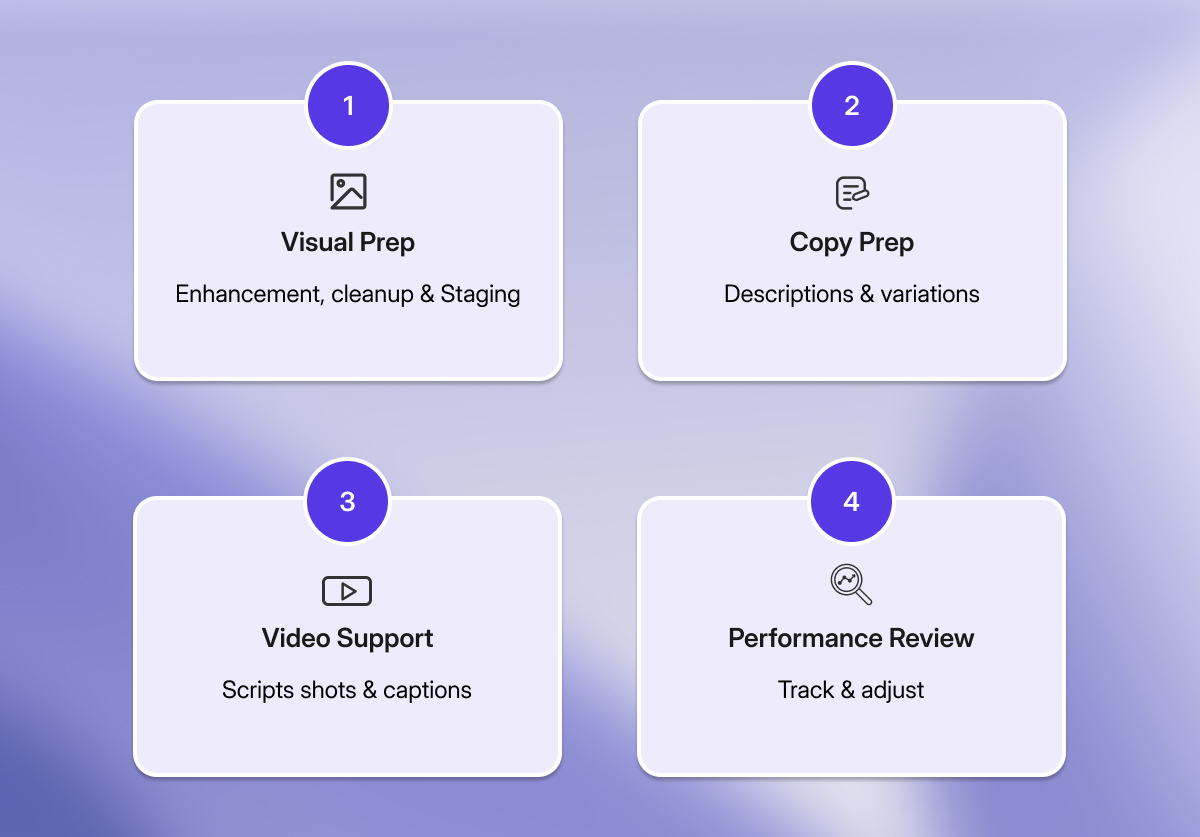
a table explaining How Property Listings Using AI Fit Into The Listing Workflow

AI in real estate now supports many parts of the real estate workflow. Writing property descriptions with ChatGPT is no longer considered the smartest usage of AI for agents. 

Today, AI tools for real estate marketing help agents shape listing strategy while keeping property details accurate. Agents use AI to prepare visuals, support communication, manage rental listings, and organize marketing tasks more efficiently. When it comes specifically to property listings using AI, the role of the technology usually falls into four core areas:

  • Visual preparation: photo enhancement, object removal, and staging
  • Copy preparation: listing descriptions and channel-specific variations
  • Video support: scripts, shot lists, captions, and short-form edits
  • Performance review: tracking interest and identifying what to adjust

A strong workflow follows one clear rule: AI can draft and refine content, but the agent decides what gets published.

Preparing Listing Photos with AI

Image enhancement using AI homeDesign

Not long ago, preparing listing photos was often the slowest part of the workflow. From shooting the property to receiving the final images from the photographer, the process typically took five to seven days.

While some agents still favor traditional methods for reasons discussed earlier, most now rely on AI-driven photo editing for property listings. A well-trained real estate photo editing model can handle the following tasks:

  • Exposure and white balance corrections
  • Shadow and highlight balancing
  • Noise control and sharpening within reason
  • Minor object removal that reduces visual distractions


Today, property listing platforms such as HomeSmart and Zillow have integrated AI-powered photo editing tools like AIHomeDesign and VirtualStagingAI into their workflow. This allows agents to enhance listing photos directly within the platform, without moving images between multiple tools.

When preparing property listings with AI photo editing tools, a brief quality review helps prevent common issues:

  • Vertical lines: walls and door frames should appear straight
  • Windows and lamps: check for unnatural halos or artificial-looking glow
  • Reflections: review mirrors, glossy floors, and television screens for distorted or missing details
  • Surfaces and textures: look for smudged patterns on cabinets, rugs, or countertops

If an image fails the review, switching the base photo, adjusting edit settings, or applying a small manual correction usually resolves the issue.
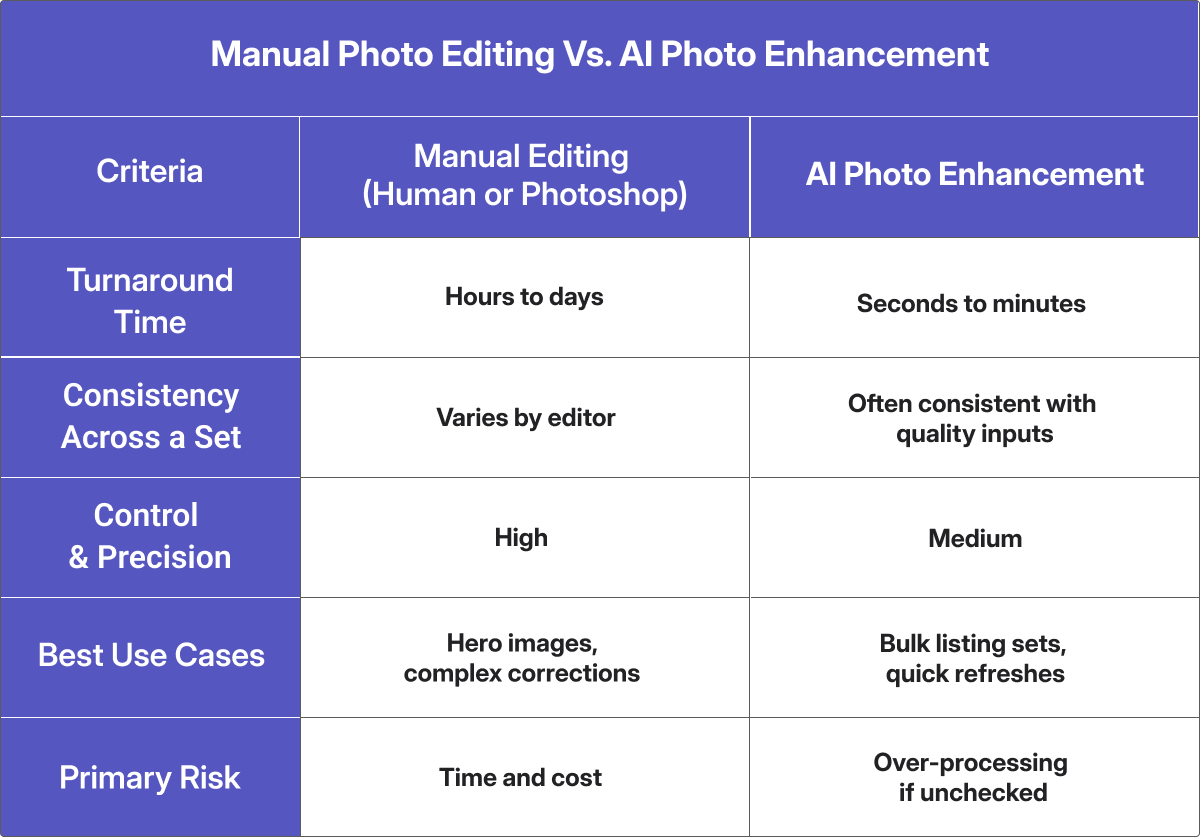
a table compare manual photo editing vs. AI photo enhancement

AI Virtual Staging and Virtual Tours: Helping Buyers Feel the Space

a virtual staged living room

AI Virtual staging and AI virtual tours work alongside photos to give buyers a clearer understanding of a property. Staging highlights the potential of empty or outdated spaces, while virtual tours allow buyers to explore layout and flow remotely. AI virtual staging works particularly well for:

  • Empty rooms that photograph smaller than they actually are
  • Outdated furniture that pulls focus away  from the space itself
  • Testing different styles to appeal to different buyer types
  • Refreshing listings quickly after weeks on the market

Property listings using AI staging help define the purpose of each room and make it easier for buyers to imagine how they would use the space.

When it comes to virtual tours, most agents still rely on professional photographers or Matterport. AI does not replace these tools, but it can support the the surrounding work by handling tasks such as:

  • Writing tour descriptions and key highlights
  • Creating captions for sharing tours on social media
  • Drafting email copy to promote the virtual tour
  • Generating short video clips or still images from tour footage for advertising
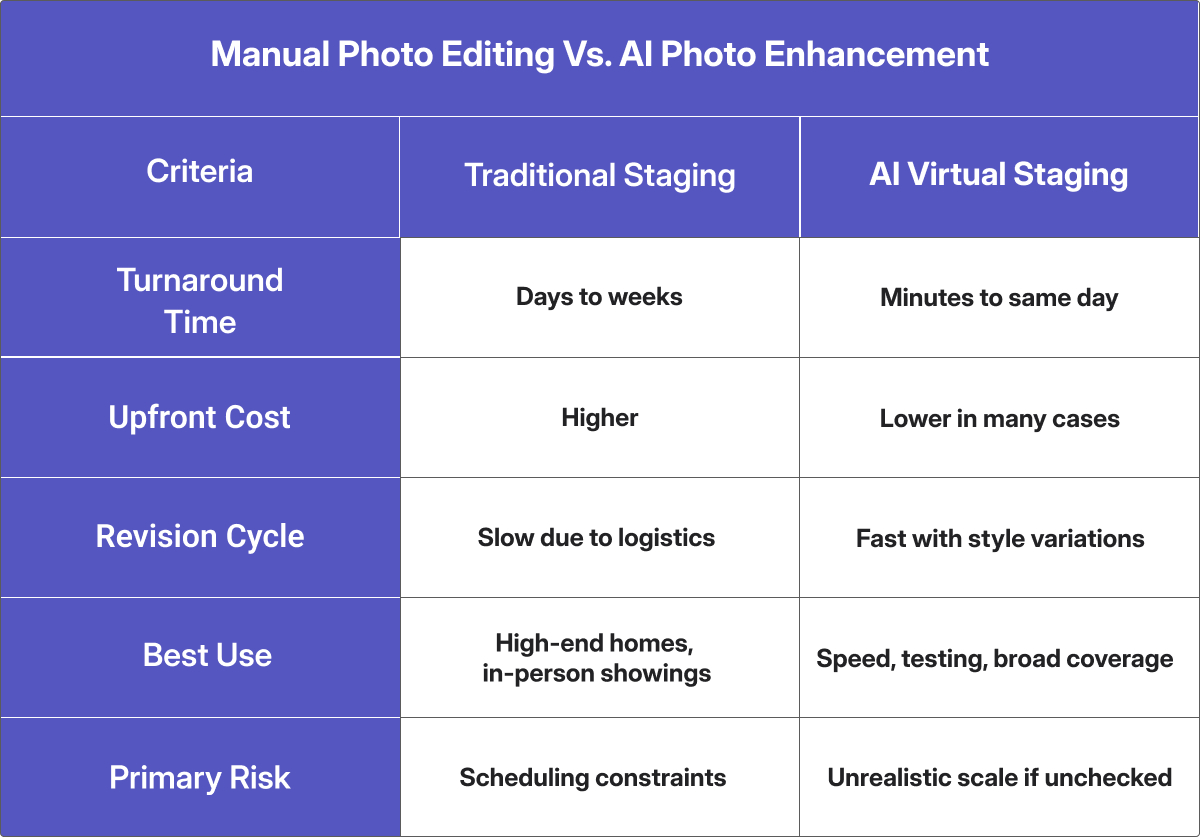
 

a table of comparing Traditional staging vs. AI virtual staging

AI Descriptions: Drafting Listing Copy Without Losing Accuracy

Writing a strong property description requires focus, yet many agents end up doing it late at night or between calls. That result is often a blank screen, repeated rewrites of the same sentence, or recycled copy from the previous listing. AI can help by generating a first draft and multiple variations, but the agent remains responsible for accuracy. 

AI models designed for property descriptions can support tasks such as:

  • Creating a first draft from notes and verified details
  • Producing short and long versions for different channels as MLS, email, and social media
  • Adjusting tone to match a defined brand voice
  • Rewriting copy quickly to reduce repetition

No matter how accurate an AI tool appears, every generated description still requires review. The issue is not that AI writes poorly, but that it writes confidently even when the input lacks detail or precision.

A missing detail or incorrect number will not cause the model to hesitate. It will still present the information with confidence. That is why all property listings using AI writing tools need a human review before they go live.

AI Analytics: Measuring Results in Property Listings Using AI
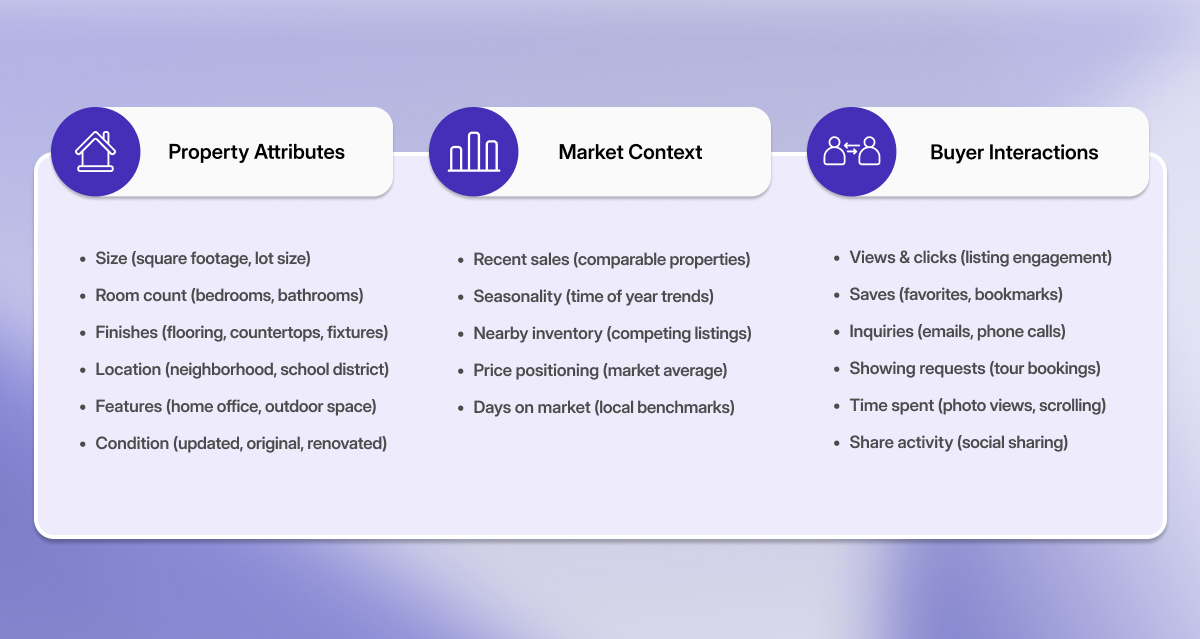
a table showing Measuring Results in Property Listings Using AI

This is the part many agents tend to skip. Analytics is where AI can reveal what attracts interest and what causes drop-off. It does not replace local knowledge, but it can highlight patterns worth testing.

Agents may assume buyers care most about square footage, yet data often show that mentions of a home office or specific photos drive more contact requests. AI surfaces these patterns far more quickly than manual review. AI analytics can combine signals such as:

  • Property attributes: size, room count, finishes, location
  • Market context: recent sales, seasonality, nearby inventory
  • Buyer interactions: views, clicks, saves, inquiries, showing requests

Pinpointing what attracts buyers

One useful approach is feature importance analysis, which identifies listing elements most closely associated with buyer interest. In some markets, this may show that home office mentions matter more than formal dining, or that specific exterior photos drive higher save rates. These insights work best as directional signals rather than absolute rules, since small sample sizes can sometimes mislead.


A Simple Workflow for Property Listings Using AI

The most effective way to use AI for listings is to follow the same sequence every time. This reduces missed steps and makes the process faster once it becomes routine.

Start with clean inputs. High quality source photos lead to fewer unexpected edits, and clear property notes reduce the risk of factual error in descriptions. From there, refine your photo set by running the full batch through AI enhancement. Choose your strongest image as the cover, since this image often determines whether a buyer clicks through or scrolls past.

Next, apply staging where it adds real value. Focus first on key empty rooms such as the living room and primary bedroom, and include the kitchen if it is unfurnished. Keep the style consistent across the whole set so the property reads as a cohesive home rather than a mix of unrelated furniture styles.

Once your visuals are solid, draft and review the description. Generate a first version from verified facts, then revise for clarity and tone. Before publishing, run through your accuracy checklist . This is where mistakes tend to surface and damage trust.

Finally, publish, measure, and adjust. Track what happens after the listing goes live: saves, inquiries, and showing requests. Run one small test at a time, swap the cover photo, update the staging, reorder images, or adjust the headline, and watch what moves the numbers.

Final thoughts

Property listings using AI work best when the technology is treated as a production assistant, not a replacement for professional expertise. The agents who get the most value are not those chasing every new toll, but those who build a clear process, follow it consistently, and use data to improve with each listing.

AI is not meant to replace the judgment an agent brings to a property. It does not understand which neighborhood details matter the most to local buyers, or whether a listing calls for a warm, family focused description or a sleek, modern tone. Those decisions remain firmly in the agent’s hands.

What AI does well is handle repetitive work, such as It takes care of repetitive work such as correcting exposure across dozens of photos, producing multiple versions of the same description for different platforms, or tracking which images generate the most interest. 

That efficiency frees agents to focus on decisions that truly require experience: choosing which properties to take on, how to position them, and how to serve clients more effectively.

FAQ

It depends on your MLS and local rules. Check your MLS photo/manipulation policy and brokerage guidelines. If you use virtual staging, many markets require clear labeling.

It can happen, particularly when edits are not reviewed carefully. To reduce the risk, check windows and lights for unnatural halos, vertical lines for distortion, reflections for missing or warped details, and surfaces for smudged textures. If an image looks off, regenerate it or correct that specific photo manually.

Use AI virtual staging for empty rooms, dated furniture, or fast refreshes. Avoid it when the space has unique built-ins or high-end finishes where inaccurate staging could misrepresent the home.

If you’re preparing property listings using AI, you should double check every detail especially: square footage, beds/baths, lot size, upgrades, school zones, and anything time-based like “recently renovated.

Track views, saves/favorites, inquiries/leads, showing requests, and how they change after edits. If you can, also watch which photos get attention and where buyers drop off.

Try the Magic!

Sign up today and unlock your 3 free tires (with unlimited regenerations) of any service you want!

Read More