ReRoom AI vs AI HomeDesign for MLS Listing Photos 2026
ReRoom AI vs AI HomeDesign: compare MLS-ready virtual staging vs idea renders. See structural fidelity, watermarks, resolution, speed, and cost per photo.
An agent can love a redesign render and still keep it off the MLS. The decision often comes down to one question: does the image still represent the property that is for sale?
ReRoom AI vs AI HomeDesign is a real split between “concept visualization” and “listing production.” ReRoom AI leans into fast style swaps, moodboard direction, and architectural presentation. AI HomeDesign focuses on listing-photo jobs like AI Virtual Staging, AI Item Removal, AI Day to Dusk, and Image Enhancement.
For a broader view of where AI HomeDesign fits among similar tools, this page sits inside our full AI HomeDesign review. The rest of this guide stays focused on MLS publishability and day-to-day listing workflow.
At a glance
ReRoom AI vs AI HomeDesign in 60 seconds
ReRoom AI suits concept work. It accepts image inputs like JPG, JPEG, or PNG, and it stays comfortable with non-photo sources like model screenshots and sketches. That matters for designers and renovators who need a quick, believable direction shot. In that lane, ReRoom’s Moodboards and illustrative Coloring outputs add something a listing tool does not try to replace.
AI HomeDesign suits listing work. It is built around the photographed room and the real estate handoff: a set of rooms, a deadline, and edits that should not change the property itself. It also packages the common listing-photo fixes with staging, so a team does not juggle separate apps for declutter, lighting mood, and overall polish.
The dividing line is structural fidelity. If the output must remain a faithful representation of the photographed space, AI HomeDesign is the safer default because its virtual staging is MLS-compliant by default and preserves original fixtures and structure. ReRoom AI can be perfect for a concept image, yet still be the wrong fit for MLS when it restyles finishes, cabinetry, or materials.
What ReRoom AI is built to do
ReRoom AI positions itself as a browser-based architectural visualization workspace at reroom.ai. It centers on “render this image into a more finished concept,” not “edit this listing photo for disclosure-friendly marketing.” That scope is not a problem. It is the point.
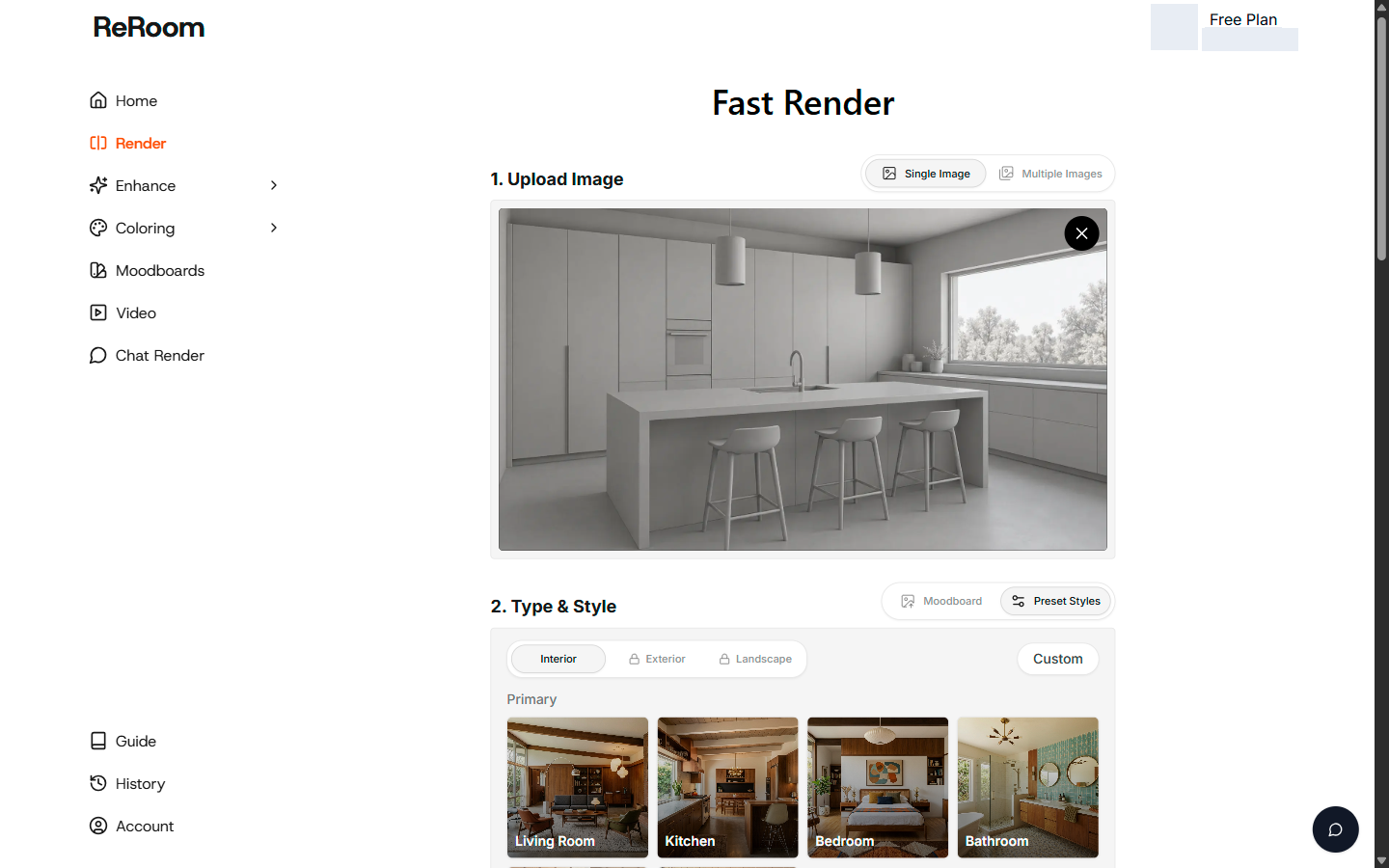
Fast Render drives the simplest workflow: pick a space type, pick a preset style card, and generate a styled result. Controls like Precise, Balanced, and Creative modes plus a Preserve Texture toggle support exploration across multiple looks. The tool also supports Moodboard-driven direction, where a saved board becomes the reference anchor for a consistent style.
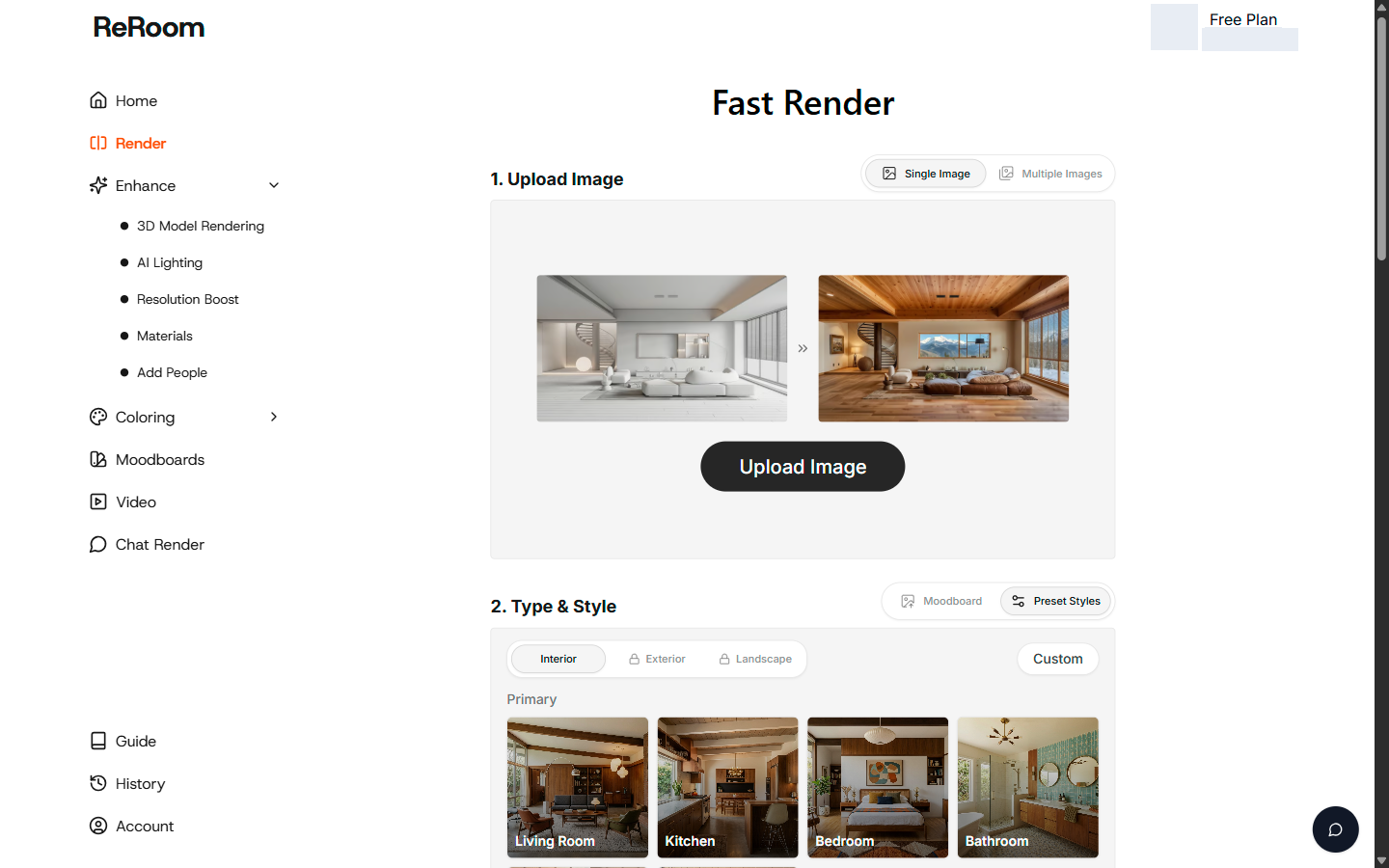
Beyond style swaps, ReRoom includes 3D Model Rendering with Material Optimized and Structure Optimized entries, plus Coloring for illustrative output. Coloring splits into 2D categories like floor plans and elevations, and 3D categories like interior and isometric views. ReRoom also lists tools such as AI Lighting, Resolution Boost, Materials, and Add People, along with a separate video credit system.
For real estate use, ReRoom’s clear strength is idea speed. A homeowner can explore warm-wood cabinetry direction. A designer can present a watercolor-style concept. A contractor can get a moodboard-backed target visual for a remodel conversation. Those are valid deliverables, even when they should not be treated as listing photos.
What AI HomeDesign is built to do
AI HomeDesign is a listing-production workspace built around how agents and photographers actually handle a property: a folder of images tied to one address, plus a predictable set of edits to make that photo set publishable.
The workflow starts with a photo upload and a tool choice. Inputs support JPG/JPEG, PNG, WEBP, and HEIC up to 50 MB per photo, which fits a camera-to-browser pipeline. Tools group into Virtual Staging, Photo Editing, Interior Design, and Home Renovation. Core tools on every plan include AI Virtual Staging, Day to Dusk, Item Removal, and Image Enhancement.
For MLS work, AI Virtual Staging carries the key promise: MLS-compliant by default and preserves original fixtures and structure. Staging settings cover 15 room types across 10 styles, with three variations per room and unlimited free regenerations. When a team needs the same room to read as “modern” across a whole gallery, that repeatability matters.
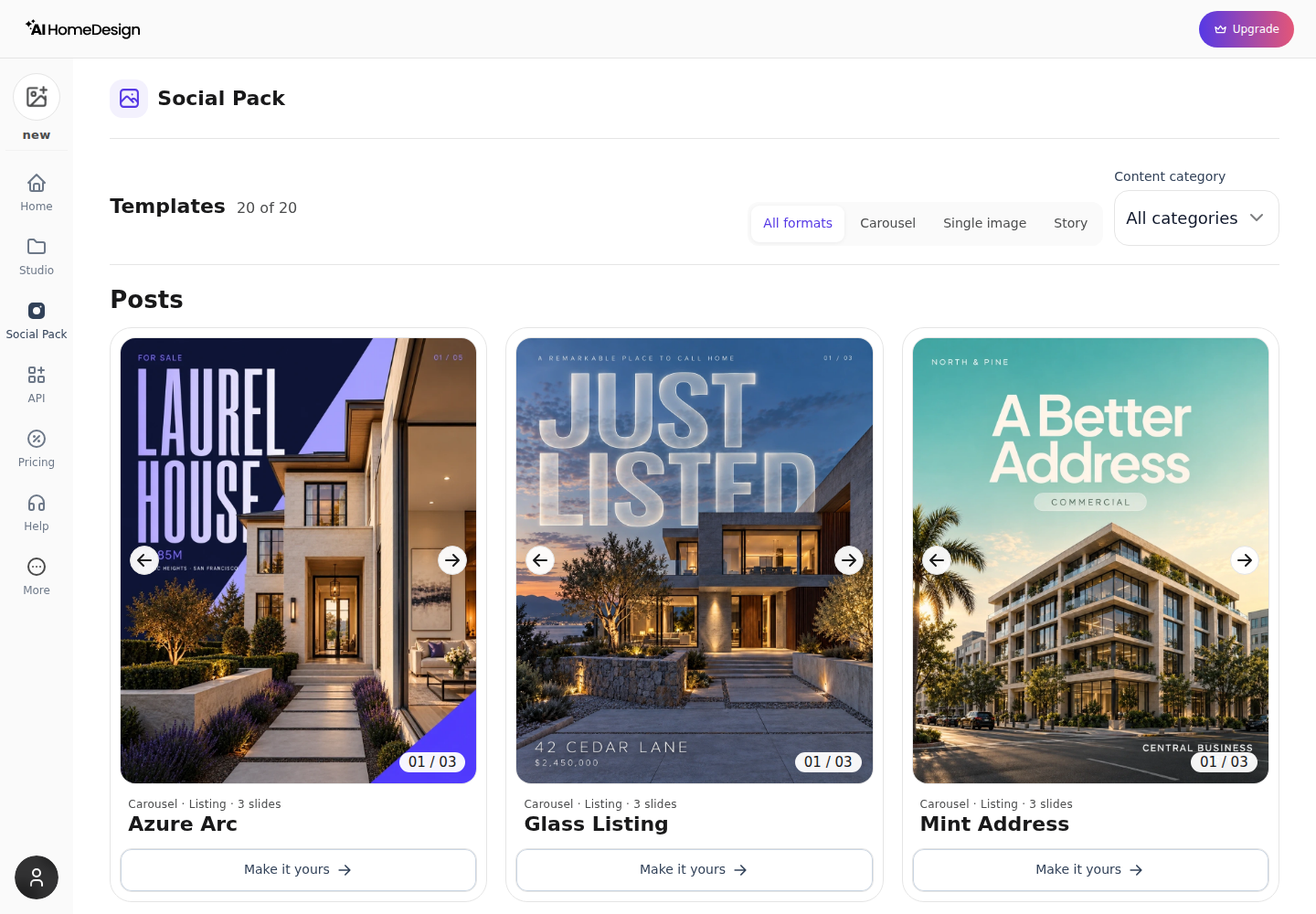
After editing, AI HomeDesign can also hand staged and enhanced visuals into a social pack, with 20 templates across Carousel, Single Image, and Story formats. That supports the common next step after MLS: posting the same images as marketing content, without rebuilding assets in a separate tool.
Where listing requirements create the gap
MLS publishability rarely comes down to “does the render look good.” It comes down to “does the image still represent the property that is being sold,” plus clear Disclosure practice around what has been edited.
Structural fidelity and representation of the property
ReRoom AI is built to add finish, lighting, and materials to an image. That is exactly what a concept render should do. For a live listing, the same behavior can turn into a risk when the output changes what a buyer thinks exists.
In one walkthrough example using a clay-model kitchen source, ReRoom returned a kitchen that introduced warm wood cabinetry and stone finishes. That is useful design direction. It also shows why ReRoom outputs often belong in renovation planning, not in MLS galleries that need to reflect the photographed condition.
AI HomeDesign approaches the problem from the opposite direction. Its virtual staging is intended to furnish the space while keeping original fixtures and structure intact. That scope lines up with how MLS photo sets are typically reviewed: furniture may change with clear labeling, but permanent elements should not.
Control, libraries, and multi-photo consistency
ReRoom AI’s controls support exploration. Preset style cards, Moodboards, and mode switches can produce fast iterations on one hero image. That fits a homeowner choosing a direction for a kitchen refresh.
AI HomeDesign’s control is oriented around a listing gallery. Room type selection supports furniture scale consistency. The staging catalog’s room-type and style coverage supports the repeating needs of agents: similar rooms across multiple properties, and consistent output across the same property.
Exports, watermarks, and what can be uploaded
ReRoom’s free-plan downloads can arrive watermarked at roughly 1360 × 768. Watermark removal and Resolution Boost controls sit behind paid access, and paid plan cards advertise watermark-free output and 4x upscaling.
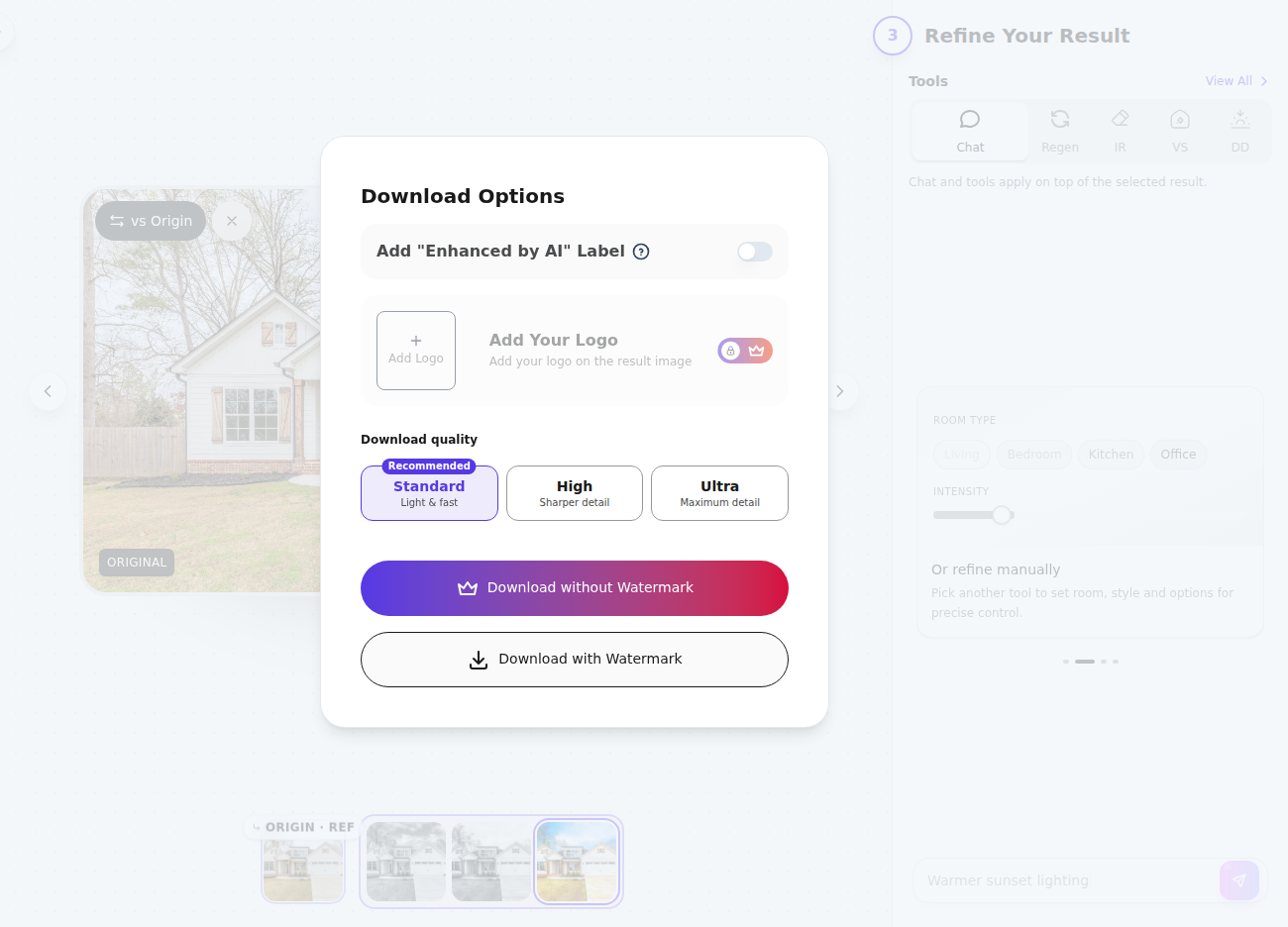
AI HomeDesign also watermarks free results, but paid plans include watermark-free downloads. AI HomeDesign lists download quality choices of Standard, High, and Ultra. One Standard watermarked JPEG export was verified at 1885 × 1061 px, while High and Ultra dimensions were not checked.
Listing-only edits that reduce tool sprawl
Many MLS-facing edits do not look like “design.” They look like cleanup and consistency.
AI HomeDesign covers those jobs directly in the same workspace: AI virtual staging for furnishing, plus listing photo editing for Image Enhancement and Item Removal workflows. ReRoom’s published tool set emphasizes rendering, materials, relighting, illustration, and people placement, rather than listing-specific day-to-dusk and declutter passes.
A practical workflow note also matters here: a listing photo set includes many images. Even when a tool renders quickly, teams still need time to review the results, apply consistent Disclosure labels, and handle rework when a single image needs a second pass.
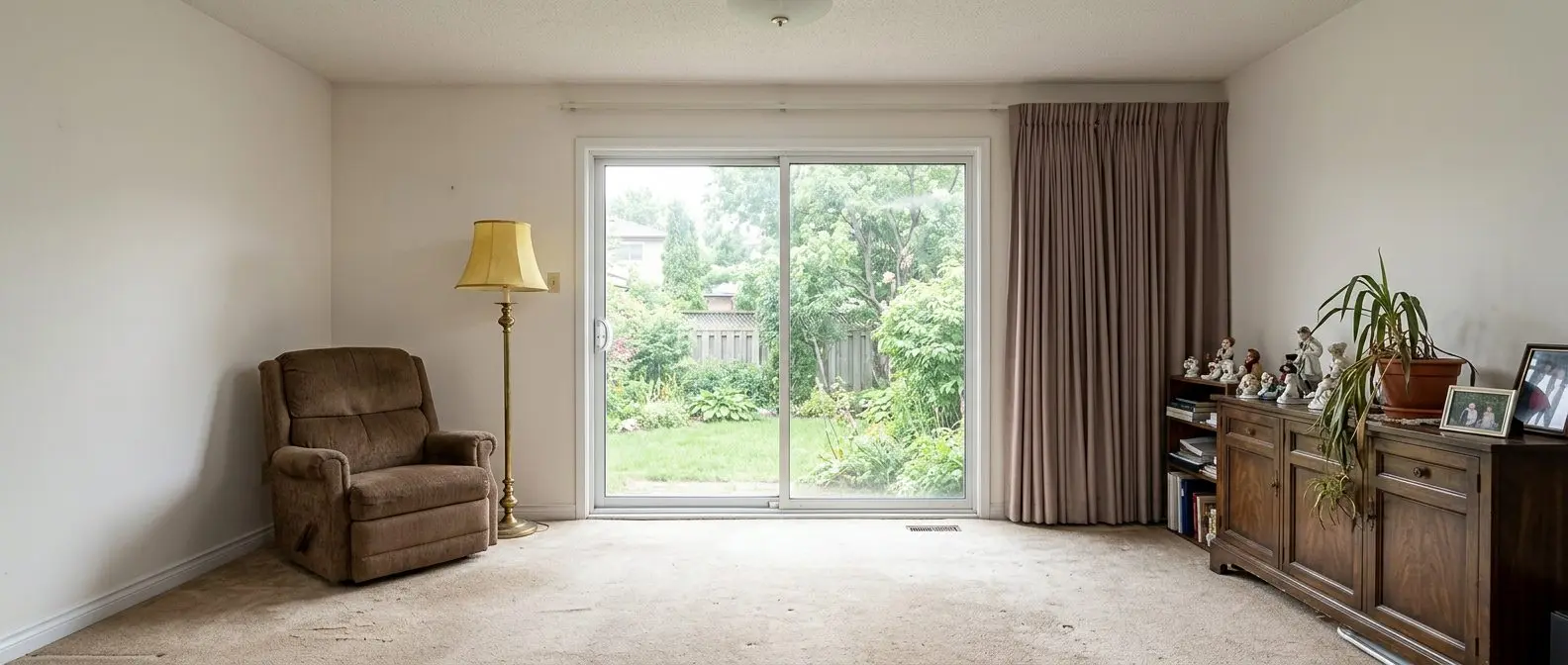
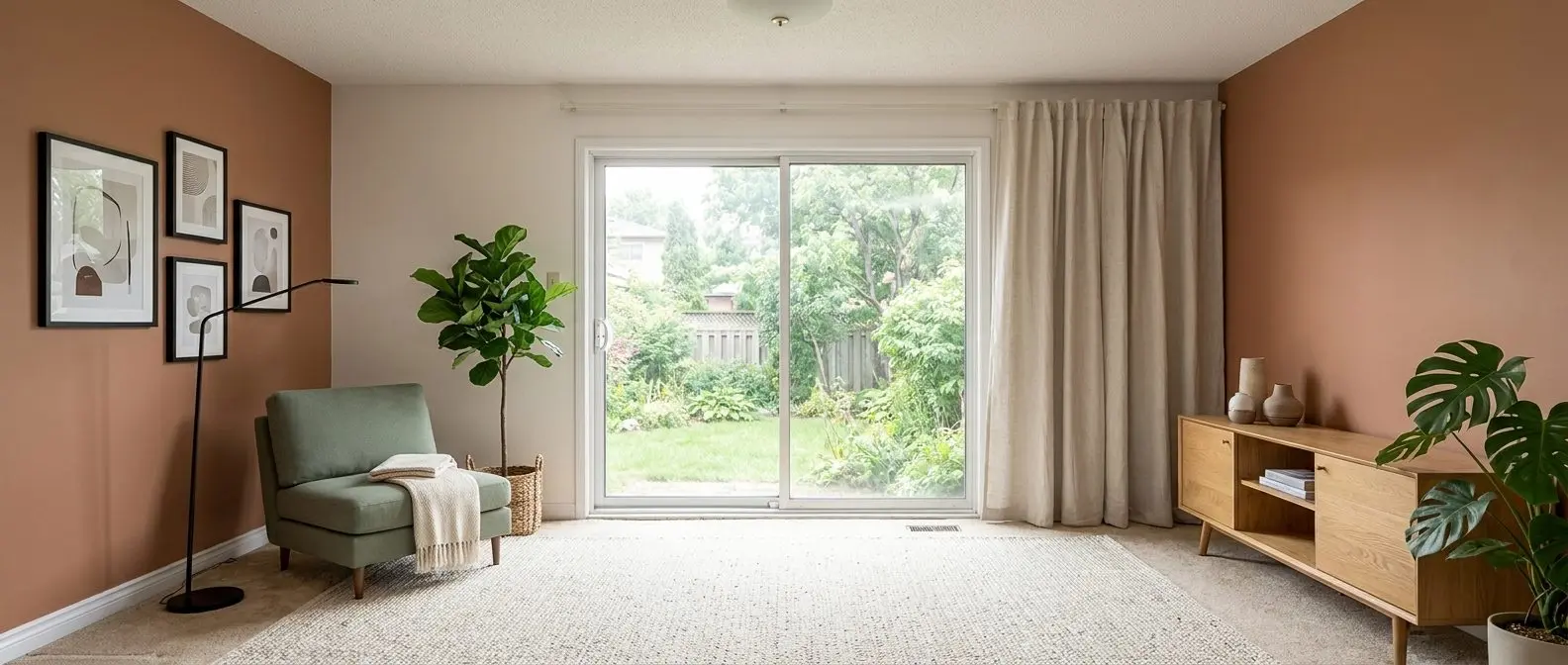
Redesign any room in a few clicks
10 styles and 30+ colour palettes, from one photo. 10+ tools, including social pack. Free trial credits, no credit card.
Start designing freePricing and cost per finished photo
Monthly equivalents · Billed annually
Published monthly figures are rounded. Totals cover the first year; confirm renewal pricing before checkout. Team Annual Plan: confirm the annual total and billing unit before checkout.
MLS decisions go smoother when pricing gets translated into “cost per publishable image” or “cost per listing.” Subscription sticker price rarely answers that.
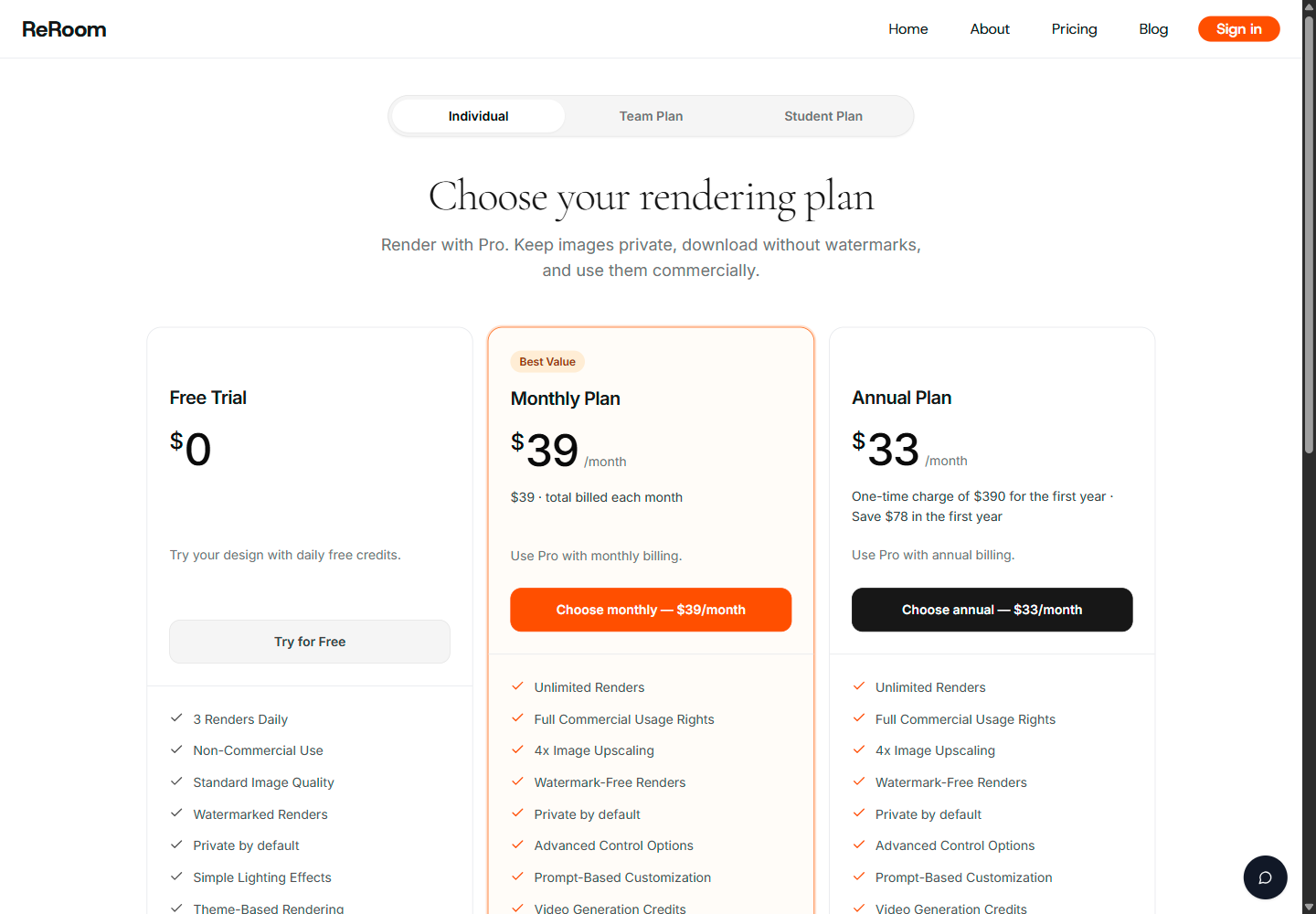
ReRoom AI has two storefront signals that often confuse buyers. The iOS listing shows a free download with Premium in-app purchases listed at $4.99–$79.99. ReRoom’s web pricing cards also list an Individual Monthly Plan at $39/month and an Individual Annual Plan at $390 for the first year, shown as $33/month, rounded. ReRoom also shows a Team plan and student offers, plus a Free Trial card that lists watermarked renders and non-commercial use.
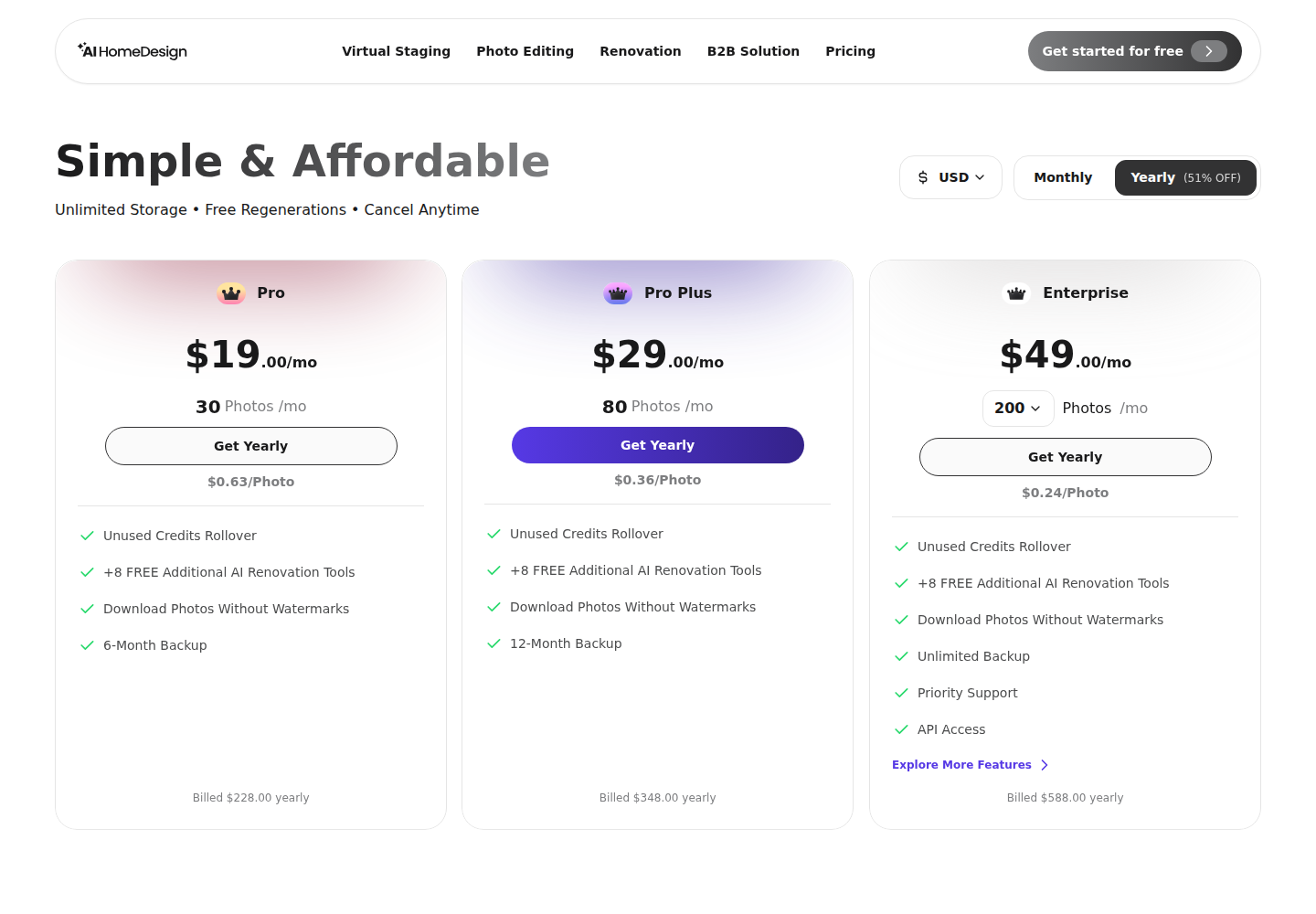
AI HomeDesign publishes both plan allowances and per-photo rates, which makes it easier to price a listing workload. Pro is $19/mo billed yearly at $228/yr for 30 photos a month. Pro Plus is $29/mo billed yearly at $348/yr for 80 photos a month. Enterprise is $49/mo billed yearly at $588/yr for 200 photos a month. Those tiers publish per-photo rates of $0.63, $0.36, and $0.24.
For a single property shoot with roughly 25–30 photos, AI HomeDesign pricing maps cleanly to one month of capacity on Pro. ReRoom’s “unlimited renders” positioning on paid Individual plans can look simpler for volume, but the MLS constraint remains: unlimited concept renders do not help if a listing needs faithful, disclosable representation across the full set.
Three real-world scenarios that decide the tool
Listing agent with a full photo set due tomorrow
A deadline listing needs more than one hero image. The agent usually needs consistent staging across multiple rooms, watermark-free exports, and a few “cleanup” jobs like declutter and polish. AI HomeDesign fits that bundle, and its per-photo pricing makes it easier to quote the work internally.
The practical win often comes after the edits. AI HomeDesign can push the same listing visuals into a social pack so the MLS gallery and the first marketing posts stay consistent.
Photographer reselling staging to clients
A photographer selling staging needs predictable repeatability: one project per property, consistent room labeling, and fast revisions that do not turn into a second purchase decision. AI HomeDesign suits that resale workflow because it is organized around property photo sets, not one-off concept art.
Some shoots still need a human pass. AI HomeDesign offers manual staging at $13.99 per image with a 24–48h turnaround, which can function as a fallback when a room needs a more guided touch.
Homeowner or renovator exploring ideas
A homeowner planning a remodel often wants finishes to change. That is the point. ReRoom AI fits this scenario because it embraces material and finish shifts, supports Moodboards for design direction, and includes illustrative Coloring output for presentation.
This is also the scenario where MLS constraints matter less. The output can act as a conversation tool with a contractor or designer, even when it should not be uploaded into a listing photo gallery.
Moving from ReRoom AI concepts to MLS images
A switch from concept renders to MLS visuals usually keeps the same starting photos. ReRoom AI accepts JPG/JPEG/PNG for its main rendering upload, while AI HomeDesign also supports WEBP and HEIC. The bigger change sits in how “style” gets expressed.
A ReRoom Moodboard acts like direction. It helps answer what the space should feel like. That intent can carry over, but the execution changes. Listing staging needs room-type accuracy, consistent camera angles across the set, and edits that do not re-spec permanent fixtures.
A simple migration check helps avoid surprises:
Checklist
0 of 4 doneTeams also benefit from knowing what other listing-focused tools do in the same lane. For example, Spacely AI compared with AI HomeDesign and REimagine Home compared with AI HomeDesign cover alternative staging workflows that still aim at real estate outputs.
What MLS disclosure expects from edited photos
MLS and brokerage standards vary, yet buyer expectations stay consistent: edited photos should not misrepresent what is physically there. That is why virtual staging usually carries a plain label like “virtually staged” on the image or in the photo remarks.
A useful rule of thumb separates “staging” from “redesign.” Staging adds furniture and decor while keeping the property itself intact. Redesign changes materials, cabinetry, finishes, or architecture. The second type can still be valuable marketing, but it belongs in renovation concept discussion, not in the primary photo set for a live listing.
This is where listing-specific edits matter. A dusk exterior aims to change mood, not structure, and it tends to remain easier to disclose than a full redesign. AI HomeDesign’s day-to-dusk editing also stays in the same listing workflow as declutter and enhancement.
Teams also benefit from a clear deliverable boundary. The edited photo set should carry only what belongs on the images: address or MLS identifiers, consistent filenames, and a clear “virtually staged” label when staging is used. Pricing strategy, commission terms, and negotiation context belong in agent-client conversations, not embedded in the image deliverables.
Edge cases still exist. A stricter workflow helps when the property is distressed, when the listing includes unfinished construction, when the space has unusual built-ins buyers will scrutinize, or when a room has safety or condition issues that should remain visible. In those cases, concept renders can support planning, while listing images should remain conservative and clearly disclosed.
As a separate comparison point, RoomGPT compared with AI HomeDesign can help when the decision is between “quick inspiration” and “listing output controls.”
The clear pick
Choose AI HomeDesign when
AI HomeDesign fits agents and photographers who need MLS-compliant virtual staging plus listing photo edits like item removal and day-to-dusk, with watermark-free exports on paid plans.
Choose ReRoom AI when
ReRoom AI fits homeowners, renovators, and designers who want quick style exploration, moodboard direction, and concept visuals that can change finishes and materials.
Frequently asked questions
Can ReRoom AI images go on an MLS listing?
Paid ReRoom plans advertise commercial usage rights and watermark-free outputs, while the Free Trial card lists watermarked renders and non-commercial use. Even with paid access, MLS suitability depends on what the image changes. If a render restyles cabinetry, materials, or finishes, it reads as a concept, not a faithful listing photo. MLS-ready staging usually preserves fixtures and structure and carries a clear “virtually staged” label.
How much does ReRoom AI cost on web vs iPhone?
On iPhone, ReRoom shows a free download with Premium in-app purchases listed at $4.99–$79.99. On the web pricing cards, ReRoom lists an Individual Monthly Plan at $39/month and an Individual Annual Plan at $390 for the first year, shown as $33/month, rounded. ReRoom also shows Team and student offers, plus a Free Trial allowance of three renders daily.
What does AI HomeDesign cost per photo?
AI HomeDesign publishes per-photo rates by tier: $0.63 on Pro, $0.36 on Pro Plus, and $0.24 on Enterprise. Those rates correspond to the yearly-billed plans at $19/mo, $29/mo, and $49/mo, billed at $228/yr, $348/yr, and $588/yr. Paid plans include watermark-free downloads, and unused credits roll over on Pro Plus and Enterprise.
Which tool is faster for a full listing gallery?
AI HomeDesign advertises results in seconds, with virtual staging under 5 seconds. ReRoom’s app description also says results arrive in seconds, and one free-account walkthrough logged single runs of roughly 23 to 43 seconds for individual jobs. For a full gallery, the bigger factor is workflow fit: AI HomeDesign plans are sized by photos per month, while ReRoom’s free allowance is three renders daily.
Does either tool remove clutter or unwanted objects?
AI HomeDesign includes AI Item Removal, including whole-room declutter in a single step, a brush mode for targeted removal, and chat-based refinement. Its AI Virtual Staging also includes a Remove Furniture option when replacing an existing setup. ReRoom’s published tools focus on rendering, materials, lighting, and illustration rather than a dedicated listing-style item removal workflow.
What disclosure language works for virtually staged MLS photos?
“Virtually staged” is a clear, common label for a furnished image that started from an empty room photo. It should appear consistently, either on the image itself or in the MLS photo remarks, based on brokerage practice. The label stays simplest when staging preserves the original fixtures and structure. If an image changes finishes or architecture, it should be treated as a concept rendering, not a standard listing photo.