Virtual Staging Solutions vs AI HomeDesign Cost and Quality
Virtual staging tools compared with AI HomeDesign on pricing, turnaround, jobs covered, revisions, and an MLS QA checklist for listing-ready images.
Listings rarely stall because a room sits empty. Listings stall because buyers cannot picture a layout, a scale, or a lifestyle fast enough to care.
This is why virtual staging tools keep showing up in agent tool stacks. The hard part is not picking “AI” or “human.” The hard part is picking a business model that matches listing volume, deadlines, and how much control belongs in-house.
Virtual Staging Solutions and AI HomeDesign sit on opposite sides of that decision. One sells a designer-led outcome per property. The other sells a self-serve toolbox priced per photo. The comparison only becomes fair once costs, turnaround, scope, and QA get measured the same way.
At a glance
Two Different Products Wearing the Same Label
A service and a tool can both use the words “virtual staging,” yet they behave like different product categories. Virtual Staging Solutions sells a staffed workflow. AI HomeDesign sells a set of tools and a credit pool.
Virtual Staging Solutions starts inside a signed-in dashboard. The main action is “Start a New Project,” which opens a 7-step project wizard. It begins with entering the property address so the service can “pull everything we know about it,” then moves through buyer profiling, high-impact room selection, styling preferences, and delivery.
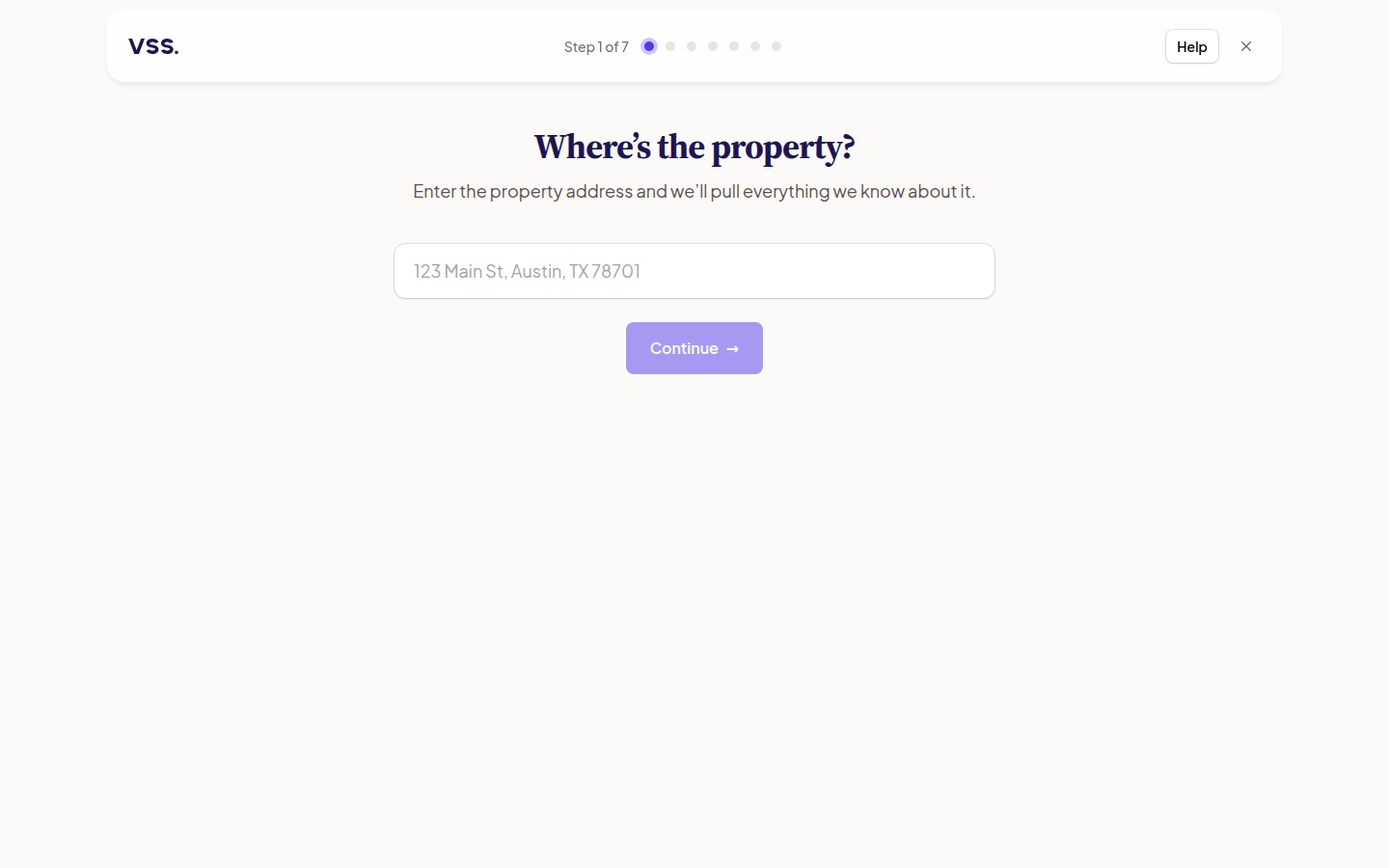
This model suits teams that want delegation and a defined process. A listing team gives inputs, then waits for delivery and revisions. The service owns the strategy layer, not just the pixels.
AI HomeDesign opens with an upload-first workflow. Photos can be batch uploaded, reused from Studio, or imported from a listing URL. After upload, the editor locks Style until Space is selected first. That design choice keeps furniture scale consistent across a whole set.
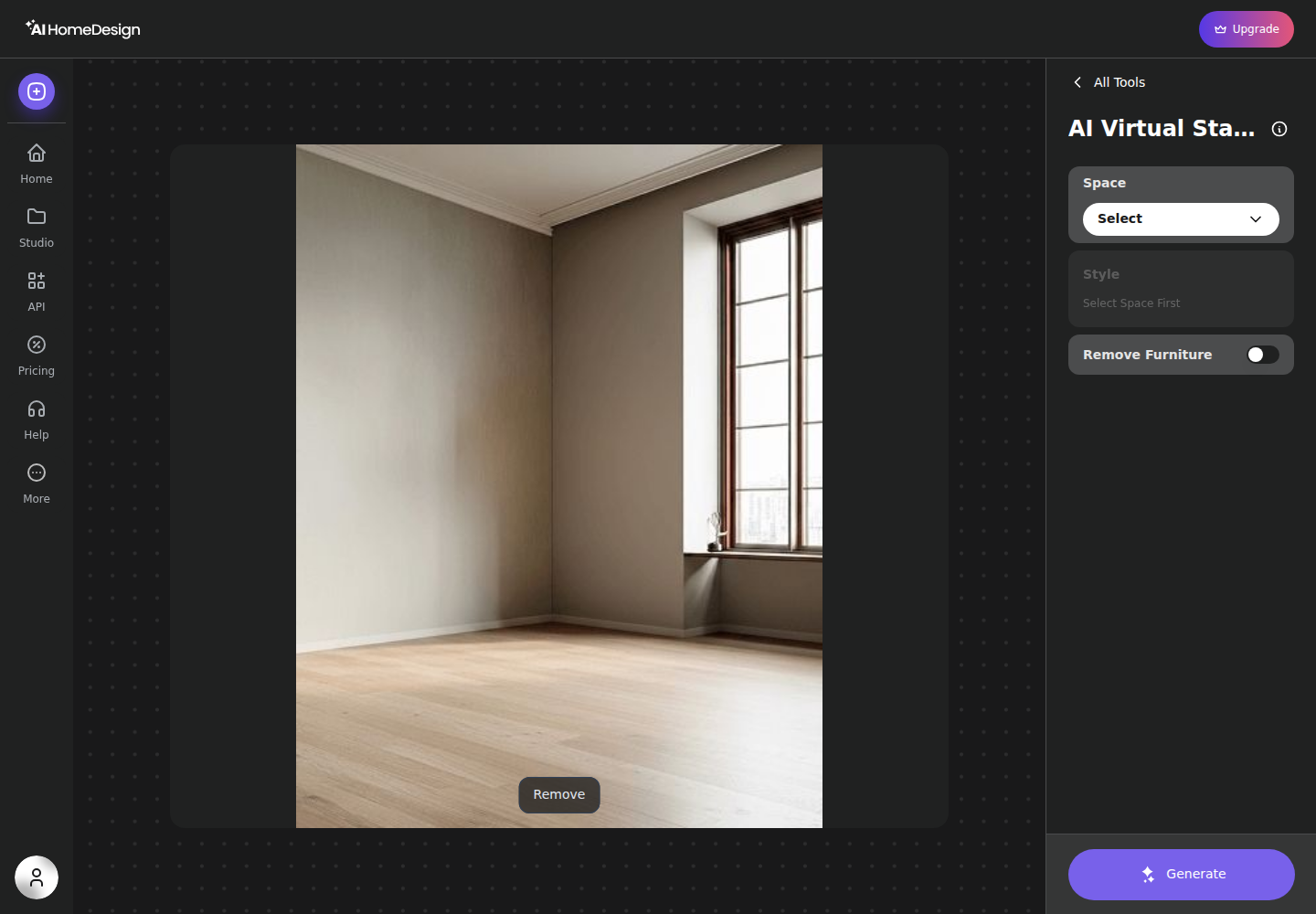
This model suits teams that want control. An agent or photographer can run several style options immediately, keep the best render, then chain follow-on edits without switching vendors.
Service-versus-software decisions show up across staging vendors, and the same logic appears in service versus self-serve staging, compared with Styldod.
Plenty of teams need neither extreme. In those cases, it helps to scan the wider list of virtual staging alternatives and pick based on scope and billing model.
Pricing Compared for a Full Listing Set
Per-property pricing and per-photo pricing do not compare until the listing set becomes the unit of analysis. A single hero image hides the real cost of staging, because most listings need a set that stays consistent across rooms and angles.
Virtual Staging Solutions publishes three per-property tiers: Starter $210, Core $408, and Comprehensive $569 (vendor pricing page, accessed September 2026). Virtual Staging Solutions’ pricing page does not publish how many photos or rooms each tier includes. That missing piece matters because a 10-photo set and a 40-photo set could sit inside the same tier.
Here is the honest way to think about the three common listing-set sizes.
- A 10-photo set: the service still prices by property, so the bill can still be $210, $408, or $569. The per-photo rate stays unknown until the tier’s photo allowance is confirmed.
- A 25-photo set: the same issue applies. The price stays per property, and the allowance stays unpublished.
- A 40-photo set: per-property pricing can become easier to justify if the tier includes most of the set. The allowance still needs to be confirmed in writing.
A per-photo number for Virtual Staging Solutions appears in third-party comparison content, but it is not a vendor-published rate. One widely cited figure is $75 per photo as reported by a third party. That figure should not stand in for the actual tier allowance.
AI HomeDesign publishes plan pricing and per-photo equivalents on yearly billing: Pro at $19 per month for 30 photos, Pro Plus at $29 per month for 80 photos, and Enterprise at $49 per month for 200 photos. Each generation costs one credit and returns four renders, so iteration stays inside the same credit spend until the listing team chooses to regenerate.
That structure makes the “full set” math simpler. A 25-photo set fits inside the 30-photo Pro plan for the month. A 40-photo set fits inside Pro Plus for the month. A 10-photo set fits in any tier, and unused credits matter most in slower months.
For teams comparing unit economics across staging vendors, how per-image staging pricing stacks up shows why credits, renders per generation, and re-run policy usually matter more than a headline monthly price.
Turnaround and Iteration Compared
Photos land at 6 p.m. Thursday and the listing is supposed to go live Friday morning. Whether staging fits inside that gap is the question turnaround actually answers.
Virtual Staging Solutions advertises a 24-hour upload-to-list turnaround. That maps to a one-day operational window for edits, review, and listing buildout. It fits listings with a planned launch, where photos land days before publish.
AI HomeDesign returns results in under 5 seconds per generation. That difference changes Thursday-night workflows. A listing team can stage, restyle, and pick the best option while the photographer still has the files open.
Iteration behaves differently under each model. In a service model, each revision adds a delivery cycle. The service removes labor from the listing team, but time still moves in rounds.
In a self-serve model, the listing team runs the rounds. Each generation returns four options, so review becomes part of the job. Paid plans include free regenerations, which changes what experimentation costs during a deadline.
A practical planning rule helps teams avoid missed launch windows. Service-led staging needs a one-day buffer before the listing goes live. Self-serve staging can happen on listing day, but only if the team reserves time for QA and disclosure.

Stage your first listing in under 5 seconds
15 space types, 10 styles, MLS-compliant by default. All 11 tools on one account. Free trial credits, no credit card.
Start staging freeCoverage Across the Five Listing Photo Jobs
A three-bedroom ranch comes back from the shoot with a cluttered garage, a dim kitchen, and an exterior photographed at noon. Furniture for the empty living room is one line item on that invoice; the rest of the set needs photo jobs that sit adjacent to staging and usually get billed separately.
The five jobs that show up most often are virtual staging, item removal, image enhancement, day-to-dusk exteriors, and virtual renovation finishes. A team that buys these from separate vendors pays the vendor-switch tax in both time and money.
Virtual Staging Solutions positions itself around designer-led virtual staging and virtual decluttering. Third-party summaries also associate it with furniture removal, image enhancement, and 3D floor plans. The service does not publish a self-serve tool list because the model does not depend on tool access.
AI HomeDesign bundles the five jobs into one credit pool. The toolbox includes AI Virtual Staging with a Remove Furniture toggle, AI Item Removal with Auto declutter or brush selection, Image Enhancement, AI Day to Dusk, and renovation tools that change walls, floors, ceilings, and backsplashes from a single photo.
Day-to-dusk work is where scope differences often show up first. Some teams stage interiors with one vendor, then pay a second vendor for twilight. The pricing patterns that drive that choice are covered in what day-to-dusk editing costs elsewhere.
A simple cost control rule keeps budgets clean. A listing team should total the invoice across all five jobs, then ask which single subscription or service bundle removes the most separate purchases.
QA, Revisions, and MLS Disclosure as a Process
A staged primary bedroom comes back and the nightstand floats a half inch above the carpet. Catching that before the photo reaches MLS takes a repeatable rubric, applied the same way no matter which model produced the image.
The fastest QA pass starts with structure integrity. No window should move. No wall line should shift. No fixed fixture should appear or disappear. A staged photo can add furniture and decor, but the room itself must stay true to the original capture.
Then the image needs a realism check that survives zoom. Agents can run an eight-point rubric on every staged image:
When an image fails the rubric, the models diverge. Virtual Staging Solutions routes the fix through its Happiness Guarantee and revision loop. That trades time for delegated judgment and refund-backed risk transfer.
AI HomeDesign routes the fix through selection and regeneration. Each generation returns four renders, so the first move is picking the best candidate. From there, the listing team can chain follow-on edits like Item Removal or Image Enhancement onto the selected render, or refine a result with chat-based edits.
MLS compliance also needs operational steps, not warnings. MLS rules vary by market, so teams should check the resources published by their MLS, such as Bright MLS and REcolorado. Still, three practices travel across markets.
First, label virtually staged images in the listing remarks and media. Plain language works: “Virtually staged” or “Photo virtually staged.” Second, keep the original unstaged photo on file. Third, never upload a watermarked export to MLS.
Deliverables also need a boundary. The export package should contain only listing-ready images and clear labels. Vendor pricing, commission strategy, and seller persuasion logic belong in the listing presentation, not in the photo folder.
The model choice becomes straightforward once the process is clear. Virtual Staging Solutions fits low volume, luxury positioning, and teams that want a guaranteed outcome managed by designers. AI HomeDesign fits steady listing volume, tight deadlines, and teams that want one toolbox to handle staging, cleanup, enhancement, day-to-dusk, and renovation visuals on one account and credit pool.
The clear pick
Choose AI HomeDesign when
AI HomeDesign fits teams that need instant turnaround, predictable per-photo pricing, and one toolbox that covers staging plus the adjacent listing-photo edits.
Choose Virtual Staging Solutions when
Virtual Staging Solutions fits teams that want designer-led delegation, buyer-profile-driven styling decisions, and a revisions-or-refund guarantee on a per-property order.
Frequently Asked Questions
How much does Virtual Staging Solutions cost in 2026?
Virtual Staging Solutions publishes per-property pricing in three tiers: Starter at $210, Core at $408, and Comprehensive at $569 per property. Virtual Staging Solutions' pricing page does not publish how many photos or rooms each tier includes, so an accurate per-photo rate depends on confirming the allowance for the chosen tier. A $75 per photo number appears in third-party comparison content, not as the vendor’s published pricing.
How much does AI HomeDesign cost per photo?
AI HomeDesign publishes per-photo equivalents on yearly billing: Pro at $0.63 per photo, Pro Plus at $0.36 per photo, and Enterprise at $0.24 per photo. Each generation costs one credit and returns four renders of the same photo. Paid plans include free regenerations and watermark-free downloads, while the free plan is watermarked and works best as a quality test.
What turnaround time should agents plan for with each option?
Virtual Staging Solutions advertises a 24-hour upload-to-list turnaround, so teams should plan around a one-day delivery window plus time for review. AI HomeDesign states results in under 5 seconds per generation, so delivery is effectively immediate, but teams still need time for selection, QA, and disclosure labeling before publishing to MLS.
Do both tools cover item removal and photo enhancement?
Virtual Staging Solutions positions itself around virtual staging and virtual decluttering, and third-party summaries also associate it with furniture removal and image enhancement. AI HomeDesign includes AI Item Removal and Image Enhancement as core tools alongside AI Virtual Staging, so the same credit pool can cover staging, declutter, and cleanup work without moving files between vendors.
What disclosure should be used for virtually staged listing photos?
A practical disclosure standard is clear labeling in the listing: “Virtually staged” or “Photo virtually staged.” The safest workflow also keeps the original unstaged photo on file, and it avoids any edit that changes structural or permanent elements such as windows, walls, or fixed fixtures. Both models can claim MLS-ready output, but the agent owns final disclosure.
Which option fits high-volume listing teams best?
High-volume teams often prefer a credit-based plan because the same subscription spreads across many photos and many listings, and AI HomeDesign publishes per-photo equivalents down to $0.24 per photo on yearly Enterprise billing. A done-for-you service like Virtual Staging Solutions can still make sense for flagship listings where buyer profiling, designer judgment, and a refund-backed guarantee matter more than unit cost.