Paintit AI vs AI HomeDesign Pricing and Watermarks 2026
Paintit AI vs AI HomeDesign: compare pricing, credits, watermarks, and MLS-ready listing workflows in 2026 so teams pick the right tool for the job.
Two tabs, two glossy before-and-after galleries, and the same promise of “AI design.” That is the moment most teams hit before paying for Paintit.ai or AI HomeDesign. The real question is simpler than the marketing: can the workflow finish a deadline-driven photo set, or is it built for exploring one space at a time.
For paintit ai searches, the confusion often comes from overlap in outputs, not overlap in how the products work. Paintit.ai runs like a design conversation that spends credits per generation. AI HomeDesign runs like a rack of property-photo jobs, priced per photo, built to keep a listing gallery consistent.
This guide uses the vendors’ published plan terms and the documented walkthrough notes, plus our full AI HomeDesign review, to separate idea exploration from listing production.
At a glance
The short answer: who each tool is built for
Paintit.ai and AI HomeDesign both start with a real photo. After that, their default buyer looks different. Paintit.ai suits exploratory work where the goal is to see options and iterate. AI HomeDesign suits production work where the goal is to ship a consistent set of listing images.
Paintit.ai fits homeowners, designers, and teams that prefer to describe changes in a chat, pick from multiple image models, and treat each output as one more concept option. The workflow rewards trying several directions, saving what works, and moving on.
AI HomeDesign fits agents, photographers, and marketing coordinators who treat listing visuals as a pipeline. It groups work into repeatable jobs such as AI Virtual Staging, AI Item Removal, AI Day to Dusk, Image Enhancement, and renovation visuals. One account and one credit pool cover virtual staging, photo editing, and renovation, with free regenerations and MLS-compliant output by default.
Both tools watermark free-tier output. That detail matters because watermarked files are evaluation assets, not deliverables.
Choose Paintit.ai if
Paintit.ai makes sense when the work stays closer to concepting than publishing.
- A conversational prompt loop matters more than repeatable controls.
- Multiple image models help explore different “reads” of the same brief.
- Scenario presets feel like a helpful starting point.
- The project is a single room, facade, or small set of concepts.
Teams that want a broader shortlist of tools beyond this matchup can scan the wider field of AI staging and design alternatives for other workflows and pricing models.
Paintit.ai can also sit beside a staging-first tool for teams that prioritize listing visuals over open-ended exploration. For that narrower workflow, REimagine Home’s staging-first approach is one common comparison point.
Two workflow shapes: a design chat versus a tool rack
The deciding factor often shows up in the first ten minutes of use.
Paintit.ai starts in a chat. A user opens a new conversation or selects one of the scenario presets, attaches a main photo, and optionally adds item or reference images. Before sending the prompt, the user picks an image model, an aspect ratio, and a variation count, then the interface shows the credit cost for that exact run. The workflow stays expressive, but the meter stays variable.
The documented free-account walkthrough recorded intermittent errors on an initial scenario-driven request, followed by a successful fresh-chat retry. That difference matters under deadline pressure, because it adds uncertainty even when the controls look familiar.

AI HomeDesign starts from a job card. After upload or import into Studio, the workflow moves into named tools with settings panels. That structure narrows the choice set on purpose. It also makes repeating the same operation across a gallery easier, because the same service card appears for every image.
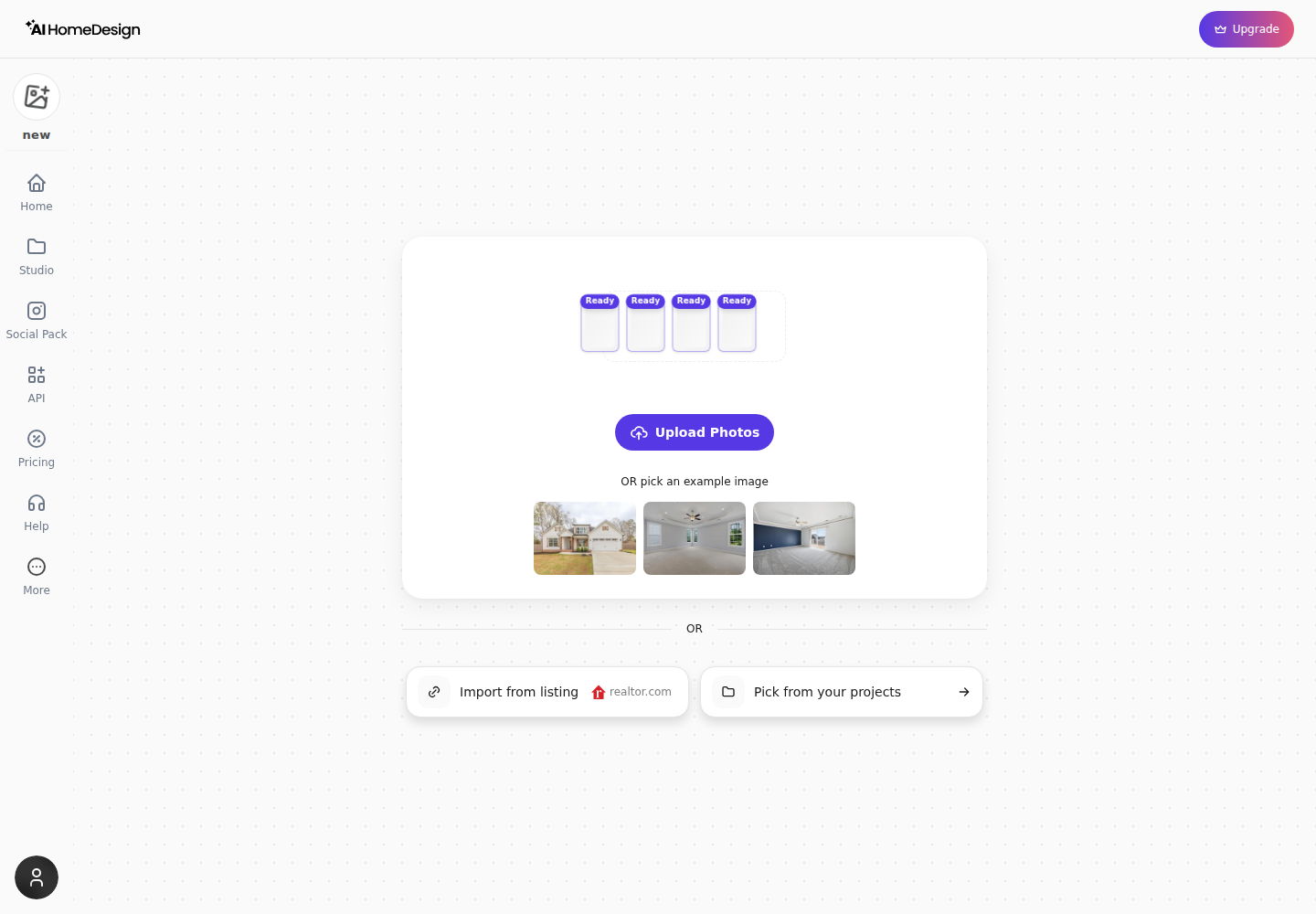
A visible “View All” picker groups tools into Virtual Staging, Photo Editing, Interior Design, and Home Renovation. That grouping mirrors how listing teams typically think: stage the vacant rooms, fix the problem shots, and create concept renovations only when a listing needs them.
The practical trade-off stays consistent: a chat composer supports richer one-off descriptions, while tool cards support repeatability across a full set. Prompt-led products also cluster into a broader category of tools. prompt-driven interior AI tools usually share the same strengths and the same consistency challenges.
Pricing and credits compared
Monthly equivalents · Billed annually
Monthly billing only — no annual plan
Paintit.ai sells monthly credit bundles, then charges credits per operation. The plan ladder starts at a free entry with credits, then steps up by larger credit amounts.
Paintit.ai’s published plans list Free at $0 with 30 credits, Starter at $9.99 per month with 500 credits, Pro at $24.99 per month with 1,500 credits, and Max at $59.99 per month with 4,500 credits. The documented catalogue presents monthly billing only, with no annual selector.
Paintit.ai also makes the per-run meter visible before sending. Credit cost changes with model choice and with variations. Model costs shown in the interface include 3 credits for Nano Banana 2 Lite, 8 credits for GPT 2.5 Flare, 10 credits for Nano Banana 2 and Seedream 5.0 Pro, and 12 credits for GPT 2.5 Sunburst.

Variations multiply cost. One observed menu showed GPT 2.5 Flare at 8 credits for one image, 16 for two, 24 for three, and 32 for four. That can be a feature during exploration, because it bundles several directions into one send.
For agents and photographers, the key question is forecasting. Under a fixed 500-credit Starter month, one-image generations at 8 credits fit more cleanly than multi-variation runs or higher-cost models. The public FAQ terms also matter for planning: unused monthly credits do not roll over, and top-ups require an active paid subscription.
AI HomeDesign prices the same problem from the other end. It publishes plan allowances in photos per month, plus published per-photo rates. On yearly billing, Pro is $228 per year, Pro Plus is $348 per year, and Enterprise is $588 per year, with published per-photo rates down to $0.24 on Enterprise. Monthly billing is also published, but yearly billing is the cleanest basis for comparing subscription value.
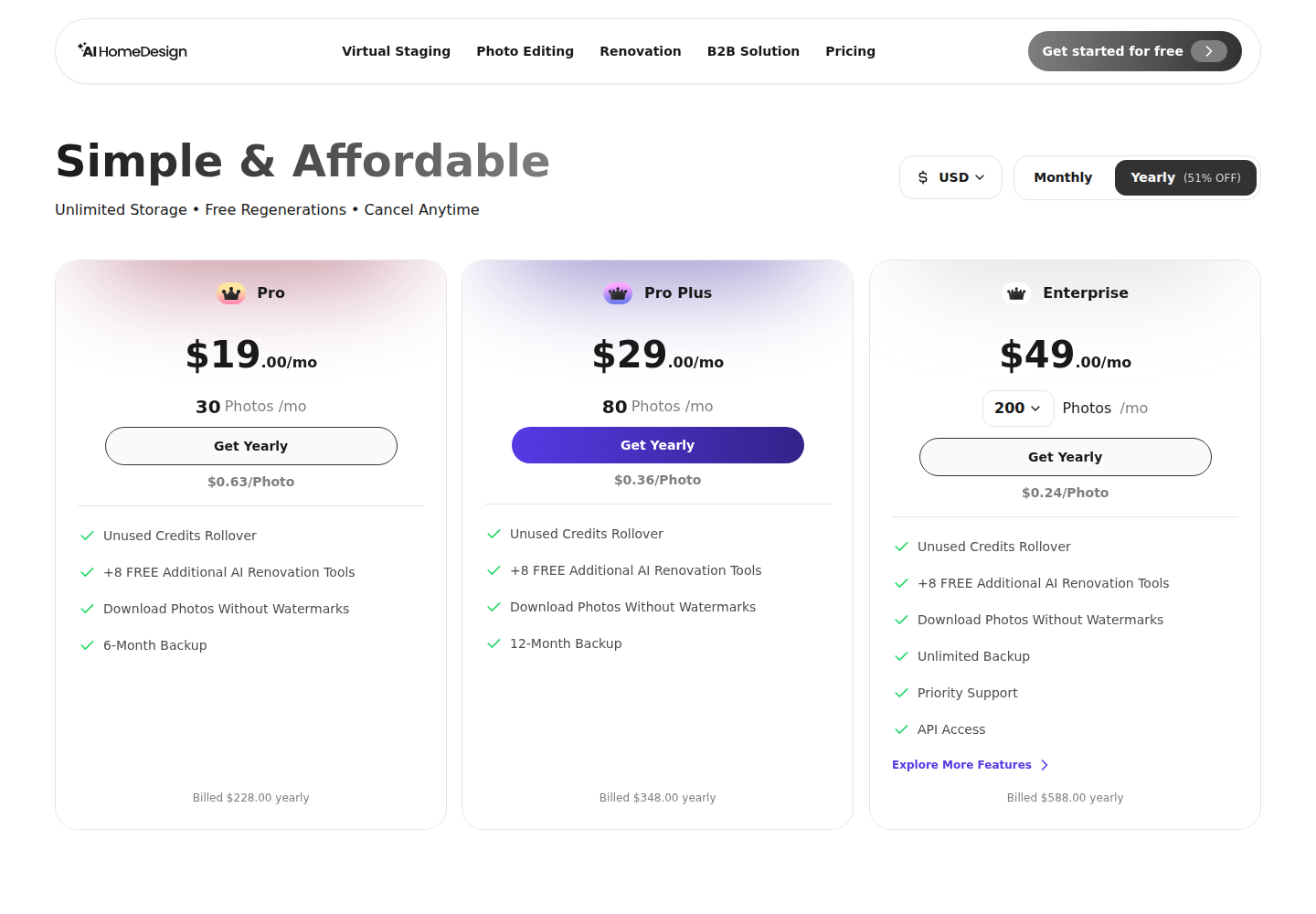
One credit-based model is not inherently “better” than the other. Credits suit exploration where the number of attempts changes. Photo allowances suit production where the photo count is known.
For teams that want a frame of reference on the broader credit-metered category, a credit-based render workspace like Spacely AI shows the same general pattern: exploration-friendly metering that still requires math before committing to a workflow.
Output quality, watermarks, and commercial rights
A listing image is a publishable artifact, not just a concept. Watermarks and usage rights decide whether a file belongs on an MLS gallery, a broker email, or a yard-sign QR landing page.
Paintit.ai’s published plan features list 1K image resolution on Free and 2K on Starter. Pro adds 4K upscale, watermark-free output, and a commercial usage license. In the documented free-plan download, the saved JPEG arrived with large Paintit watermarks.

AI HomeDesign’s free trial also produces watermarked results, and a Standard watermarked JPEG export was verified in the documented walkthrough. On paid tiers, AI HomeDesign includes watermark-free downloads as a plan feature.
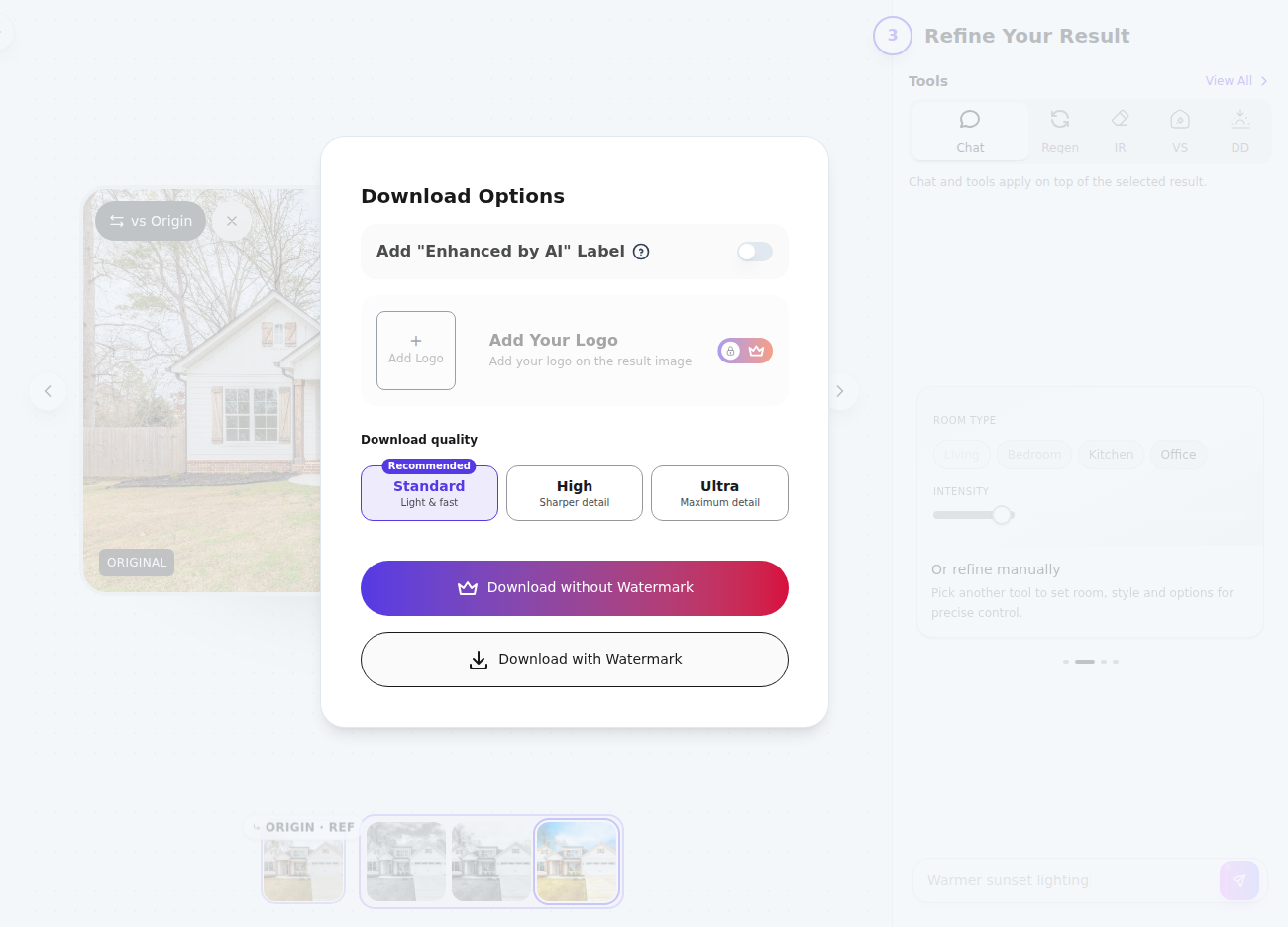
Commercial use and watermark policy should sit at the front of the buying decision. A tool can look great in the browser and still fail the job if the output requires a visible watermark removal step that only exists at a higher tier.
Realism and whether the room survives the render
Quality talk gets vague fast, because neither product publishes a single “accuracy score.” A better approach uses a repeatable inspection that matches listing risk.
A listing-safe render keeps the property’s permanent structure intact. That means window count and placement stay fixed. Door positions stay fixed. Ceiling lines remain straight, and the floor plane stays continuous. Cosmetic changes can vary, but geometry should not.
The same inspection works for interiors and exteriors. On a facade, rooflines and window openings should stay stable. Landscaping can shift for concept purposes, but a render should not imply a window, dormer, or door that does not exist.
Paintit.ai exposes several controls that point toward targeted changes. Quick edit includes shortcuts such as Furniture, Day Night, People, Remove watermark, and Cleanup mess. It also includes a Colors menu with Color picker and Find colors, but the walkthrough did not verify an exact shade match or a brand-coded paint catalog.
AI HomeDesign approaches targeted edits through named renovation tools. It documents Wall Change, Floor Change, Ceiling Change, and Backsplash Change through material pickers. Its staging flow also documents a Remove Furniture toggle for full replacement staging.
Surface edits and whole-scene redesigns should be judged separately. A virtual staging image can be “wrong taste” and still be listing-safe. A repaint or renovation visual that shifts windows or removes fixtures crosses into misrepresentation territory.
Redesign any room in a few clicks
10 styles and 30+ colour palettes, from one photo. All 11 tools on one account. Free trial credits, no credit card.
Start designing freeWalkthrough one: repainting a house for planning
A homeowner or contractor typically needs direction, not documentation. That changes which constraints matter.
Start with even-light photos. Exteriors work best under open shade or bright overcast. Interiors work best with straight verticals and minimal lens distortion. The goal is a clean reference image, not a perfect marketing photo.
Paintit.ai fits this workflow when iteration matters. A repaint or exterior scenario preset can start the chat, then the main photo and reference images can steer the look. A cheaper model can support first-pass exploration, while a higher-cost model can support final options.
AI HomeDesign fits the same job through renovation tools that constrain choices through pickers rather than prompts. Wall Change provides a controlled surface edit, which can suit teams that want consistency across multiple rooms.
Two boundary rules keep repaint previews honest. First, neither tool is documented here as matching a paint manufacturer’s product code, so a render should stay in the lane of direction. Second, the final confirmation should happen on a physical sample in daylight, because screen color varies.
This is also one of the cases where watermarking can be acceptable. A watermarked concept still helps a painter conversation. A watermarked image does not belong in a public listing.
Walkthrough two: a 28-photo listing set on a deadline
Production work looks different. The goal is not a single great image. The goal is a coherent gallery.
A standard listing-photo delivery window is two days. That window gives time for selection, edits, and a broker review before publishing. Same-day delivery exists, but it increases risk for any workflow that requires retries or manual sorting.
AI HomeDesign maps cleanly to the production checklist. Studio keeps the property set together, then each photo can run through a named job. Common sequences include Image Enhancement across the full set, AI Item Removal for problem shots, AI Virtual Staging for vacant rooms, and AI Day to Dusk for a key exterior.
The documented guide also matters for batch handling. AI HomeDesign documents a batch limit of five photos on Free and 25 photos on paid plans. A 28-image set therefore requires more than one batch on paid tiers, and it requires careful grouping.
Paintit.ai can still do listing work, but the workflow tax rises with photo count. Each prompt run carries model choice, ratio choice, variation choice, and a variable credit cost. Consistency across rooms depends on repeating the same language and constraints every time.
That consistency is not cosmetic. Buyers scroll fast. A gallery looks unprofessional when furniture style changes wildly, white balance shifts room to room, or exterior skies jump between moods.
For teams evaluating listing-first tools more broadly, the workflow expectations in staging a vacant room for a listing provide a useful baseline for what “listing-ready” usually means.
Neither vendor publishes a per-photo processing time as a guaranteed SLA. Under a deadline, the safer choice is usually the workflow with the fewest per-image decisions and the most repeatable controls.
Disclosure and MLS rules for AI-altered listing photos
AI-altered listing photos carry disclosure obligations regardless of which tool created them. Broker and MLS expectations vary, but the safe pattern stays consistent.
Cosmetic enhancement of what is already there carries lower risk than changes that alter what a buyer believes exists. Virtual staging adds furniture that was not present. A renovation visual can imply new finishes that do not exist. A repaint visual can imply a new exterior condition. Those are different claims, and they deserve different labels.
A practical file-handling rule keeps teams safe: the deliverable should include the final images plus a clear disclosure label on each altered image, while the original, unedited files stay archived for reference. The strategy discussion belongs in the listing appointment or the broker review, not embedded in the image itself.
Commission or fee figures should not appear in the image deliverable. Listing visuals circulate beyond the seller, and mixing compensation with marketing assets creates avoidable friction.
AI HomeDesign is designed to be MLS-compliant by default through preserving original fixtures and structure, but compliance still depends on how images are labeled and presented in the listing.
For a deeper read on how listing teams handle this in practice across tools, how edited listing photos are handled in practice is a useful adjacent example.
Below is disclosure language that covers the most common cases without adding legal citations that vary by MLS.
Virtually staged image. Furniture and decor have been added digitally.

AI-enhanced image. Color and lighting adjustments were made digitally.

Renovation rendering for illustration only. Finishes shown do not exist in the home today.
Edge cases require extra caution. Distressed sales often require minimal visual manipulation to avoid misrepresentation disputes. Historic homes need extra scrutiny around original windows, trim, and built-ins. New construction and unfinished spaces need clear labeling that the image shows a concept, not the current state. Tenant-occupied listings can add privacy constraints that change what edits are appropriate.
In every case, a geometry check belongs before publishing. If a render changes windows, doors, or major fixtures, the file should stay in the concept lane and carry concept labeling.
How to test both tools in an afternoon
A clean evaluation does not need a huge test set. It needs representative photos and consistent inputs.
Pick three to five images that mirror real work: one vacant room, one cluttered room, and one exterior. Keep the brief identical across tools. For Paintit.ai, keep model and variation settings stable across images. For AI HomeDesign, keep the same Space and Style choices where the tool supports them.
Log four notes for each run: meter usage, retry count, watermark status, and geometry preservation. That produces a decision that matches the real workflow, not the prettiest marketing image.
Checklist
0 of 5 doneThe clear pick
Choose AI HomeDesign when
AI HomeDesign fits agents and photographers shipping consistent, watermark-free listing galleries with a forecastable per-photo cost and MLS-compliant output by default.
Choose Paintit.ai when
Paintit.ai fits homeowners and teams iterating on concepts in a chat workflow where model choice and variations matter more than per-photo forecasting.
Frequently asked questions
How much does Paintit.ai cost in 2026?
Paintit.ai publishes a Free plan at $0 with 30 credits, Starter at $9.99 per month with 500 credits, Pro at $24.99 per month with 1,500 credits, and Max at $59.99 per month with 4,500 credits. The inspected public catalogue shows monthly billing only, with no annual plan option listed.
How do Paintit.ai credits work for variations?
Paintit.ai charges credits per run based on the selected image model and the variation count. One observed menu with GPT 2.5 Flare showed 8 credits for one image, 16 for two, 24 for three, and 32 for four. That means a “try four options” run can cost several times a single output.
Do unused Paintit.ai credits roll over?
No. The published Paintit.ai FAQ states that unused monthly credits do not roll over into the next month. The same FAQ terms also state that credit top-ups require an active paid subscription. That combination matters for planning around slower months and for handling a sudden listing rush.
What does AI HomeDesign cost per photo on yearly billing?
AI HomeDesign publishes per-photo rates alongside its yearly plans. On annual billing, Pro is $228 per year with a published $0.63 per photo rate, Pro Plus is $348 per year with $0.36 per photo, and Enterprise is $588 per year with $0.24 per photo. Those rates align to the included monthly photo allowances.
Are free outputs watermarked on both tools?
Yes. Paintit.ai’s Free tier produced a downloaded JPEG with visible Paintit watermarks in the documented walkthrough. AI HomeDesign’s free trial is described as watermarked, and a Standard watermarked export was verified in the documented review. Publishable listing images usually require upgrading to a paid tier.
Which tool fits a full listing photo set best?
A photo-allowance workflow with named tools and project organization fits listing production better than a variable-cost chat workflow, because it supports forecasting and consistency across many images. AI HomeDesign also documents batch limits of five photos on Free and 25 photos on paid plans, which matters for large sets.